
fast-style-transfer
 fast-style-transfer copied to clipboard
 lengstrom
ImportError: No module named moviepy.video.io.VideoFileClip
Followed instructions step by step found here: https://classroom.udacity.com/courses/nd101-preview/lessons/7cb11162-03a5-4ac7-a205-3b72a6bb33b4/concepts/b0c0431d-f4c6-4628-8f39-8e87e350c294 but when attempting to run the demo command (python evaluate.py --checkpoint ./rain-princess.ckpt --in-path ./myImage.jpg --out-path ./output_image.jpg) I get the above error. Perhaps I've missed something obvious?
On Mac OS, High Sierra.


Ah, yes, I tried that but am getting the following error report:
InsecurePlatformWarning Could not fetch URL https://pypi.python.org/simple/moviepy/: There was a problem confirming the ssl certificate: [Errno 1] _ssl.c:504: error:0D0890A1:asn1 encoding routines:ASN1_verify:unknown message digest algorithm - skipping Could not find a version that satisfies the requirement moviepy (from versions: ) No matching distribution found for moviepy
Is this a sign the service is temporarily down? Or is this another obvious thing?
Looks like I needed to install with the following line:
pip install --trusted-host pypi.python.org moviepy
now when I attempt to run the same command from my first comment I get:
  File "evaluate.py", line 14, in <module>
    from moviepy.video.io.VideoFileClip import VideoFileClip
  File "/Users/jacksonstone/miniconda3/envs/style-transfer/lib/python2.7/site-packages/moviepy/video/io/VideoFileClip.py", line 3, in <module>
    from moviepy.video.VideoClip import VideoClip
  File "/Users/jacksonstone/miniconda3/envs/style-transfer/lib/python2.7/site-packages/moviepy/video/VideoClip.py", line 21, in <module>
    from .io.ffmpeg_writer import ffmpeg_write_image, ffmpeg_write_video
  File "/Users/jacksonstone/miniconda3/envs/style-transfer/lib/python2.7/site-packages/moviepy/video/io/ffmpeg_writer.py", line 11, in <module>
    from moviepy.config import get_setting
  File "/Users/jacksonstone/miniconda3/envs/style-transfer/lib/python2.7/site-packages/moviepy/config.py", line 35, in <module>
    FFMPEG_BINARY = get_exe()
  File "/Users/jacksonstone/miniconda3/envs/style-transfer/lib/python2.7/site-packages/imageio/plugins/ffmpeg.py", line 86, in get_exe
    raise NeedDownloadError('Need ffmpeg exe. '
imageio.core.fetching.NeedDownloadError: Need ffmpeg exe. You can download it by calling:
  imageio.plugins.ffmpeg.download()```
using: pip install --trusted-host pypi.python.org ffmpeg
I get the error
Could not find a version that satisfies the requirement ffmpeg (from versions: ) No matching distribution found for ffmpeg
brew install ffmpeg did the trick! Thank you very much, sir. Not sure if this repo is officially associated with the Udacity course linked above, but the doc may need updating? Either way, I think the issue should be closed.
Here's how it worked for me in case someone in the future runs into this problem:
In terminal, run:
1.) /usr/bin/ruby -e "$(curl -fsSL https://raw.githubusercontent.com/Homebrew/install/master/install)"
2.)brew install ffmpeg
3.) pip install --trusted-host pypi.python.org moviepy

Tried adrian's steps above but they failed at the brew install (I'm on ubuntu).
The clue was in this error: imageio.core.fetching.NeedDownloadError: Need ffmpeg exe. You can download it by calling: imageio.plugins.ffmpeg.download()```
so I typed:
python
then
import imageio
and then entered
imageio.plugins.ffmpeg.download()
and it downloaded the file for me.

Had a simular issue, so installed both moviepy and ffmpeg. The following worked for me...
# install moviepy
sudo pip install moviepy

# install ffmpeg
sudo add-apt-repository ppa:mc3man/trusty-media
sudo apt-get update
sudo apt-get install ffmpeg
sudo apt-get install frei0r-plugins

I had to pip install moviepy and apt-get install ffmpeg for it to work. I had another error when trying to use tensorflow-gpu having an incompatibility with the nVidia cudnn library. Disregarding the instructions and creating my own conda environment with the latest of everything I could find resolved it.

Why evaluate.py requires moviepy? I thought it was designed for still images.

After installin the module moviepy in virtualenv and ffmpef also still iam getting the same error that module not found. Please Help.



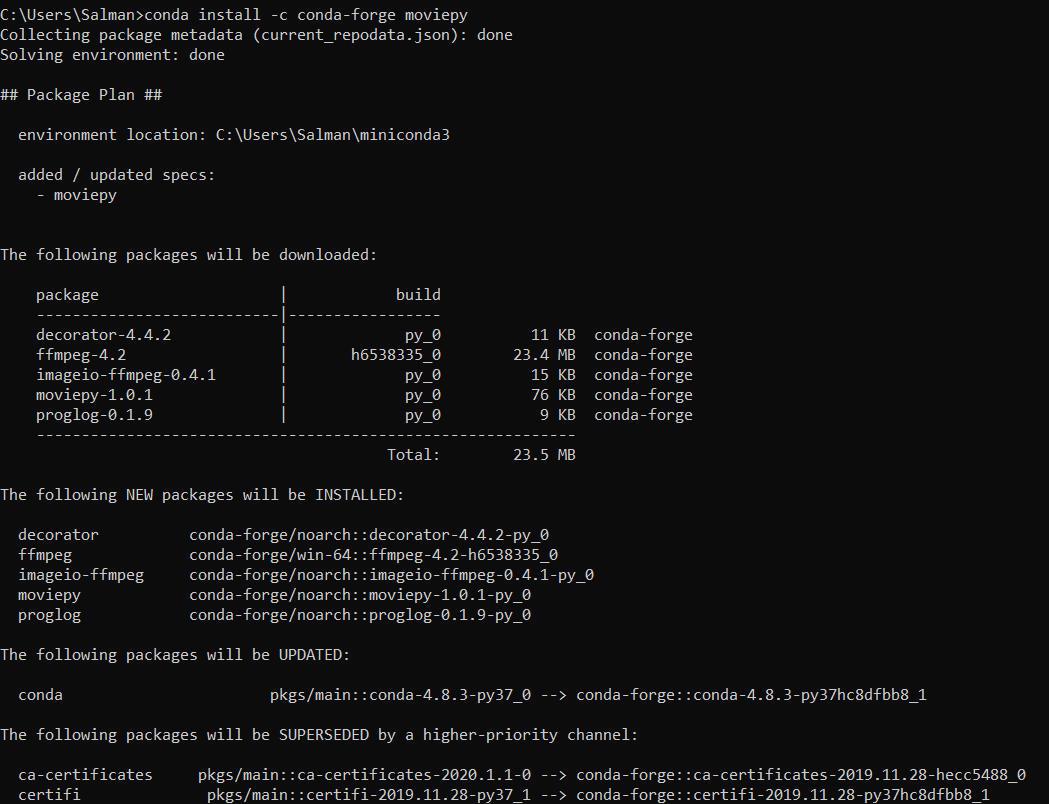

Have installed MoviePy through pip and conda. It says it is succesfully installed yet it is giving an error "ModuleNotFoundError". I am using Windows 10, Python 3.7

Have installed MoviePy through pip and conda. It says it is succesfully installed yet it is giving an error "ModuleNotFoundError". I am using Windows 10, Python 3.7
I also had this problem, do you also have another version of Python installed? If that's the case, you might want to specify to pip which version by running pip3 install moviepy

I encountered this issue today. When I installed MoviePy, every required component got installed as well ( I use pip ) but for some reason, I encountered that same issue. So, I literally tried everything that was mentioned above but still, nothing worked. The funny thing was that after investigated my /usr/bin/ I decided to switch from #!bin/python to #!/bin/python3 and I ended up getting error messages from pylint ( visual studio extension) - meaning it successfully imported moviepy.editor . But still, I was getting the same error so I decided to use python3 instead of python when executing my file.py and it worked. so my solution: python3 your_file_that_contains_moviepy.py I would also advise to alias pip3 as pip and python3 as python
