
mypy-pycharm
 mypy-pycharm copied to clipboard
 leinardi
Traceback when opening PyCharm project
Step 2: Describe your environment
- Plugin version:
0.10.2 - PyCharm/IDEA version:
2018.2.4 - Mypy version:
None
Step 3: Describe the problem:
Steps to reproduce:
- Install mypy plugin without mypy package
- Open another project
- IDE Fatal Error notification.
Expected Results:
- mypy plugin disabled
Relevant Code:
None
java.lang.Throwable: Error while detecting Mypy path: INFO: Could not find files for the given pattern(s).
	at com.intellij.openapi.diagnostic.Logger.error(Logger.java:123)
	at com.leinardi.pycharm.mypy.mpapi.MypyRunner.detectSystemMypyPath(MypyRunner.java:212)
	at com.leinardi.pycharm.mypy.mpapi.MypyRunner.getMypyPath(MypyRunner.java:146)
	at com.leinardi.pycharm.mypy.mpapi.MypyRunner.getMypyPath(MypyRunner.java:124)
	at com.leinardi.pycharm.mypy.mpapi.MypyRunner.checkMypyAvailable(MypyRunner.java:176)
	at com.leinardi.pycharm.mypy.mpapi.MypyRunner.checkMypyAvailable(MypyRunner.java:152)
	at com.leinardi.pycharm.mypy.MypyInspection.inspectFile(MypyInspection.java:76)
	at com.leinardi.pycharm.mypy.MypyInspection.lambda$checkFile$0(MypyInspection.java:65)
	at com.intellij.openapi.application.impl.ApplicationImpl$2.call(ApplicationImpl.java:337)
	at java.util.concurrent.FutureTask.run(FutureTask.java:266)
	at java.util.concurrent.ThreadPoolExecutor.runWorker(ThreadPoolExecutor.java:1142)
	at java.util.concurrent.ThreadPoolExecutor$Worker.run(ThreadPoolExecutor.java:617)
	at java.lang.Thread.run(Thread.java:745)#### Observed Results:


Hi @tim-mitchell, could you please attach the idea.log file (https://intellij-support.jetbrains.com/hc/en-us/articles/207241085-Locating-IDE-log-files) after you get the Exception?

Even better would be if it offered to install Mypy if the executable was not found.

I installed it from the plug-in repo just a couple days ago and didn't see a dialog like that.
This issue has been automatically marked as stale because it has not had activity in the last 60 days.
![stale[bot] avatar](https://avatars.githubusercontent.com/in/1724?v=4 "Published by a pub.dev verified publisher")
I have the same issue. Seems also that error occurs not only on Pycharm startup, but randomly when Pycharm is running.
Pycharm version: 2018.3.4 Plugin version: 0.10.2 Mypy version: 0.670

Facing the same issue. I have also linked the mypy executable, as suggested for a similar thread for pylint extension. Pylint is able to run fine post linking the executable, mypy issue persists.
I have installed mypy in a virtual env.
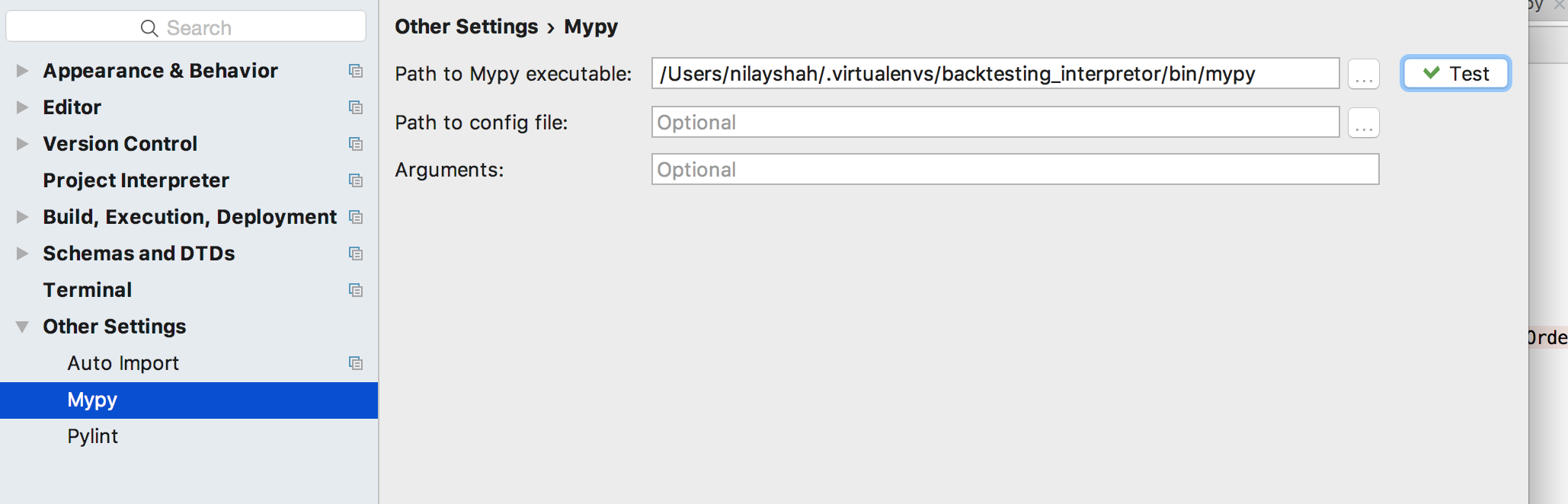
Attaching the relevant idea.log relevant_idea_log.txt
Seems to be error at this line of code
I am unable to completely understand it but.. Seems like the code is trying to find the main module in the pycharm project path although the mypy is installed in another virtual env directory..
Can you please inspect?

This issue has been automatically marked as stale because it has not had activity in the last 60 days.