
dwm_lut
 dwm_lut copied to clipboard
 ledoge
Automation
Hello, I found this great application thanks to the good people at the DisplayCAL forum. Here is the link to the background thread that lead to creation of this request here: https://hub.displaycal.net/forums/topic/8-bit-vs-10-bit-monitor-whats-the-practical-difference-for-color/#post-31082
My use case: I have a wide color gamut gaming monitor with 160% sRGB and 96% DCI-P3. Running both photo apps and other non-color managed apps and games on Windows. Issue: Oversaturated colors in non-color managed apps, games and Windows desktop.
Your application appears to solve the issue very nicely. The question is now about more automation for creation of the required profiles, LUTs, etc and automation of enabling and switching between the active profiles.
Vincent at DisplayCAL forum suggested creation of a synth profile, creating a LUT based on it and using it in your app, in combination with default (I assume sRGB) profile in OS. This should be working great for color managed apps. Another usage is to create a calibration DisplayCAL profile for the monitor, create a LUT based on it and use it in your app, which works well for Windows desktop, games and other non-color managed apps, but desaturates color managed apps too much.
Hence the need of switching both active OS profile and the active LUT in your app - 2 pairs of profiles and LUTs at least.
And therefore the request for more automation, e.g. integration with the tray app of DisplayCAL, activation of combinations of profiles and LUTs, creation of the synth profile from the calibrated profile. The sky is the limit :)
At the simples level, can I ask for documentation on how to configure activating the LUT on Windows startup in the latest GUI version? I assume it is the latest and greatest version to be used.
I hope I explained the request in an clear way (I am new to the topic and still trying to learn to get enough understanding).

I use windows task sheduler for autostart, also added the gui.exe to the exceptions of displaycal loader, maybe try to look into that, also apps like photoshop allow you to choose what profile to use, despite the profile installed in system's defaults. theoretically it can be possible to create another version of gui.exe with different signature and use them both simultaneously with different luts

Could you share the command and parameters that you use to load and activate a specific LUT on Windows start up? Are you using the GUI version? Is the location of the LUT or naming convention required to be done in specific way?
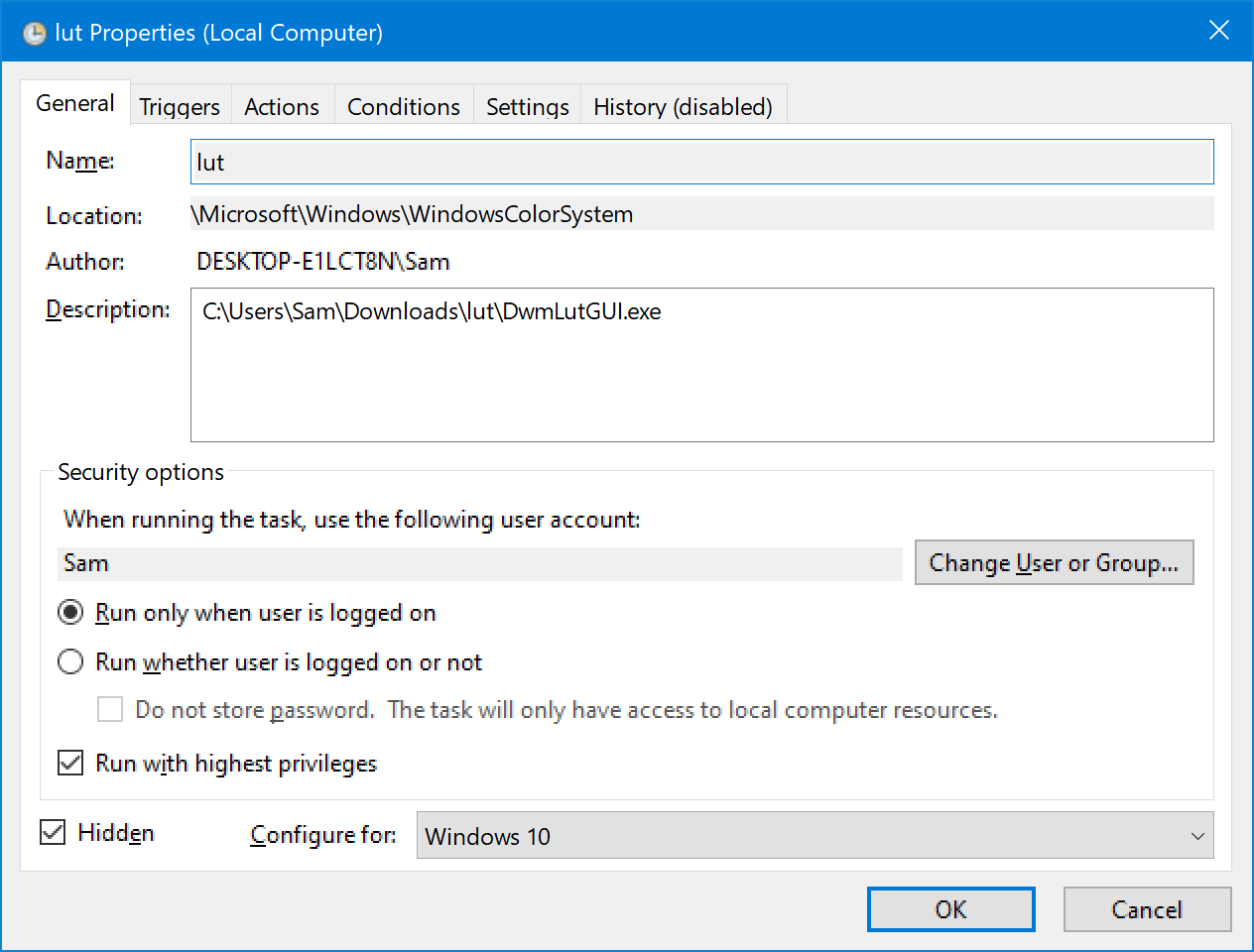
well, I'm lazy so didn't really go through it properly to fully automize, so I just set up a windows task for launching gui.exe 30 seconds after the system boot, and then I just manually click "apply" and minimaze the app. I keep the lut file in the same folder with the program
Hence the need of switching both active OS profile and the active LUT in your app - 2 pairs of profiles and LUTs at least.
I agree, this isn't ideal and ideally one program would handle both somehow. Sounds like it could get very complicated though, so I can't guarantee that that'll ever be a thing.
At the simples level, can I ask for documentation on how to configure activating the LUT on Windows startup in the latest GUI version? I assume it is the latest and greatest version to be used.
This isn't possible in the current release, but I just made one with support for some basic command line arguments here. You'll want to set up a task for it to run on boot like @alansleep did, but with the arguments -apply -minimize or -apply -exit, depending on whether you want the program to stay open in the tray or quit completely. I haven't tested it extensively, but it should work – let me know if you encounter any issues.

thanks for the new release, @ledoge, I'll be testing it tomorrow! and I wanna thank you big time for creating the program in the first place. as I'm using an srgb monitor, it already resolved ALL of my problems :)
ideally one program would handle both somehow
maybe you could add a list of several luts to choose from, like two or three positions? for example you right click on the tray icon and there pick one of them. that'll be a good start
I just tested the new version and "-apply -minimize" parameters work well. Thanks.
What is the chance for future tighter integration with DisplayCAL, to be able to switch pairs of profiles with "one button click" or a keyboard shortcut? I am guessing that the DisplayCAL developer would need to be involved.
maybe you could add a list of several luts to choose from, like two or three positions? for example you right click on the tray icon and there pick one of them. that'll be a good start
Could do something like showing the n most recently used LUTs in the context menu, yeah. Might have to overhaul the main UI as well though to make it match... For now, I'm happy with the current state, although it could definitely be improved in the future.
What is the chance for future tighter integration with DisplayCAL, to be able to switch pairs of profiles with "one button click" or a keyboard shortcut? I am guessing that the DisplayCAL developer would need to be involved.
I believe the DisplayCAL profile loader just uses Windows' profile associations, so that shouldn't require any changes on that end. Should just work if I use the Windows API for setting the active profile, I think – not sure though.
been testing autostart with -apply -minimaze, works flawlessly, thanks) I have only one suggestion for improvement - "disable and exit" option in the context menu of the tray icon by right click of a mouse
-apply -minimaze
It works! I am going to deploy this tool to my designer's P3 monitor PCs. It would be a foolproof solution that they don't need to learn anything about monitor color management.
Thanks for your work!

@alansleep I expanded the context menu in the latest (v3.1) release and included that option, check it out!
@ledoge damn son, you nailed it!
sorry about the "son", I'm just too excited. it's perfect and it even works better in general, faster and without the need to refresh the desktop every time
maybe you could add a list of several luts to choose from, like two or three positions? for example you right click on the tray icon and there pick one of them. that'll be a good start
That would be awesome! And if there was an option to assign hotkeys, it would be possible to quickly switch between, say, gamma 2.4 / gamma 2.2 / 1886 LUTs.
Could do something like showing the n most recently used LUTs in the context menu, yeah.
With hotkeys for cycling them? :)
For now, I'm happy with the current state,
Thanks a million for sharing this app!

Probably not gonna add any further options like selecting LUTs from the context menu or being able to assign hotkeys anytime soon, sorry. Seems like it could get pretty complex pretty quickly with multiple monitors and also HDR support now being a thing.
However, you should be able to rig something up with AutoHotkey or similar, swapping out the config.xml file and running the exe with -apply -exit for changing the active LUTs.
Probably not gonna add any further options like selecting LUTs from the context menu or being able to assign hotkeys anytime soon, sorry. Seems like it could get pretty complex pretty quickly with multiple monitors and also HDR support now being a thing.
However, you should be able to rig something up with AutoHotkey or similar, swapping out the
config.xmlfile and running the exe with-apply -exitfor changing the active LUTs.
I feel like it's pretty enough too. With parameters, we can do a lot.
The deployment went very well! I used the windows schedule task to apply the LUT at the login. After several days, it's surprisingly robust. The LUT is rarely gone. Excluded only one situation: if a remote desktop connection is established, the LUT would be gone.
I think RDP is not everyone using, so it's not a big deal. But If you could find a solution to apply back, it would be nice.
My trick for solving it is: adding another trigger "when the workstation is unlocked."
if a remote desktop connection is established, the LUT would be gone
I tested this and it seems to be inconsistent, sometimes everything works fine, other times DWM crashes when I log in normally after disconnecting from RDP (which effectively disables the LUT, as the DLL has to be reinjected after DWM gets restarted). Not really sure what can be done to prevent the crash here, sorry.