
anipose
 anipose copied to clipboard
 lambdaloop
[Feature request] Filter for preventing limbs swapping over
As always, thanks for making this brilliant open source software! I have some 2D human tracking which with the current filters seem to perform really well. However, I'm running into the issue of limb swapping ID - i.e. the correct points are detected, but e.g. right and left leg swaps over. This person is rotating, so changing between facing towards and away from the camera, which might be the cause, but the swaps are instantaneous. It seems like something which could be prevented by a filter. I don't quite know how it would be achieved, but since the filters are one of my main reasons for using anipose I thought it might be an idea to consider. I've included 2 frames as examples where the legs swap over.

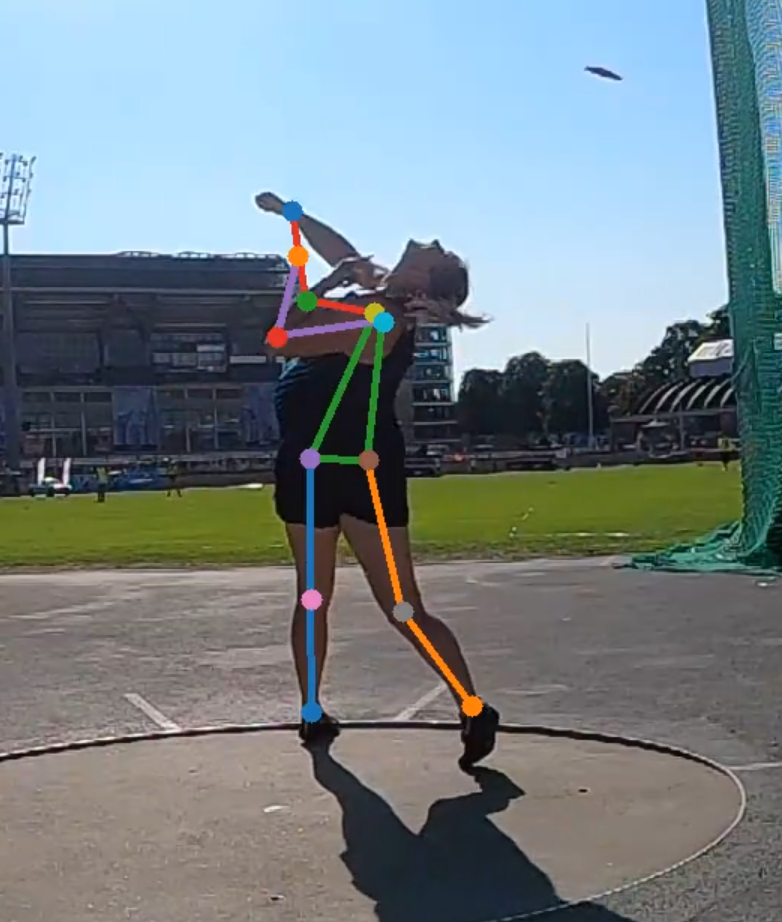

hey @roaldarbol if you are using the human pretrained model from Deeplabcut, it actually treats left and right as the same, i.e. there is no distinction; if you want to start with the human pretrained model though, and train on your own data, be sure to set mirror = false in the pose_cfg.yaml file.
hope that helps!

Hi @MMathisLab! I am indeed, so that makes a lot of sense - and I didn't know that the network has that behaviour. I really want to avoid labelling myself, especially as the pretrained network gets the points really well!
I do think it should be doable to compare left/right points, e.g. if there is a marked jump from one frame to the next for a right limb, then check if the next frame has a MUCH smaller jump for the left limb - and if so, swap the remainder of the two tracks accordingly. I'll give it a go (though in R) to see how easily it can be done with the sumary .csv file and get back. :-)
Sounds good! I haven't followed the latest on anipose, but there is the ARMIA model filter within dlc, I'd give that a go as well? dlc.filterpredictions(config)
I'll give it a look, thanks for taking the time to reach out. Just to visualise the issue, here's a plot of my issue:
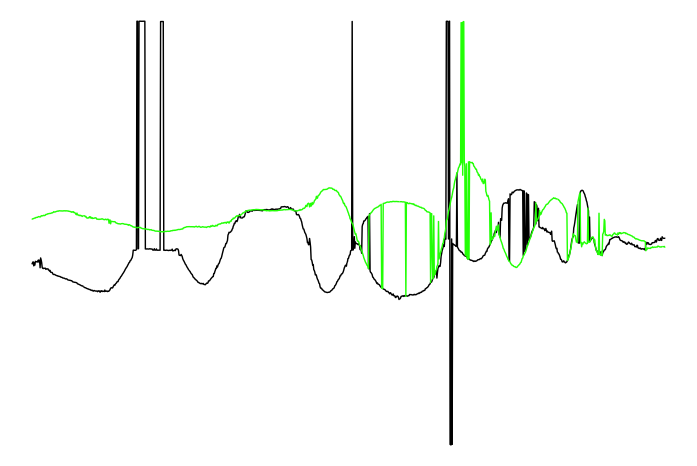 (each graph is the x coordinate of a wrist on the Y-axis, and time on the X-axis)
@roaldarbol Have you tried the the Viterbi filter within Anipose? It's made to correct errors exactly like this. It picks out the best trajectory from multiple options.
To enable it, you need to track your videos in DeepLabCut with multiple outputs enabled. To do that, you need to add the following to the DLC config.yaml:
num_outputs: 20
(You can set this value to any number, but I find 20 works well enough.)
Then in your Anipose config.toml file, you need to enable the Viterbi filter:
[filter]
enabled = true
type = "viterbi"
multiprocessing = true # optional: faster but in some cases causes crashes

I haven't tried that, I'll give it a go when I get back to working on it. Thanks for the suggestion!
Now I finally got around to trying this out!
Unfortunately, it gets stuck and I have to Ctrl+C to break free - it seems that somehow multiprocessing causes this despite being disabled:
(ANIPOSE) roaldarbol@Mikkels-MacBook-Pro 2021-09-10-anipose-diskos % anipose filter
Filtering tracked points...
/Users/roaldarbol/Google Drive/anipose/2021-09-10-anipose-diskos/trial-1/pose-2d-filtered/disc.h5
0it [00:00, ?it/s]^CProcess ForkPoolWorker-15:
0it [01:34, ?it/s]

Aborted!
Traceback (most recent call last):
  File "/Users/roaldarbol/opt/anaconda3/envs/ANIPOSE/lib/python3.7/multiprocessing/process.py", line 297, in _bootstrap
    self.run()
  File "/Users/roaldarbol/opt/anaconda3/envs/ANIPOSE/lib/python3.7/multiprocessing/process.py", line 99, in run
    self._target(*self._args, **self._kwargs)
  File "/Users/roaldarbol/opt/anaconda3/envs/ANIPOSE/lib/python3.7/multiprocessing/pool.py", line 110, in worker
    task = get()
  File "/Users/roaldarbol/opt/anaconda3/envs/ANIPOSE/lib/python3.7/multiprocessing/queues.py", line 352, in get
    res = self._reader.recv_bytes()
  File "/Users/roaldarbol/opt/anaconda3/envs/ANIPOSE/lib/python3.7/multiprocessing/connection.py", line 216, in recv_bytes
    buf = self._recv_bytes(maxlength)
  File "/Users/roaldarbol/opt/anaconda3/envs/ANIPOSE/lib/python3.7/multiprocessing/connection.py", line 407, in _recv_bytes
    buf = self._recv(4)
  File "/Users/roaldarbol/opt/anaconda3/envs/ANIPOSE/lib/python3.7/multiprocessing/connection.py", line 379, in _recv
    chunk = read(handle, remaining)
KeyboardInterrupt
It works when I only use the normal filtering, but when enabling type = "viterbi" it just kind of enters an infinity-loop (which shows 0it [00:00, ?it/s] forever). Any idea what I could do here?
Ah, I think it's possible that the latest version of anipose fixes the multiprocessing issue but it's not pushed to pip yet.
Could you try installing it from the source on github?
It would involve downloading the code here to your computer and then running
python setup.py develop
within the anipose code folder.
For viterbi, the progress bar is over each filter going per joint. If you have long videos, it make take a while to complete one iteration.
Ah cool, I'll give that a shot now! The video I tested it on isn't too big and I left it running for over an hour the first time, so I think it did really stall.