
capsule-render
 capsule-render copied to clipboard
 kyechan99
sonobuoy retrieve cmd returns error: "error retrieving results: unexpected EOF"
What steps did you take and what happened: Step 1: ran the pre-packaged systemd-logs plugin: sonobuoy run --plugin systemd-logs --dns-pod-labels dns.operator.openshift.io/daemonset-dns=default --dns-namespace openshift-dns
Step 2: Checked the status of the plugin after a while:
sonobuoy status
Output:

Step 3: Tried to download the results tar file
sonobuoy retrieve
Output:

What did you expect to happen: I expected Step 3 above to run successfully without any error messages. Note: After Step 3 throws error, I still see a result tar file but it is corrupt and throws error during extraction.
Anything else you would like to add: Steps to provision the cluster https://docs.openshift.com/container-platform/4.9/installing/installing_azure/installing-azure-account.html
Environment:
- Sonobuoy version: v0.56.2
- Kubernetes version: (use
kubectl version): v1.22.0-rc.0+a44d0f0 - Kubernetes installer & version: Openshift Container Platform , version: 4.9.5
- Cloud provider or hardware configuration: Azure cloud
- OS (e.g. from
/etc/os-release):

- Sonobuoy tarball (which contains * below)

Thanks for the bug report. Out of curiosity have you tried to modify the --retrieve-path flag?
This type of error was common a few versions ago when the location changed and some plugins/workers/aggregator logic wasn't always syncing up. As a result I added that flag to allow you to try and download other files from the aggregator to help debug.
It defaults to /tmp/sonobuoy but you could also try /tmp/results or /tmp/sonobuoy/results if you see those paths in any plugins or configs.

So far unable to repro with the k8s version and sonobuoy version mentioned; but that is on a kind cluster. Working to get an openshift cluster up and try there. We don't do anything provider-specific so that would be an odd bug though.
I'm working to get the necessary accounts set up to try and reproduce the issue, but it would probably be fastest if you could provide me the output of sonobuoy logs; the tail end of that in particular usually mentions having created the tarball, its location, errors, etc.
Attaching the output of the command 'sonobuoy logs' below
namespace="sonobuoy" pod="sonobuoy" container="kube-sonobuoy" time="2022-02-28T08:37:58Z" level=info msg="Scanning plugins in ./plugins.d (pwd: /)" time="2022-02-28T08:37:58Z" level=info msg="Scanning plugins in /etc/sonobuoy/plugins.d (pwd: /)" time="2022-02-28T08:37:58Z" level=info msg="Directory (/etc/sonobuoy/plugins.d) does not exist" time="2022-02-28T08:37:58Z" level=info msg="Scanning plugins in ~/sonobuoy/plugins.d (pwd: /)" time="2022-02-28T08:37:58Z" level=info msg="Directory (~/sonobuoy/plugins.d) does not exist" time="2022-02-28T08:37:58Z" level=info msg="Starting server Expected Results: [{ocp-4-8-18-gpk44-master-0 systemd-logs} {ocp-4-8-18-gpk44-master-1 systemd-logs} {ocp-4-8-18-gpk44-master-2 systemd-logs} {ocp-4-8-18-gpk44-worker-eastus1-5pfsc systemd-logs} {ocp-4-8-18-gpk44-worker-eastus2-4wj95 systemd-logs} {ocp-4-8-18-gpk44-worker-eastus3-j59gt systemd-logs}]" time="2022-02-28T08:37:58Z" level=info msg="Starting annotation update routine" time="2022-02-28T08:37:58Z" level=info msg="Starting aggregation server" address=0.0.0.0 port=8080 time="2022-02-28T08:37:58Z" level=info msg="Running plugin" plugin=systemd-logs time="2022-02-28T08:38:14Z" level=info msg="received request" client_cert="[systemd-logs]" method=PUT node=ocp-4-8-18-gpk44-master-0 plugin_name=systemd-logs url=/api/v1/results/by-node/ocp-4-8-18-gpk44-master-0/systemd-logs time="2022-02-28T08:38:15Z" level=info msg="received request" client_cert="[systemd-logs]" method=PUT node=ocp-4-8-18-gpk44-worker-eastus3-j59gt plugin_name=systemd-logs url=/api/v1/results/by-node/ocp-4-8-18-gpk44-worker-eastus3-j59gt/systemd-logs time="2022-02-28T08:38:17Z" level=info msg="received request" client_cert="[systemd-logs]" method=PUT node=ocp-4-8-18-gpk44-worker-eastus2-4wj95 plugin_name=systemd-logs url=/api/v1/results/by-node/ocp-4-8-18-gpk44-worker-eastus2-4wj95/systemd-logs time="2022-02-28T08:38:17Z" level=info msg="received request" client_cert="[systemd-logs]" method=PUT node=ocp-4-8-18-gpk44-master-1 plugin_name=systemd-logs url=/api/v1/results/by-node/ocp-4-8-18-gpk44-master-1/systemd-logs time="2022-02-28T08:38:18Z" level=info msg="received request" client_cert="[systemd-logs]" method=PUT node=ocp-4-8-18-gpk44-master-2 plugin_name=systemd-logs url=/api/v1/results/by-node/ocp-4-8-18-gpk44-master-2/systemd-logs time="2022-02-28T08:38:20Z" level=info msg="received request" client_cert="[systemd-logs]" method=PUT node=ocp-4-8-18-gpk44-worker-eastus1-5pfsc plugin_name=systemd-logs url=/api/v1/results/by-node/ocp-4-8-18-gpk44-worker-eastus1-5pfsc/systemd-logs time="2022-02-28T08:38:20Z" level=info msg="Last update to annotations on exit" time="2022-02-28T08:38:20Z" level=info msg="Shutting down aggregation server" time="2022-02-28T08:38:20Z" level=info msg="Log lines after this point will not appear in the downloaded tarball." I0228 08:38:21.491865 1 request.go:668] Waited for 1.025664429s due to client-side throttling, not priority and fairness, request: GET:https://172.30.0.1:443/apis/metal3.io/v1alpha1?timeout=32s time="2022-02-28T08:38:24Z" level=info msg="Resources is not set explicitly implying query all resources, but skipping secrets for safety. Specify the value explicitly in Resources to gather this data." time="2022-02-28T08:38:24Z" level=info msg="Collecting Node Configuration and Health..." time="2022-02-28T08:38:24Z" level=info msg="Creating host results for ocp-4-8-18-gpk44-master-0 under /tmp/sonobuoy/a604a256-299f-4362-bbb8-c60f9e03f577/hosts/ocp-4-8-18-gpk44-master-0\n" time="2022-02-28T08:38:24Z" level=info msg="Creating host results for ocp-4-8-18-gpk44-master-1 under /tmp/sonobuoy/a604a256-299f-4362-bbb8-c60f9e03f577/hosts/ocp-4-8-18-gpk44-master-1\n" time="2022-02-28T08:38:24Z" level=info msg="Creating host results for ocp-4-8-18-gpk44-master-2 under /tmp/sonobuoy/a604a256-299f-4362-bbb8-c60f9e03f577/hosts/ocp-4-8-18-gpk44-master-2\n" time="2022-02-28T08:38:24Z" level=info msg="Creating host results for ocp-4-8-18-gpk44-worker-eastus1-5pfsc under /tmp/sonobuoy/a604a256-299f-4362-bbb8-c60f9e03f577/hosts/ocp-4-8-18-gpk44-worker-eastus1-5pfsc\n" time="2022-02-28T08:38:24Z" level=info msg="Creating host results for ocp-4-8-18-gpk44-worker-eastus2-4wj95 under /tmp/sonobuoy/a604a256-299f-4362-bbb8-c60f9e03f577/hosts/ocp-4-8-18-gpk44-worker-eastus2-4wj95\n" time="2022-02-28T08:38:24Z" level=info msg="Creating host results for ocp-4-8-18-gpk44-worker-eastus3-j59gt under /tmp/sonobuoy/a604a256-299f-4362-bbb8-c60f9e03f577/hosts/ocp-4-8-18-gpk44-worker-eastus3-j59gt\n" time="2022-02-28T08:38:24Z" level=info msg="Running cluster queries" W0228 08:38:26.626199 1 warnings.go:70] v1 ComponentStatus is deprecated in v1.19+ W0228 08:38:27.004805 1 warnings.go:70] policy/v1beta1 PodSecurityPolicy is deprecated in v1.21+, unavailable in v1.25+ time="2022-02-28T08:38:27Z" level=info msg="Querying server version and API Groups" time="2022-02-28T08:38:27Z" level=info msg="Filtering namespaces based on the following regex:.*" time="2022-02-28T08:38:27Z" level=info msg="Namespace default Matched=true" time="2022-02-28T08:38:27Z" level=info msg="Namespace kube-node-lease Matched=true" time="2022-02-28T08:38:27Z" level=info msg="Namespace kube-public Matched=true" time="2022-02-28T08:38:27Z" level=info msg="Namespace kube-system Matched=true" time="2022-02-28T08:38:27Z" level=info msg="Namespace openshift Matched=true" time="2022-02-28T08:38:27Z" level=info msg="Namespace openshift-apiserver Matched=true" time="2022-02-28T08:38:27Z" level=info msg="Namespace openshift-apiserver-operator Matched=true" time="2022-02-28T08:38:27Z" level=info msg="Namespace openshift-authentication Matched=true" time="2022-02-28T08:38:27Z" level=info msg="Namespace openshift-authentication-operator Matched=true" time="2022-02-28T08:38:27Z" level=info msg="Namespace openshift-cloud-credential-operator Matched=true" time="2022-02-28T08:38:27Z" level=info msg="Namespace openshift-cluster-csi-drivers Matched=true" time="2022-02-28T08:38:27Z" level=info msg="Namespace openshift-cluster-machine-approver Matched=true" time="2022-02-28T08:38:27Z" level=info msg="Namespace openshift-cluster-node-tuning-operator Matched=true" time="2022-02-28T08:38:27Z" level=info msg="Namespace openshift-cluster-samples-operator Matched=true" time="2022-02-28T08:38:27Z" level=info msg="Namespace openshift-cluster-storage-operator Matched=true" time="2022-02-28T08:38:27Z" level=info msg="Namespace openshift-cluster-version Matched=true" time="2022-02-28T08:38:27Z" level=info msg="Namespace openshift-config Matched=true" time="2022-02-28T08:38:27Z" level=info msg="Namespace openshift-config-managed Matched=true" time="2022-02-28T08:38:27Z" level=info msg="Namespace openshift-config-operator Matched=true" time="2022-02-28T08:38:27Z" level=info msg="Namespace openshift-console Matched=true" time="2022-02-28T08:38:27Z" level=info msg="Namespace openshift-console-operator Matched=true" time="2022-02-28T08:38:27Z" level=info msg="Namespace openshift-console-user-settings Matched=true" time="2022-02-28T08:38:27Z" level=info msg="Namespace openshift-controller-manager Matched=true" time="2022-02-28T08:38:27Z" level=info msg="Namespace openshift-controller-manager-operator Matched=true" time="2022-02-28T08:38:27Z" level=info msg="Namespace openshift-dns Matched=true" time="2022-02-28T08:38:27Z" level=info msg="Namespace openshift-dns-operator Matched=true" time="2022-02-28T08:38:27Z" level=info msg="Namespace openshift-etcd Matched=true" time="2022-02-28T08:38:27Z" level=info msg="Namespace openshift-etcd-operator Matched=true" time="2022-02-28T08:38:27Z" level=info msg="Namespace openshift-host-network Matched=true" time="2022-02-28T08:38:27Z" level=info msg="Namespace openshift-image-registry Matched=true" time="2022-02-28T08:38:27Z" level=info msg="Namespace openshift-infra Matched=true" time="2022-02-28T08:38:27Z" level=info msg="Namespace openshift-ingress Matched=true" time="2022-02-28T08:38:27Z" level=info msg="Namespace openshift-ingress-canary Matched=true" time="2022-02-28T08:38:27Z" level=info msg="Namespace openshift-ingress-operator Matched=true" time="2022-02-28T08:38:27Z" level=info msg="Namespace openshift-insights Matched=true" time="2022-02-28T08:38:27Z" level=info msg="Namespace openshift-kni-infra Matched=true" time="2022-02-28T08:38:27Z" level=info msg="Namespace openshift-kube-apiserver Matched=true" time="2022-02-28T08:38:27Z" level=info msg="Namespace openshift-kube-apiserver-operator Matched=true" time="2022-02-28T08:38:27Z" level=info msg="Namespace openshift-kube-controller-manager Matched=true" time="2022-02-28T08:38:27Z" level=info msg="Namespace openshift-kube-controller-manager-operator Matched=true" time="2022-02-28T08:38:27Z" level=info msg="Namespace openshift-kube-scheduler Matched=true" time="2022-02-28T08:38:27Z" level=info msg="Namespace openshift-kube-scheduler-operator Matched=true" time="2022-02-28T08:38:27Z" level=info msg="Namespace openshift-kube-storage-version-migrator Matched=true" time="2022-02-28T08:38:27Z" level=info msg="Namespace openshift-kube-storage-version-migrator-operator Matched=true" time="2022-02-28T08:38:27Z" level=info msg="Namespace openshift-kubevirt-infra Matched=true" time="2022-02-28T08:38:27Z" level=info msg="Namespace openshift-machine-api Matched=true" time="2022-02-28T08:38:27Z" level=info msg="Namespace openshift-machine-config-operator Matched=true" time="2022-02-28T08:38:27Z" level=info msg="Namespace openshift-marketplace Matched=true" time="2022-02-28T08:38:27Z" level=info msg="Namespace openshift-monitoring Matched=true" time="2022-02-28T08:38:27Z" level=info msg="Namespace openshift-multus Matched=true" time="2022-02-28T08:38:27Z" level=info msg="Namespace openshift-network-diagnostics Matched=true" time="2022-02-28T08:38:27Z" level=info msg="Namespace openshift-network-operator Matched=true" time="2022-02-28T08:38:27Z" level=info msg="Namespace openshift-node Matched=true" time="2022-02-28T08:38:27Z" level=info msg="Namespace openshift-oauth-apiserver Matched=true" time="2022-02-28T08:38:27Z" level=info msg="Namespace openshift-openstack-infra Matched=true" time="2022-02-28T08:38:27Z" level=info msg="Namespace openshift-operator-lifecycle-manager Matched=true" time="2022-02-28T08:38:27Z" level=info msg="Namespace openshift-operators Matched=true" time="2022-02-28T08:38:27Z" level=info msg="Namespace openshift-ovirt-infra Matched=true" time="2022-02-28T08:38:27Z" level=info msg="Namespace openshift-sdn Matched=true" time="2022-02-28T08:38:27Z" level=info msg="Namespace openshift-service-ca Matched=true" time="2022-02-28T08:38:27Z" level=info msg="Namespace openshift-service-ca-operator Matched=true" time="2022-02-28T08:38:27Z" level=info msg="Namespace openshift-user-workload-monitoring Matched=true" time="2022-02-28T08:38:27Z" level=info msg="Namespace openshift-vsphere-infra Matched=true" time="2022-02-28T08:38:27Z" level=info msg="Namespace sonobuoy Matched=true" time="2022-02-28T08:38:27Z" level=info msg="Running ns query (default)" time="2022-02-28T08:38:29Z" level=info msg="Running ns query (kube-node-lease)" time="2022-02-28T08:38:31Z" level=info msg="Running ns query (kube-public)" time="2022-02-28T08:38:34Z" level=info msg="Running ns query (kube-system)" time="2022-02-28T08:38:36Z" level=info msg="Running ns query (openshift)" time="2022-02-28T08:38:38Z" level=info msg="Running ns query (openshift-apiserver)" time="2022-02-28T08:38:42Z" level=info msg="Running ns query (openshift-apiserver-operator)" time="2022-02-28T08:38:44Z" level=info msg="Running ns query (openshift-authentication)" time="2022-02-28T08:38:46Z" level=info msg="Running ns query (openshift-authentication-operator)" time="2022-02-28T08:38:48Z" level=info msg="Running ns query (openshift-cloud-credential-operator)" time="2022-02-28T08:38:51Z" level=info msg="Running ns query (openshift-cluster-csi-drivers)" time="2022-02-28T08:38:53Z" level=info msg="Running ns query (openshift-cluster-machine-approver)" time="2022-02-28T08:38:56Z" level=info msg="Running ns query (openshift-cluster-node-tuning-operator)" time="2022-02-28T08:38:58Z" level=info msg="Running ns query (openshift-cluster-samples-operator)" time="2022-02-28T08:39:00Z" level=info msg="Running ns query (openshift-cluster-storage-operator)" time="2022-02-28T08:39:03Z" level=info msg="Running ns query (openshift-cluster-version)" time="2022-02-28T08:39:05Z" level=info msg="Running ns query (openshift-config)" time="2022-02-28T08:39:07Z" level=info msg="Running ns query (openshift-config-managed)" time="2022-02-28T08:39:10Z" level=info msg="Running ns query (openshift-config-operator)" time="2022-02-28T08:39:12Z" level=info msg="Running ns query (openshift-console)" time="2022-02-28T08:39:14Z" level=info msg="Running ns query (openshift-console-operator)" time="2022-02-28T08:39:17Z" level=info msg="Running ns query (openshift-console-user-settings)" time="2022-02-28T08:39:19Z" level=info msg="Running ns query (openshift-controller-manager)" time="2022-02-28T08:39:22Z" level=info msg="Running ns query (openshift-controller-manager-operator)" time="2022-02-28T08:39:24Z" level=info msg="Running ns query (openshift-dns)" time="2022-02-28T08:39:26Z" level=info msg="Running ns query (openshift-dns-operator)" time="2022-02-28T08:39:29Z" level=info msg="Running ns query (openshift-etcd)" time="2022-02-28T08:39:31Z" level=info msg="Running ns query (openshift-etcd-operator)" time="2022-02-28T08:39:33Z" level=info msg="Running ns query (openshift-host-network)" time="2022-02-28T08:39:36Z" level=info msg="Running ns query (openshift-image-registry)" time="2022-02-28T08:39:38Z" level=info msg="Running ns query (openshift-infra)" time="2022-02-28T08:39:41Z" level=info msg="Running ns query (openshift-ingress)" time="2022-02-28T08:39:43Z" level=info msg="Running ns query (openshift-ingress-canary)" time="2022-02-28T08:39:45Z" level=info msg="Running ns query (openshift-ingress-operator)" time="2022-02-28T08:39:48Z" level=info msg="Running ns query (openshift-insights)" time="2022-02-28T08:39:50Z" level=info msg="Running ns query (openshift-kni-infra)" time="2022-02-28T08:39:52Z" level=info msg="Running ns query (openshift-kube-apiserver)" time="2022-02-28T08:39:55Z" level=info msg="Running ns query (openshift-kube-apiserver-operator)" time="2022-02-28T08:39:57Z" level=info msg="Running ns query (openshift-kube-controller-manager)" time="2022-02-28T08:39:59Z" level=info msg="Running ns query (openshift-kube-controller-manager-operator)" time="2022-02-28T08:40:02Z" level=info msg="Running ns query (openshift-kube-scheduler)" time="2022-02-28T08:40:04Z" level=info msg="Running ns query (openshift-kube-scheduler-operator)" time="2022-02-28T08:40:07Z" level=info msg="Running ns query (openshift-kube-storage-version-migrator)" time="2022-02-28T08:40:09Z" level=info msg="Running ns query (openshift-kube-storage-version-migrator-operator)" time="2022-02-28T08:40:11Z" level=info msg="Running ns query (openshift-kubevirt-infra)" time="2022-02-28T08:40:14Z" level=info msg="Running ns query (openshift-machine-api)" time="2022-02-28T08:40:16Z" level=info msg="Running ns query (openshift-machine-config-operator)" time="2022-02-28T08:40:18Z" level=info msg="Running ns query (openshift-marketplace)" time="2022-02-28T08:40:21Z" level=info msg="Running ns query (openshift-monitoring)" time="2022-02-28T08:40:23Z" level=info msg="Running ns query (openshift-multus)" time="2022-02-28T08:40:25Z" level=info msg="Running ns query (openshift-network-diagnostics)" time="2022-02-28T08:40:28Z" level=info msg="Running ns query (openshift-network-operator)" time="2022-02-28T08:40:30Z" level=info msg="Running ns query (openshift-node)" time="2022-02-28T08:40:33Z" level=info msg="Running ns query (openshift-oauth-apiserver)" time="2022-02-28T08:40:35Z" level=info msg="Running ns query (openshift-openstack-infra)" time="2022-02-28T08:40:37Z" level=info msg="Running ns query (openshift-operator-lifecycle-manager)" time="2022-02-28T08:40:40Z" level=info msg="Running ns query (openshift-operators)" time="2022-02-28T08:40:42Z" level=info msg="Running ns query (openshift-ovirt-infra)" time="2022-02-28T08:40:44Z" level=info msg="Running ns query (openshift-sdn)" time="2022-02-28T08:40:47Z" level=info msg="Running ns query (openshift-service-ca)" time="2022-02-28T08:40:49Z" level=info msg="Running ns query (openshift-service-ca-operator)" time="2022-02-28T08:40:52Z" level=info msg="Running ns query (openshift-user-workload-monitoring)" time="2022-02-28T08:40:54Z" level=info msg="Running ns query (openshift-vsphere-infra)" time="2022-02-28T08:40:56Z" level=info msg="Running ns query (sonobuoy)" time="2022-02-28T08:40:59Z" level=info msg="Namespace default Matched=false" time="2022-02-28T08:40:59Z" level=info msg="Namespace kube-node-lease Matched=false" time="2022-02-28T08:40:59Z" level=info msg="Namespace kube-public Matched=false" time="2022-02-28T08:40:59Z" level=info msg="Namespace kube-system Matched=true" time="2022-02-28T08:40:59Z" level=info msg="Namespace openshift Matched=false" time="2022-02-28T08:40:59Z" level=info msg="Namespace openshift-apiserver Matched=false" time="2022-02-28T08:40:59Z" level=info msg="Namespace openshift-apiserver-operator Matched=false" time="2022-02-28T08:40:59Z" level=info msg="Namespace openshift-authentication Matched=false" time="2022-02-28T08:40:59Z" level=info msg="Namespace openshift-authentication-operator Matched=false" time="2022-02-28T08:40:59Z" level=info msg="Namespace openshift-cloud-credential-operator Matched=false" time="2022-02-28T08:40:59Z" level=info msg="Namespace openshift-cluster-csi-drivers Matched=false" time="2022-02-28T08:40:59Z" level=info msg="Namespace openshift-cluster-machine-approver Matched=false" time="2022-02-28T08:40:59Z" level=info msg="Namespace openshift-cluster-node-tuning-operator Matched=false" time="2022-02-28T08:40:59Z" level=info msg="Namespace openshift-cluster-samples-operator Matched=false" time="2022-02-28T08:40:59Z" level=info msg="Namespace openshift-cluster-storage-operator Matched=false" time="2022-02-28T08:40:59Z" level=info msg="Namespace openshift-cluster-version Matched=false" time="2022-02-28T08:40:59Z" level=info msg="Namespace openshift-config Matched=false" time="2022-02-28T08:40:59Z" level=info msg="Namespace openshift-config-managed Matched=false" time="2022-02-28T08:40:59Z" level=info msg="Namespace openshift-config-operator Matched=false" time="2022-02-28T08:40:59Z" level=info msg="Namespace openshift-console Matched=false" time="2022-02-28T08:40:59Z" level=info msg="Namespace openshift-console-operator Matched=false" time="2022-02-28T08:40:59Z" level=info msg="Namespace openshift-console-user-settings Matched=false" time="2022-02-28T08:40:59Z" level=info msg="Namespace openshift-controller-manager Matched=false" time="2022-02-28T08:40:59Z" level=info msg="Namespace openshift-controller-manager-operator Matched=false" time="2022-02-28T08:40:59Z" level=info msg="Namespace openshift-dns Matched=false" time="2022-02-28T08:40:59Z" level=info msg="Namespace openshift-dns-operator Matched=false" time="2022-02-28T08:40:59Z" level=info msg="Namespace openshift-etcd Matched=false" time="2022-02-28T08:40:59Z" level=info msg="Namespace openshift-etcd-operator Matched=false" time="2022-02-28T08:40:59Z" level=info msg="Namespace openshift-host-network Matched=false" time="2022-02-28T08:40:59Z" level=info msg="Namespace openshift-image-registry Matched=false" time="2022-02-28T08:40:59Z" level=info msg="Namespace openshift-infra Matched=false" time="2022-02-28T08:40:59Z" level=info msg="Namespace openshift-ingress Matched=false" time="2022-02-28T08:40:59Z" level=info msg="Namespace openshift-ingress-canary Matched=false" time="2022-02-28T08:40:59Z" level=info msg="Namespace openshift-ingress-operator Matched=false" time="2022-02-28T08:40:59Z" level=info msg="Namespace openshift-insights Matched=false" time="2022-02-28T08:40:59Z" level=info msg="Namespace openshift-kni-infra Matched=false" time="2022-02-28T08:40:59Z" level=info msg="Namespace openshift-kube-apiserver Matched=false" time="2022-02-28T08:40:59Z" level=info msg="Namespace openshift-kube-apiserver-operator Matched=false" time="2022-02-28T08:40:59Z" level=info msg="Namespace openshift-kube-controller-manager Matched=false" time="2022-02-28T08:40:59Z" level=info msg="Namespace openshift-kube-controller-manager-operator Matched=false" time="2022-02-28T08:40:59Z" level=info msg="Namespace openshift-kube-scheduler Matched=false" time="2022-02-28T08:40:59Z" level=info msg="Namespace openshift-kube-scheduler-operator Matched=false" time="2022-02-28T08:40:59Z" level=info msg="Namespace openshift-kube-storage-version-migrator Matched=false" time="2022-02-28T08:40:59Z" level=info msg="Namespace openshift-kube-storage-version-migrator-operator Matched=false" time="2022-02-28T08:40:59Z" level=info msg="Namespace openshift-kubevirt-infra Matched=false" time="2022-02-28T08:40:59Z" level=info msg="Namespace openshift-machine-api Matched=false" time="2022-02-28T08:40:59Z" level=info msg="Namespace openshift-machine-config-operator Matched=false" time="2022-02-28T08:40:59Z" level=info msg="Namespace openshift-marketplace Matched=false" time="2022-02-28T08:40:59Z" level=info msg="Namespace openshift-monitoring Matched=false" time="2022-02-28T08:40:59Z" level=info msg="Namespace openshift-multus Matched=false" time="2022-02-28T08:40:59Z" level=info msg="Namespace openshift-network-diagnostics Matched=false" time="2022-02-28T08:40:59Z" level=info msg="Namespace openshift-network-operator Matched=false" time="2022-02-28T08:40:59Z" level=info msg="Namespace openshift-node Matched=false" time="2022-02-28T08:40:59Z" level=info msg="Namespace openshift-oauth-apiserver Matched=false" time="2022-02-28T08:40:59Z" level=info msg="Namespace openshift-openstack-infra Matched=false" time="2022-02-28T08:40:59Z" level=info msg="Namespace openshift-operator-lifecycle-manager Matched=false" time="2022-02-28T08:40:59Z" level=info msg="Namespace openshift-operators Matched=false" time="2022-02-28T08:40:59Z" level=info msg="Namespace openshift-ovirt-infra Matched=false" time="2022-02-28T08:40:59Z" level=info msg="Namespace openshift-sdn Matched=false" time="2022-02-28T08:40:59Z" level=info msg="Namespace openshift-service-ca Matched=false" time="2022-02-28T08:40:59Z" level=info msg="Namespace openshift-service-ca-operator Matched=false" time="2022-02-28T08:40:59Z" level=info msg="Namespace openshift-user-workload-monitoring Matched=false" time="2022-02-28T08:40:59Z" level=info msg="Namespace openshift-vsphere-infra Matched=false" time="2022-02-28T08:40:59Z" level=info msg="Namespace sonobuoy Matched=true" time="2022-02-28T08:40:59Z" level=info msg="querying pod logs under namespace kube-system" time="2022-02-28T08:40:59Z" level=info msg="Collecting Pod Logs by namespace (kube-system)" time="2022-02-28T08:40:59Z" level=info msg="querying pod logs under namespace sonobuoy" time="2022-02-28T08:40:59Z" level=info msg="Collecting Pod Logs by namespace (sonobuoy)" time="2022-02-28T08:40:59Z" level=info msg="Collecting Pod Logs by FieldSelectors: []" time="2022-02-28T08:40:59Z" level=info msg="recording query times at /tmp/sonobuoy/a604a256-299f-4362-bbb8-c60f9e03f577/meta/query-time.json" time="2022-02-28T08:41:13Z" level=info msg="Results available at /tmp/sonobuoy/202202280837_sonobuoy_a604a256-299f-4362-bbb8-c60f9e03f577.tar.gz" time="2022-02-28T08:41:13Z" level=info msg="no-exit was specified, sonobuoy is now blocking"
Thanks for the bug report. Out of curiosity have you tried to modify the
--retrieve-pathflag?This type of error was common a few versions ago when the location changed and some plugins/workers/aggregator logic wasn't always syncing up. As a result I added that flag to allow you to try and download other files from the aggregator to help debug.
It defaults to
/tmp/sonobuoybut you could also try/tmp/resultsor/tmp/sonobuoy/resultsif you see those paths in any plugins or configs.
I did not modify the --retrieve-path flag. Also, from the logs it seems like the results are available at the path '/tmp/sonobuoy/', which is the default path. so i guess it should have worked, but unfortunately it's not.
I should also mention that this issue is also reproable on k8s version 'v1.21.1+6438632' and ocp installer version '4.8.18'
With no errors or warnings and the output indicating the data is in the right place I'm a bit at a loss.
A few other things that may help:
- if you do a
sonobuoy status --jsonyou get some extra info. Its just an annotation on the pod so it should also be there if you look under the /resources/ns/sonobuoy/core_v1_pods file. The pod gets tagged with info like:
  "status": "complete",
  "tar-info": {
    "name": "202202241512_sonobuoy_942c7128-1162-4d16-bc72-4695489b8062.tar.gz",
    "created": "2022-02-24T15:13:17.2641824Z",
    "sha256": "27ec20065a8cc226db8d0c7b8223ee4532f62880868b95479786e2cd8e0f9123",
    "size": 494655
  }
That way you could at least see if that data got filled in and if the tarball was the expected non-zero size
- Additionally, we build the Sonobuoy image with a distroless image which makes it tough to debug because there aren't lots of preloaded tools. But one thing you could do is to use the output from
sonobuoy genand add a busybox sidecar to the aggregator that shares the /tmp/sonobuoy mount so you can dig into whatever you want and see what the tarball details are.
I'm sorry I cant do more but I'm unable to repro at the current time (still working on getting accounts). If you happen to have the time/inclination I'm happy to jump on a zoom or something and live debug with you though. You can ping me on the Kubernetes slack (@jschake)
That error frequently happens with me running custom plugins. I am not sure if it's the size of the tarball file or some kind of instability of the internet between where I am running the sonobuoy client to the k8s cluster.
What always works with me is to retry after a while - sometimes it works after two or three times:
    retries=0
    retry_limit=10
    while true; do
        result_file=$(sonobuoy retrieve)
        RC=$?
        if [[ ${RC} -eq 0 ]]; then
            break
        fi
        retries=$(( retries + 1 ))
        if [[ ${retries} -eq ${retry_limit} ]]; then
            log_info "Retries timed out. Check 'sonobuoy retrieve' command."
            exit 1
        fi
        log_info "Error retrieving results. Waiting ${STATUS_INTERVAL_SEC}s to retry...[${retries}/${retry_limit}]"
        sleep "${STATUS_INTERVAL_SEC}"
    done
Client info:
$ sonobuoy version
Sonobuoy Version: v0.56.0
MinimumKubeVersion: 1.17.0
MaximumKubeVersion: 1.99.99
GitSHA: 0665cd322b11bb40c2774776de765c38d8104bed

Kubernetes Version: v1.23.5+9ce5071

What always works with me is to retry after a while - sometimes it works after two or three times
That's interesting; if that's the case and I can repro it then we can always add built-in retries for the CLI and can log them with Trace statements.
Re-reviewing the original statement of the problem I will note that the status of the plugin showing 'complete' doesn't necessarily mean the tarball is ready yet.
You need to wait for the output from status to say the tarball is ready (there is a 'preparing tarball for download' step. If you use status --json you can also check for the tar-info field values or the status field to be complete.
$ sonobuoy status --json|jq
{
  "plugins": [
    {
      "plugin": "debugworkloads",
      "node": "global",
      "status": "complete",
      "result-status": "failed",
      "result-counts": {
        "failed": 1,
        "passed": 1
      },
      "progress": {
        "name": "debugworkloads",
        "node": "global",
        "timestamp": "2022-04-28T14:23:48.6049302Z",
        "msg": "Suite completed.",
        "total": -1,
        "completed": 1,
        "failures": [
          "Resource Quotas respected"
        ]
      }
    }
  ],
  "status": "complete",
  "tar-info": {
    "name": "202204281423_sonobuoy_5e4ffa01-f4ea-495e-9dc4-20e962768631.tar.gz",
    "created": "2022-04-28T14:24:00.1692776Z",
    "sha256": "ed736cb8e6f2a4e53ea90fb3f3e18f0b3a07315a9563f4e6cd717dc9000055b7",
    "size": 250985
  }
}
Re-reviewing the original statement of the problem I will note that the status of the plugin showing 'complete' doesn't necessarily mean the tarball is ready yet.
You need to wait for the output from
statusto say the tarball is ready (there is a 'preparing tarball for download' step. If you usestatus --jsonyou can also check for thetar-infofield values or thestatusfield to becomplete.
That's interesting. I would say that I've never checked that field when it's crashing. I also would like to link the same issue when working on another project (https://github.com/Azure/azure-arc-validation/issues/48).
I will take a look in this field at the next executions.
One quick question: do you think that makes sense to retrieve check that field before starting the download process and raise a alert like 'try it later' or 'waiting the tarball to be ready', as it needs the tarball to be ready?
@johnSchnake I just reproduce the problem. It seems the tar is ready the it is not able to download:
$ sonobuoy status
                           PLUGIN     STATUS   RESULT   COUNT              PROGRESS
       openshift-kube-conformance   complete   failed       1   35/345 (0 failures)
   openshift-conformance-level1     complete   failed       1    11/81 (0 failures)
   openshift-conformance-level2     complete   failed       1    17/17 (0 failures)
   openshift-conformance-level3     complete   failed       1      0/0 (0 failures)

Sonobuoy has completed. Use `sonobuoy retrieve` to get results.

$ sonobuoy retrieve
error retrieving results: EOF

Thu May  5 18:05:25 -03 2022 #> Collecting results...
error retrieving results: EOF
Thu May  5 18:05:27 -03 2022 #> Error retrieving results. Waiting 10s to retry...[1/10]
error retrieving results: EOF
Thu May  5 18:05:39 -03 2022 #> Error retrieving results. Waiting 10s to retry...[2/10]
error retrieving results: EOF
Thu May  5 18:05:51 -03 2022 #> Error retrieving results. Waiting 10s to retry...[3/10]
error retrieving results: EOF
Thu May  5 18:06:03 -03 2022 #> Error retrieving results. Waiting 10s to retry...[4/10]
error retrieving results: EOF
Thu May  5 18:06:14 -03 2022 #> Error retrieving results. Waiting 10s to retry...[5/10]
error retrieving results: EOF
Thu May  5 18:06:26 -03 2022 #> Error retrieving results. Waiting 10s to retry...[6/10]
error retrieving results: EOF
Thu May  5 18:06:38 -03 2022 #> Error retrieving results. Waiting 10s to retry...[7/10]
error retrieving results: EOF
Thu May  5 18:06:50 -03 2022 #> Error retrieving results. Waiting 10s to retry...[8/10]
error retrieving results: EOF
Thu May  5 18:07:01 -03 2022 #> Error retrieving results. Waiting 10s to retry...[9/10]
error retrieving results: EOF
Thu May  5 18:07:13 -03 2022 #> Retries timed out. Check 'sonobuoy retrieve' command.
Payload:
  "status": "complete",
  "tar-info": {
    "name": "202205052042_sonobuoy_4e194bba-b4d2-4365-a1c7-8f4e13478b72.tar.gz",
    "created": "2022-05-05T20:49:55.553925472Z",
    "sha256": "a9c225987892651dc997ea402f8e4ddfe5a5199e83db1d56c5cead6cb48458fa",
    "size": 104671467
  }
Hint: that execution the plugin did not finish the normal execution / has crashed (not sure the reason yet as I can't have the logs on the client side):
Thu May  5 17:43:41 -03 2022> Global Status: running
JOB_NAME                       | STATUS     | RESULTS    | PROGRESS                  | MESSAGE
openshift-kube-conformance     | complete   |            | 35/345 (0 failures)       | waiting post-processor...
openshift-conformance-level1   | running    |            | 0/81 (0 failures)         | status=waiting-for=openshift-kube-conformance=(0/0/0)=[1/100]
openshift-conformance-level2   | running    |            | 0/17 (0 failures)         | status=blocked-by=openshift-conformance-level1=(0/-81/0)=[3/100]
openshift-conformance-level3   | running    |            | 0/0 (0 failures)          | status=blocked-by=openshift-conformance-level2=(0/-17/0)=[0/100]


Thu May  5 17:45:15 -03 2022> Global Status: running
JOB_NAME                       | STATUS     | RESULTS    | PROGRESS                  | MESSAGE
openshift-kube-conformance     | complete   |            | 35/345 (0 failures)       | waiting post-processor...
openshift-conformance-level1   | complete   |            | 11/81 (0 failures)        | waiting post-processor...
openshift-conformance-level2   | complete   |            | 17/17 (0 failures)        | waiting post-processor...
openshift-conformance-level3   | running    |            | 0/0 (0 failures)          | status=waiting-for=openshift-conformance-level2=(0/0/0)=[1/100]


Thu May  5 17:45:28 -03 2022> Global Status: post-processing
JOB_NAME                       | STATUS     | RESULTS    | PROGRESS                  | MESSAGE
openshift-kube-conformance     | complete   | failed     | 35/345 (0 failures)       | Total tests processed: 1 (0 pass / 1 failed)
openshift-conformance-level1   | complete   | failed     | 11/81 (0 failures)        | Total tests processed: 1 (0 pass / 1 failed)
openshift-conformance-level2   | complete   | failed     | 17/17 (0 failures)        | Total tests processed: 1 (0 pass / 1 failed)
openshift-conformance-level3   | complete   | failed     | 0/0 (0 failures)          | Total tests processed: 1 (0 pass / 1 failed)

Thu May  5 17:45:28 -03 2022 #> Jobs has finished.


Thu May  5 17:45:30 -03 2022> Global Status: post-processing
JOB_NAME                       | STATUS     | RESULTS    | PROCESSOR RESULTS
openshift-kube-conformance     | complete   | failed     | Total tests processed: 1 (0 pass / 1 failed)
openshift-conformance-level1   | complete   | failed     | Total tests processed: 1 (0 pass / 1 failed)
openshift-conformance-level2   | complete   | failed     | Total tests processed: 1 (0 pass / 1 failed)
openshift-conformance-level3   | complete   | failed     | Total tests processed: 1 (0 pass / 1 failed)
do you think that makes sense to retrieve check that field before starting the download process and raise a alert like 'try it later' or 'waiting the tarball to be ready', as it needs the tarball to be ready?
It could spit a warning if it is not set, but I wouldn't want to force it to be set in case there was a problem with the status being set; I don't want it to prevent retrieving various files. That being said, it is (if I recall correctly) what the --wait flag hinges on, just FYI.
The only thing I can think of is that the ocp installer is disabling the API endpoints for executing commands on pods or something? If the image/cli isn't the problem, and the k8s version isn't the problem, thats the only thing that stands out as unique.
What retrieve is doing is connecting to to the k8s API and running the sonobuoy splat command to grab all the tar balls in that directory.
req := restClient.Post().
		Resource("pods").
		Name(podName).
		Namespace(cfg.Namespace).
		SubResource("exec").
		Param("container", config.AggregatorContainerName)
	req.VersionedParams(&corev1.PodExecOptions{
		Container: config.AggregatorContainerName,
		Command:   tarCmd(cfg.Path),
		Stdin:     false,
		Stdout:    true,
		Stderr:    false,
	}, scheme.ParameterCodec)
Going to do a google at least to see if anything comes up about the installer and unique api settings/limitations.
You could also check the API logs after a failed retrieve and see if there is anything that stands out.
More sense than limiting the API, would be if the default user settings the installer gives you is not a full cluster admin. At this point that seems like the most likely; you find that you dont have 'exec' permissions in RBAC. Let me know if you can take a look at that and what you find.
Hey @johnSchnake - I noticed this on our OpenShift cluster running sonobuoy retrieve as well. OpenShift has a very very large number of system namespaces compared to regular Kubernetes (a fresh OpenShift Cluster comes with 75+ namespaces without any user workloads) with a large number of Pods running (and everything amplifies when you have many nodes), so my guess is that's contributing to the problem:
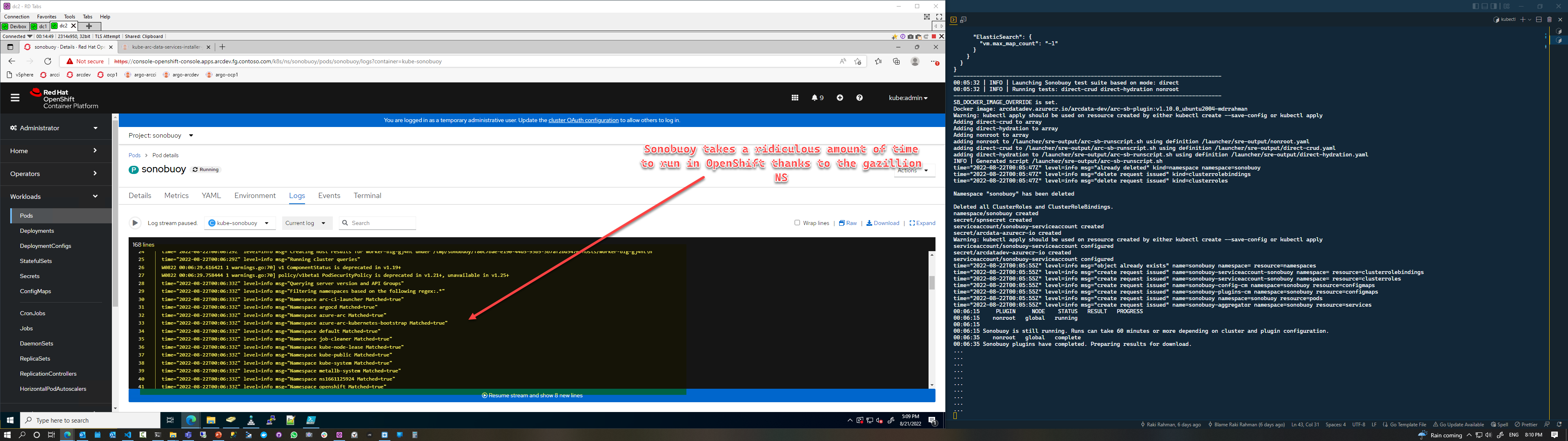
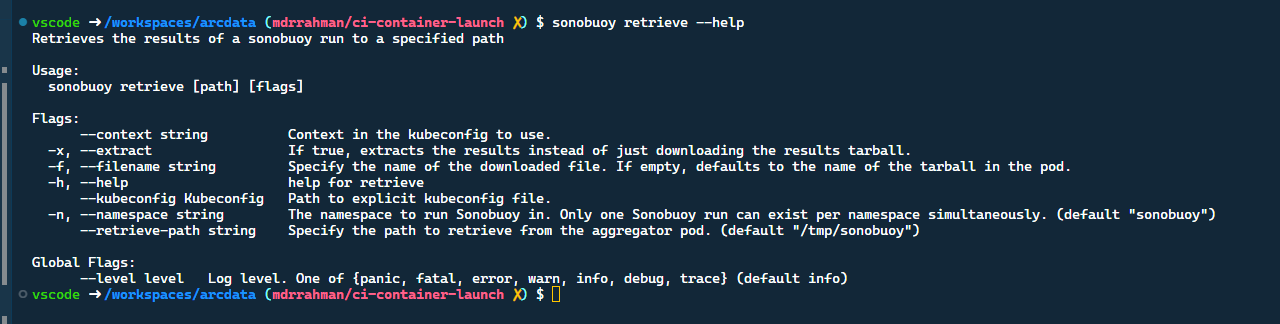
We're using sonobuoy for a custom plugin though - so we could live without all the gazillion Openshift namespace metadata, do you know if there's a flag to have Sonobuoy retrieve skip querying certain namespaces? I couldn't see anything in the cli:

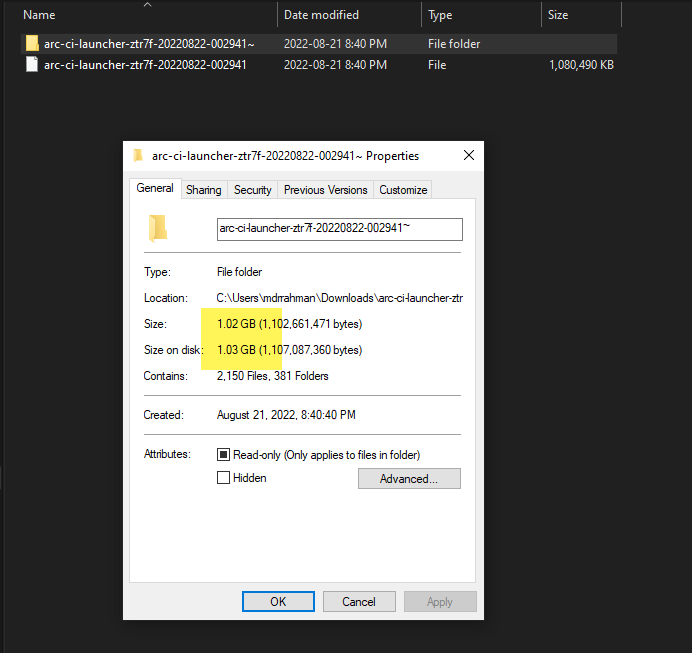
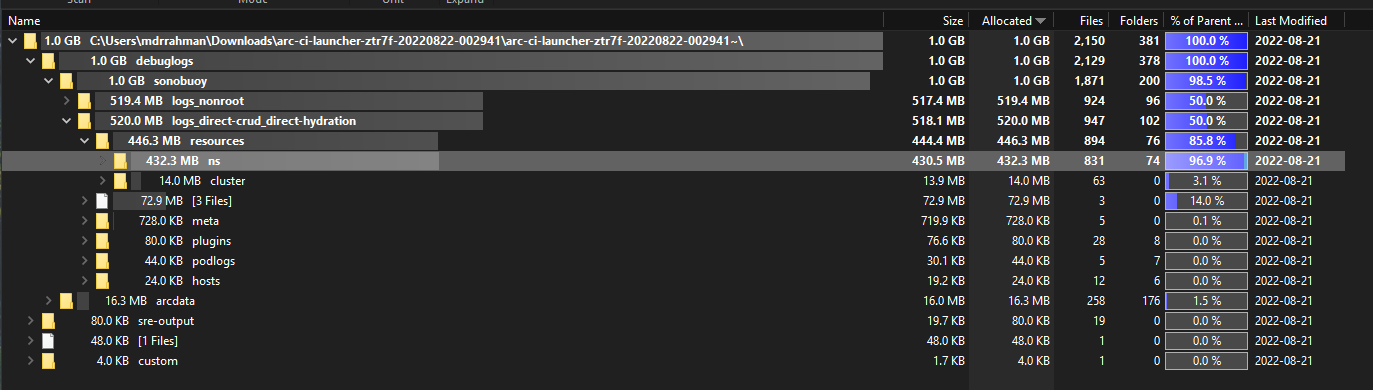
You'll find this funny, the tarball a 15 minute custom plugin test generated is 292 MB:

And after unzipping, it blows up to 1 GB of logs:
I'm not seeing a skip logic in retrieve here but it might be a good feature to add in.
For anyone else who faces this^:
https://github.com/vmware-tanzu/sonobuoy/blob/785b39031166a11107c6f98cbce803a2ba190235/site/content/docs/v0.56.9/sonobuoy-config.md#query-options
You want to set Namespace Filters to resolve the above issue with OpenShift.
Hi,
I'm having a similar problem:
$ results=$(sonobuoy retrieve )
error retrieving results: unexpected EOF
When I try to extract the *.tar.gz file via Windows I always see:
Unexpected data end : 202302200537_sonobuoy_47151a38-37bb-4a96-965d-0bfa9f5f114c.tar
And when I try to extract the *.tar file in it I get the meassage:
Unexpected end of data
Data error : resources\cluster\apiextensions.k8s.io_v1_customresourcedefinitions.json
When I have a look at the given file I can see:
{"apiVersion":"apiextensions.k8s.io/v1",#### REDACTED ####,"values":{"description":"values is an array of string values. If the operator is In or NotIn, the values array must be non-empty. If the operator is Exists or DoesNotExist, the values array must be empty. This array is replaced during a
As you can see at the end there are at least some brackets missing so that the json format is corrupted.
Maybe this can help for root cause analysis.

Hey @pydctw @joyvuu-dave - do you think it's realistic to expect a maintainer to pick this up anytime soon?
If not, would you be willing to accept PRs?
The issue is easy to reproduce. Create a plugin that spits out 15 GB of logs, loop plugin run 100 times, Sonobuoy will throw when it tries to retrieve the logs 1 of those times, because the current retry logic could use improvements.
We use Sonobuoy heavily in our Continuous Integration Pipelines, and have exact telemetry when this bug is reproduced (whenever sonobuoy retrieve is heavily stressed). I believe it can solved with more robust retry logic in this file:
https://github.com/vmware-tanzu/sonobuoy/blob/main/pkg/client/retrieve.go
Basically, the bash retry logic @mtulio has implemented client side in the above reply in this thread, needs to be injected into Golang.
That error frequently happens with me running custom plugins. I am not sure if it's the size of the tarball file or some kind of instability of the internet between where I am running the sonobuoy client to the k8s cluster.
What always works with me is to retry after a while - sometimes it works after two or three times:
    retries=0
    retry_limit=10
    while true; do
        result_file=$(sonobuoy retrieve)
        RC=$?
        if [[ ${RC} -eq 0 ]]; then
            break
        fi
        retries=$(( retries + 1 ))
        if [[ ${retries} -eq ${retry_limit} ]]; then
            log_info "Retries timed out. Check 'sonobuoy retrieve' command."
            exit 1
        fi
        log_info "Error retrieving results. Waiting ${STATUS_INTERVAL_SEC}s to retry...[${retries}/${retry_limit}]"
        sleep "${STATUS_INTERVAL_SEC}"
    done
Client info:
$ sonobuoy version
Sonobuoy Version: v0.56.0
MinimumKubeVersion: 1.17.0
MaximumKubeVersion: 1.99.99
GitSHA: 0665cd322b11bb40c2774776de765c38d8104bed

Kubernetes Version: v1.23.5+9ce5071
Hey @pydctw @joyvuu-dave - do you think it's realistic to expect a maintainer to pick this up anytime soon?
If not, would you be willing to accept PRs?
Hi @mdrakiburrahman, thanks for the input and apologies in slow responses as we are going through changes in maintainers.
To answer your question, yes, we will be happy to accept a PR. cc @franknstyle

@mdrakiburrahman we implemented it on the backend in Golang, if you are not working on open the PR, I can port it to the sonobuoy's retrieve client. Let me know.
@mtulio - that would be amazing mate, it would avoid dupe work on my team's side. We heavily use Sonobuoy here at Microsoft for our Kubernetes CI testing, I'd be happy to start helping maintain the bits that pulls logs, our CI runs generates 10 GB+ tarballs that stresses the current Sonobuoy implementation.
Please open the PR.
Thank you @pydctw for this awesome project.
@mtulio - that would be amazing mate, it would avoid dupe work on my team's side. We heavily use Sonobuoy here at Microsoft for our Kubernetes CI testing, I'd be happy to start helping maintain the bits that pulls logs, our CI runs generates 10 GB+ tarballs that stresses the current Sonobuoy implementation.
Please open the PR.
o/ For sure! I will sync with the team and submit it soon.
For us, max 10 retries with two seconds of interval is working well. I had only one exception in my labs when I was using an very slow internet connection and tried to retrieve results. I believe it's a combination of the size and the connection between the cli and API when streaming the tarball.
@mtulio - just a heads up, I tried basically what's in your PR and in the Bash above. One of our tests generate about 8 GB of logs, and unfortunately it seems like Sonobuoy client is unable to pull the 8GB logs even after retries, my guess is, the connection breaks halfway through the pull, and the retry resets everything (and fails again halfway through):
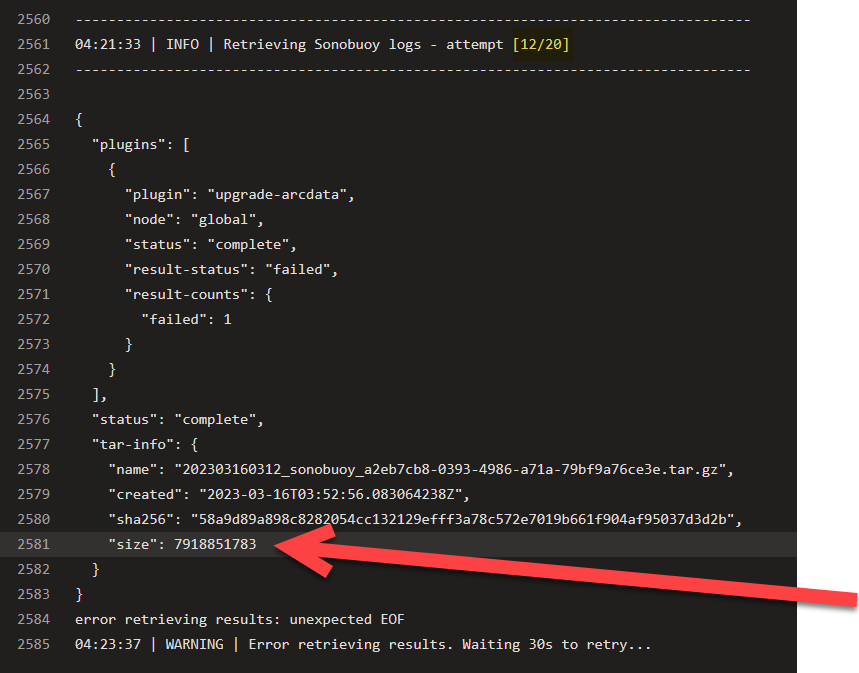
If it's possible to chunk blocks in the Sonobuoy CLI and progress where it last left off, that might be a more robust solution. The only other alternative I can think of, is the aggregator itself is either failing to serve up the Tarball, but since we don't have logs from Aggregator (they'd be inside that tarball), we can't know where things are failing.
(I've reproduced this^ with 8GB of logs across multiple runs in various Kubernetes distros.)
@mdrakiburrahman
the connection breaks halfway through the pull, and the retry resets everything (and fails again halfway through
yes, this is what I perceive when it happens.
If it's possible to chunk blocks in the Sonobuoy CLI and progress where it last left off, that might be a more robust solution
For sure and I think it should be a long-term solution, it was something on my radar some time ago. ATM I didn't dig into how many changes we need to change on the API and CLI to make it happen.
The other workaround, when CLI really doesn't allow me to download, even with retries, was to copy the raw data directly from the pod to my machine. I am curious if you already have tried it with big-size files or if something else was hanging and blocking doing it (it always worked with me too):
${oc_cmd} debug node/${node_name} -- chroot /host /bin/bash -c "cat ${result_file}" 2>/dev/null > ${local_results}.tar.gz
- node_name: node running the sonobuoy server pod
- result_file: result file path (on pod)
- local_results: filename that will be saved locally
@mtulio Ah that's clever, you're directly finding the node that runs the aggregator and pulling it out. The problem is....we run Sonobuoy every night as part of our CI pipelines on 16 Kubernetes Clusters (so we don't interact manually with it). I suppose, if there's a way to:
- Get the name of the result file (from the Sonobuoy Status)
- Figure out which node it sits on, and where in that node's filesystem
- Debug into the node
- Pull it out from the node to client machine
And do all of this in a Continuous Integration pipeline as a failure hook.....this can be done.
Btw, Kubectl has the chunking mechanism built into their binary (built with Go) - the folks at the Kubernetes client repo recently added this in (that means the oc client has it too). So steps 1-4 should totally work with kubectl, the pain will be in performing 2 and 3 automatically.
Similar to kubectl, at Microsoft we have a similar robust file copy binary called azcopy: https://learn.microsoft.com/en-us/azure/storage/common/storage-use-azcopy-v10 - it has the chunking mechanism built in.
My point is, I don't think Sonobuoy is equipped to solve the large file copy problem by itself (it's a test orchestrator, rather than a file handler), but - if we can elegantly piggyback kubectl or something like azcopy into the Sonobuoy native process - that might also solve this problem.
Another option is looking at how the kubectl project solved this large file problem and stealing some of their Go code.
There has not been much activity here. We'll be closing this issue if there are no follow-ups within 15 days.
![stale[bot] avatar](https://avatars.githubusercontent.com/in/1724?v=4 "Published by a pub.dev verified publisher")