
aws-load-balancer-controller
 aws-load-balancer-controller copied to clipboard
 kubernetes-sigs
Ingress Address not updated when cluster has Private Nodes
Describe the bug I have a cluster where nodes do not have internet access (no NAT or anything else). ALB Controller creates a ALB, which I can see in the console, and this URL, taken from AWS console, takes me to application page and it opens and works all ok.
The problem is ingress fails to update with this endpoint. The error is " Failed Deploy Model due to Request error send request failed caused by: "https://wafv2.ap-south-1.amazonaws.com/" dial tcp <IP address> i/o timeout "
I have also attached image of this status on ingress.
Steps to reproduce
- Create private cluster where nodes do not have internet access.
- Deploy ALBC
- Deploy application on this page - https://docs.aws.amazon.com/eks/latest/userguide/alb-ingress.html
kubectl apply -f https://raw.githubusercontent.com/kubernetes-sigs/aws-load-balancer-controller/v2.4.1/docs/examples/2048/2048_full.yaml
Expected outcome Ingress address should be updated and available when describing it.
Environment
- AWS Load Balancer controller version - 2.4.1
- Kubernetes version - 1.22
- Using EKS (yes/no), if so version? Yes, 1.22
Additional Context:
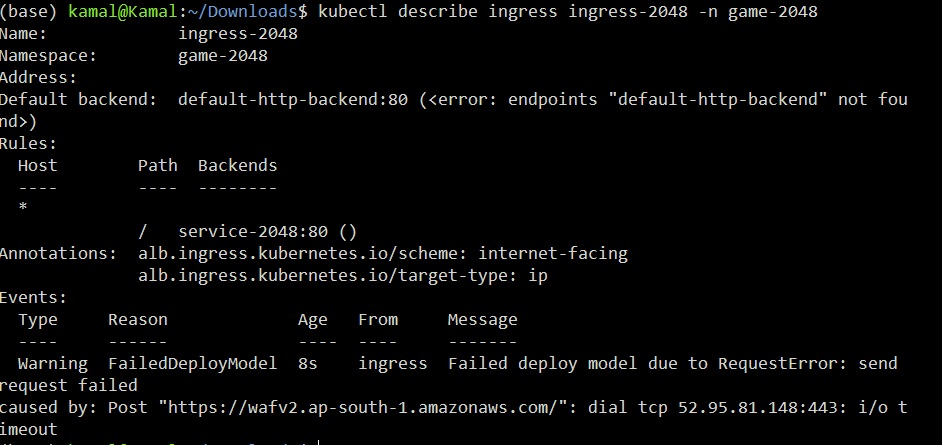

I have tried this for both internet-facing and internal ingress, both result in same error.
I have worked around by adding these 3 settings while deployment.
--set enableShield=false
--set enableWaf=false
--set enableWafv2=false
I think for now , if required, these will need to be enabled manually on load balancers later on.
The Kubernetes project currently lacks enough contributors to adequately respond to all issues and PRs.
This bot triages issues and PRs according to the following rules:
- After 90d of inactivity,
lifecycle/staleis applied - After 30d of inactivity since
lifecycle/stalewas applied,lifecycle/rottenis applied - After 30d of inactivity since
lifecycle/rottenwas applied, the issue is closed
You can:
- Mark this issue or PR as fresh with
/remove-lifecycle stale - Mark this issue or PR as rotten with
/lifecycle rotten - Close this issue or PR with
/close - Offer to help out with Issue Triage
Please send feedback to sig-contributor-experience at kubernetes/community.
/lifecycle stale

The Kubernetes project currently lacks enough active contributors to adequately respond to all issues and PRs.
This bot triages issues and PRs according to the following rules:
- After 90d of inactivity,
lifecycle/staleis applied - After 30d of inactivity since
lifecycle/stalewas applied,lifecycle/rottenis applied - After 30d of inactivity since
lifecycle/rottenwas applied, the issue is closed
You can:
- Mark this issue or PR as fresh with
/remove-lifecycle rotten - Close this issue or PR with
/close - Offer to help out with Issue Triage
Please send feedback to sig-contributor-experience at kubernetes/community.
/lifecycle rotten
@skamalj, I'm closing the issue. If problem persists, feel free to reach out to us.
