
keystone
 keystone copied to clipboard
 keystonejs
Upload value invalid when using context to upload a file
Having an Upload object in a extended custom mutation and trying to pass it to query or graphql.run fails with the following error GraphQLError [Object]: Variable "$data" got invalid value {} at "data.files.create.file.upload"; Upload value invalid..
I have the following custom extended mutation:
const typeDefs: GraphQLSchemaExtension<KeystoneContext>['typeDefs'] = `
  type Mutation {
    uploadFile(file: Upload!): Boolean
  }
`;

const resolvers: GraphQLSchemaExtension<KeystoneContext>['resolvers'] = {
  Mutation: {
    uploadFile: async (_root, { data }, context) => {
      console.log(data);

      await context.sudo().graphql.run({
        query: gql`
          mutation ($data: TeacherCreateInput!) {
            createFile(data: $data) {
              id
            }
          }
        `,
        variables: {
          data: {
               file: { upload: data.file }
            },
          },
        },
      });

      return true;
    },
  },
};
When executing the FE code that calls this I can see in the logs that data.file is a proper Upload object (there is no validation error) but when executing the graphql.run in the server it's when it fails.
Promise {
  {
    filename: 'duck.jpeg',
    mimetype: 'image/jpeg',
    encoding: '7bit',
    createReadStream: [Function: createReadStream]
  }
}

Had the unfortunate pleasure of facing this bug myself.
I was able to determine that when query leaves processRequest from graphql-upload the data format is proper GraphQLUpload object looking something like this:
file: {
  upload: Upload {
    resolve: [Function (anonymous)],
    reject: [Function (anonymous)],
    promise: Promise {
      {
        filename: 'test.odt',
        mimetype: 'application/octet-stream',
        encoding: '7bit',
        createReadStream: [Function: createReadStream]
      }
    },
    file: {
      filename: 'test.odt',
      mimetype: 'application/octet-stream',
      encoding: '7bit',
      createReadStream: [Function: createReadStream]
    }
  }
}
However what is entering my custom mutation is something that seems to be FileUpload object (https://github.com/keystonejs/keystone/blob/main/packages/core/src/types/schema/graphql-ts-schema.ts#L136):
file: {
  upload: Promise {
    {
      filename: 'test.odt',
      mimetype: 'application/octet-stream',
      encoding: '7bit',
      createReadStream: [Function: createReadStream]
    }
  }
}
Now if you try to pass above to graphql-js, then you have some cryptic error caused by "Upload value invalid" from graphql-upload (https://github.com/jaydenseric/graphql-upload/blob/master/GraphQLUpload.mjs) because it is no longer an Upload object:
const GraphQLUpload = new GraphQLScalarType({
  name: "Upload",
  description: "The `Upload` scalar type represents a file upload.",
  parseValue(value) {
    if (value instanceof Upload) return value.promise;
    throw new GraphQLError("Upload value invalid.");
  },
I would love to make PR fixing this, but at the moment I do not understand enough about keystone internals in this area to be able to do so.
For anyone facing this problem: at the moment best advice I can give you is to hack received file object into proper Upload object once again inside your custom query/mutation. Something like below works for me:
import Upload from "graphql-upload/Upload.js";
...
// workaround for https://github.com/keystonejs/keystone/issues/7986
const makeUploadAgain = (file: any) => {
  const upload = new Upload();
  (upload as any).resolve(file.upload);
  return { upload };
};
...
await context.query.Something.createOne({
  data: {
    file: makeUploadAgain(file)
 }
})

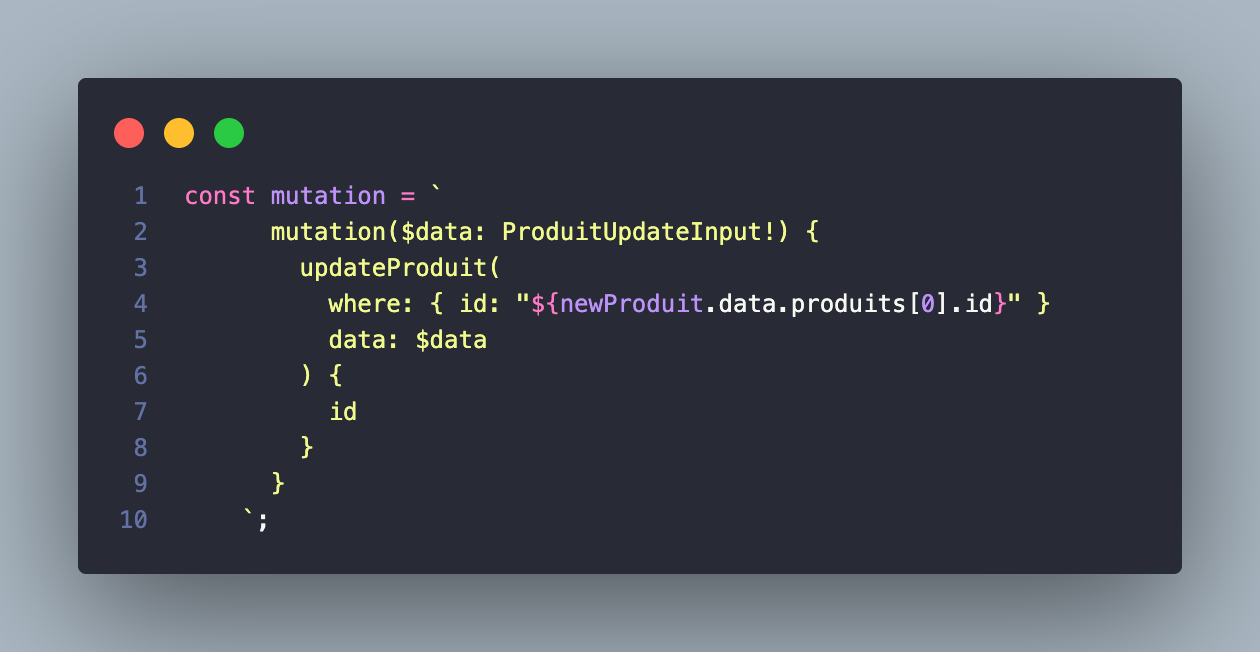
i'm facing the same problem, here is my code :
Mutation
Upload object :

Data variable :

error :
message: 'Variable "$data" got invalid value { promise: {}, file: { filename: "621b507cf46cb800539baf7f-SARL ESSALAM ELECTRONIC.pdf", mimetype: "application/pdf", encoding: "7bit" } } at "data.marque.create.certificat.upload"; Upload value invalid.', locations: [ [Object] ], extensions: { code: 'BAD_USER_INPUT', exception: [Object] } }

