
CAPEv2
 CAPEv2 copied to clipboard
 kevoreilly
Memory access error occurred during analysis in 32-bit OS environment
About accounts on capesandbox.com
- Issues isn't the way to ask for account acctivation. Ping capesandbox in Twitter with your username
This is opensource and you getting free support so be friendly!
- Free support from doomedraven ended, no whiskey no support. For something he updated the documentation :)
Prerequisites
Please answer the following questions for yourself before submitting an issue.
- [*] I am running the latest version
- [*] I checked the documentation and found no answer
- [*] I checked to make sure that this issue has not already been filed
- [*] I'm reporting the issue to the correct repository (for multi-repository projects)
- [*] I'm have read all configs with all optional parts
Expected Behavior
The sample starts and operates normally on 32bitOS
Current Behavior
When the sample is put into the Windows 10 x86 sandbox, memory access error occurs. (analysis.log) Memory access errors occur with any kind of sample is put in (eg txt, exe, doc, xls, etc.). When put same sample into the Windows 10 x64 sandbox, the sample starts and operates normally .
When I put in a text file and debug it, I got a memory access error occurred after "if KERNEL32.ResumeThread (self.h_thread)! = -1:" in the "resume" method of "analyzer/windows/lib/api/process.py"( LineNo: 450). I think that multiple processes or threads are running and it is considered that the execution timing of various processes has an effect. So I put 10 milliseconds sleep before "With Popen ..." of the "run" method of Python's Lib / subprocess.py. As a result, memory access errors no longer occur, but other errors now appear. (WithSleep_analysis.log)
Failure Information (for bugs)
analysis.log
 WithSleep_analysis.log
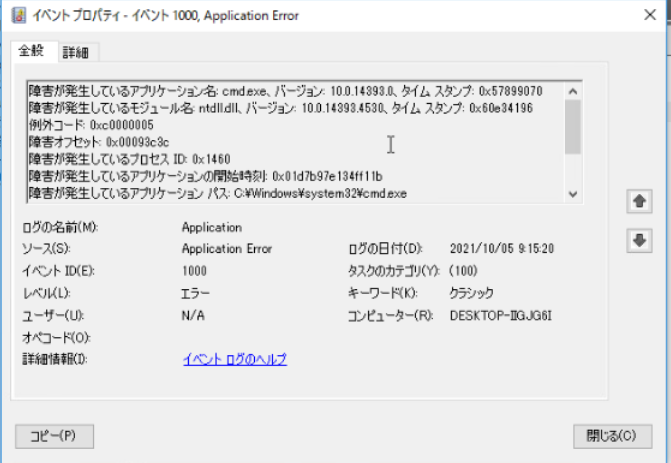
*The OS I'm using is the Japanese version. The items displayed in the event viewer are as follows: 1st line - The name of the failing application 2nd line - The name of the module that is failing 3rd line - Exception code 4th line - Fault offset 5th line - The failing process ID 6th line - Start time of failing application 7th line - The failing application path
Steps to Reproduce
- Install CAPE on Windows 10 x86 by following the steps in "Installation recommendations and scripts for optimal performance" in the README.md
- Stop the following functions:
- Windows defender
- Windows firewall
- UAC
- DEP
- Put a sample
Context
Please provide any relevant information about your setup. This is important in case the issue is not reproducible except for under certain conditions.
| Question | Answer |
|---|---|
| Git commit | sorry, I couldn't confirm. I installed it on 10/7. |
| OS version | Hipervisor: ESXi 6.7U3, Host: Ubuntu 20.04.03 LTS, Guest: Windows 10 x86(Ver.2016 ltsb build:14393), Virtualization software: KVM |
Windows 10 x64 that can be analyzed normally is Ver.pro build: 17763
Failure Logs

I think that multiple processes or threads are running and it is considered that the execution timing of various processes has an effect. So I put 10 milliseconds sleep before "With Popen ..." of the "run" method of Python's Lib / subprocess.py.
I said as above in the my first post. But I found that the monitoring process wasn't working, because I made a mistake in putting the "sleep" method.
When I put the "Sleep" method correctly, the monitoring process was working and memory access error occurred.
No memory access error occurred when the "run without monitoring" option was enabled. Therefore, I checked the issue of capemon, and I thought that my issue was similar to # 11(Windows 10 and PEB module hiding). Does capemon.dll (Commit: 1d669eb) in CAPEv2 / analyzer / windows / dll contain countermeasures for issue # 11 of capemon?
Is there anyone who can analyze with Windows 10 32bit? I would be grateful if you could give me some hints.
Sorry I haven't yet been able to test this - I am building a 32-bit Win10 vm now to try and recreate.
The latest capemon is always the one to use, the one you mention is nearly 3 weeks out of date. It does of course contain all the updates including that for #11 although it sounds like it's not the same issue.
In the meantime, since it sounds like an issue loading, please try supplying the option no-iat=1 to force the loader to use thread injection as loading mechanism rather than IAT patching.
Also, there is a log entry for yara just before things go awry so please also try adding yarascan=0.
In fact try the following options turning off features that might be causing problems:
no-iat=1,yarascan=0,caller-dump=0,injection=0,minhook=1

I just got my win10x86 vm running and can see problems - setting minhook=1 alone was enough to get things running suggesting a hook issue. I will begin hook testing to narrow it down, it might take a while as there are hundreds of hooks but I'll get cracking.
I see. Thank you for your help and investigating. When I built and checked the following environment, this issue occurred on windows 8.1 32bit and windows 10 32bit.
- Windows 7 32bit
- Windows 7 64bit
- Windows 8.1 32bit
- Windows 8.1 64bit
- Windows 10 32bit
- Windows 10 64bit
Hi Amwami - I found that the hook for NtWaitForSingleObject causes issues with Win10x86 so I've disabled it on this platform (and Win8+) - please update to the latest commit https://github.com/kevoreilly/CAPEv2/commit/cfa06a95924b39843d6398b40337bf3d8b90e721 and let me know if this fixes the problem. Thanks.
Thank you for your support. I will inform you of the result as soon as I confirm it. Thank you.
Sorry for the late confirmation. I updated to the latest, but I am still investigating because a system error has occurred in a 32-bit environment.
I would like to meet the relevant software requirements for my investigate, but what version of Python are you using? I am using 3.8.X32 bits.
I doubt Python is the problem. Can you please share the sample so I can test myself more efficiently.
I will send you a part of the sample.
In addition to this sample, this error also occurs in exe file and pdf file and jpeg file and more.
I am investigating with the CAPE dropped on November 16th.
And I am using a photo viewer as an application to open JPEG file.
test.txt
This issue is fixed as far as I know - if issues still persist let me know and we will reopen.