

 keepassxreboot
a site with a port can't auto fill,eg. http://abc.com:8081
Expected Behavior
Current Behavior
Possible Solution
Steps to Reproduce (for bugs)
Debug info
KeePassXC - 2.6.6 KeePassXC-Browser - 1.7.12 Operating system: Win64 Browser: Chrome/Chromium 94.0.4606.81

Make sure you are running the latest version of KeePassXC. This was fixed a long time ago.

Make sure you are running the latest version of KeePassXC. This was fixed a long time ago.
Thank you for your reply I have added the debug info, i'm using the lateast version.
Make sure you are running the latest version of KeePassXC. This was fixed a long time ago.
There are two sites in my database 1.abc.com 2.abc.com:8081 when I open abc.com:8081, the abc.com item will be fill in。 an't match the longest url
2.7.2 is the latest version of KeePassXC. Make sure you haven't denied access to the site with the port numbers to the browser extension.
I'm having the same issue. When navigating to http://10.0.0.7:5000, autofill does not work. The URL in my KeePassXC entry is also http://10.0.0.7:5000/ (same result when the trailing slash is removed.
I made sure to remove any site preferences or custom login field settings in the browser extension so they do not interfere with the autofill process (browser extension settings attached here)
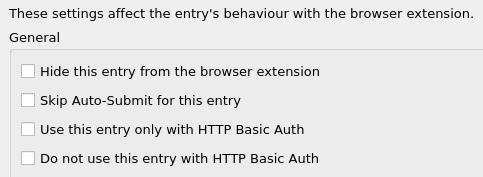
KeePassXC entry, "Browser Integration" tab:
Debug info
KeePassXC Version: 2.7.1 KeePassXC-Browser Version: 1.7.12 Operating system: Ubuntu 20.04 (amd64) Browser: Firefox 100.0.2 (64-bit) from default system repos
