
keepassxc-browser
 keepassxc-browser copied to clipboard
 keepassxreboot
walmart.com password field is not detected or filled-in
Expected Behavior
I have a walmart.com account in keypass-xc. On logging-in, I expect the username and password fields to get filled in.
Current Behavior
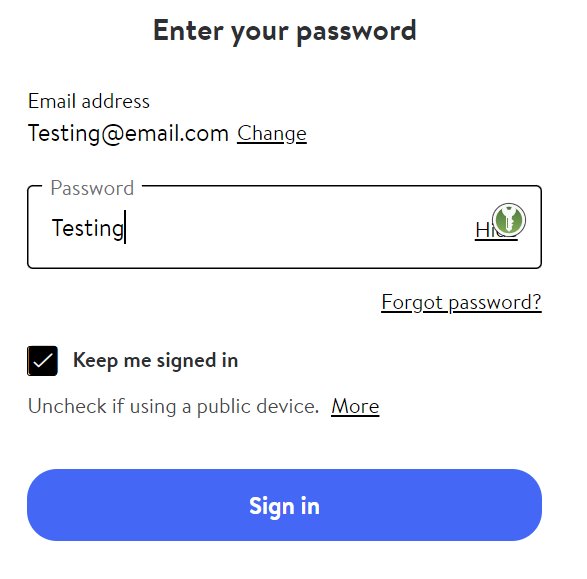
The username field gets detected and filled-in correctly. On the following password page the password field does not get detected or filled in.
Steps to Reproduce (for bugs)
- Create an account on walmart.com and create a keypassxc entry with the username, password and URL set to "walmart.com". Browse to walmart.com.
- There is a drop-down on the main-site for logging into a personal account. Click "Sign in" the site redirects to: https://www.walmart.com/account/login?vid=oaoh&tid=0&returnUrl=%2F Use keypassxc-browser to populate the username field and click the "Sign In" button.
- The browser now shows the password page which only has a password field: https://www.walmart.com/account/signin/withpassword?vid=oaoh&tid=0&returnUrl=%2F
- Notice that the password field is not detected. The keypassxc-browser popup menu (which shows "Settings", "Choose custom login fields" etc.) shows the proper matching keyass-xc entry for walmart.com Trying "Choose custom login fields" does not improve field detection; it "goes through the motions" (using skip for username and TOTP) and a custom entry gets created (shows on the Settings page), but the password field on this page still does not get detected. No icon shows up in the password field. Auto-complete, auto-submit and auto-fill are NOT being used. The context menu item "Fill password only" does nothing.
Debug info
KeePassXC - 2.6.7 KeePassXC-Browser - 1.7.11 Operating system: MacOS Catalina Browser: Brave

You need to add the site as a username-only site. The extension pop up should offer this option when you visit the initial login page.

Yes this site was added with the "Add username-only option for the site", sorry for forgetting to mention that in the original submission. (I've verified this by looking at "Site Preferences" in settings, the Page URL is "https://www.walmart.com/account/*" and "Username-only detection" is checked). As mentioned in main report, this successfully detects the username field. The issue is that the password field on the following page is not detected, nor can be filled in via the context menu, nor can be added as a custom field.
There is a similar issue with "https://secure.bankofamerica.com/": the username and password fields are visible at the same time but the password field is not detected. The site can be added with the "Add username-only option for the site" button to get the username field to populate, but subsequently the password field remains undetected by keypassxc-browser.
The next version and there PR:s will probably help. The last one I made today will allow filling the password field manually even from the context menu when no fields are detected. https://github.com/keepassxreboot/keepassxc-browser/pull/1580 https://github.com/keepassxreboot/keepassxc-browser/pull/1390 https://github.com/keepassxreboot/keepassxc-browser/pull/1547
With Bank of America's site, the page scripts clearly delete the value that is filled. They're probably doing some checking that user actually is inserting the value usinga keyboard. If that check is well made, it's hard to hack it.

Worked for me, but I needed to press "Redetect fields" from the extension popup on the password page.
That's great, thanks!
A bit more on the Bank of America site, I'm seeing different behavior on Chrome vs Brave. keypassxc-browser is detecting both fields on Chrome just fine (i.e. without username-only). I've tried to look for obvious differences in the setup (javascript blocking or some such) but haven't found anything yet.
@droidmonkey I've verified your work-around, indeed "Redetect login fields" does work for walmart.com, thank you, that's very workable!
@droidmonkey Sometimes it detects that field even automatically if you enter usename and submit quickly. Maybe some animation thing distrubs it here.
Update: Full field detection on the Bank of America site works on Chrome only in non-incognito mode. Otherwise Chrome and Brave behave identically.
@asad-at-srt As far as I know Brave has some internal blocking code that cannot be configured in detail. That may be the reason for the behavior.