
keepassxc-browser
 keepassxc-browser copied to clipboard
 keepassxreboot
Clickjacking vulnerability
KeePassXC-Browser is vulnerable to clickjacking because it is possible to hide the icon or parts of the extension.
A user visits the website for which he has a saved password. If the website is vulnerable to XSS (it doesn't have to be a login page) and the attacker has already exploited it, as soon as the user clicks anywhere, his saved password will be stolen.
Current Behavior
In the KeepassXC-Browser the password is filled in by default when you click on the icon.
If a new form is created with opacity:0.2, the icon is still same visible.
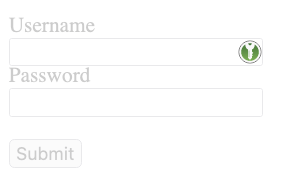 But if the form is in an iframe and the iframe has
 opacity:0.2, the icon is transparent in the frame => possible to make the icon invisible.
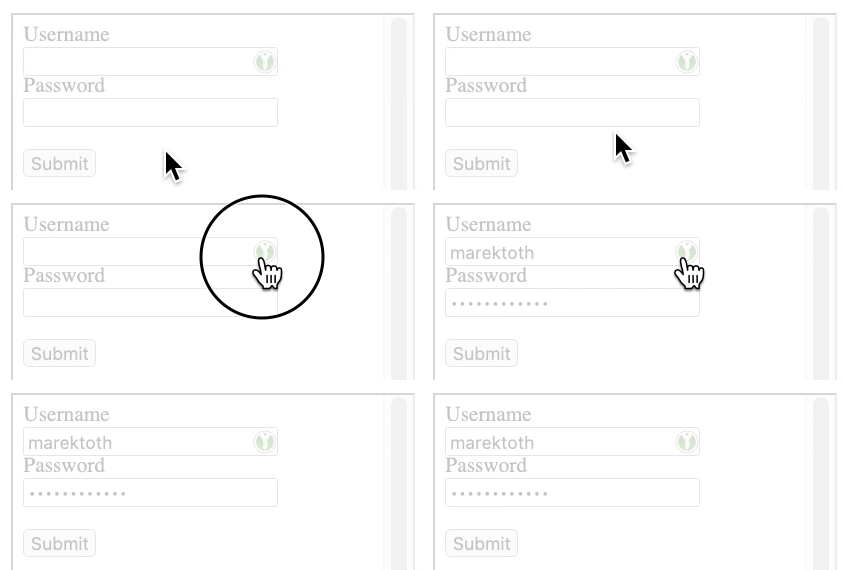 The attack consists of an attacker exploiting an XSS vulnerability, creating a new login form, and then loading the same site in an iframe. The content in the iframe will be shifted to the newly created form so that the user always clicks on the icon.
Examples of invisible iframe attacks:
- An attacker put an invisible iframe where the user probably clicks
- (Demo is available below) Invisible iframe under the mouse cursor - An attacker creates an invisible iframe with the size of KeepassXC-Browser icon. Content in the iframe would be exactly positioned on the icon and the iframe will tracks the position of the cursor. In this case, wherever the user clicks, he always clicks on the icon -> login data will be filled.
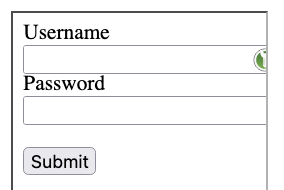
The general problem, in this case, is that the extension is not always "on-top" in the iframe. In addition to the mentioned making the icon invisible, it is possible to cover parts of the extension (the icon) or affect the visible part (change visible size). Below you can see the reduced width of the iframe that affects the visible part of the icon.
 Another way of abuse would be to have a 1x1 px iframe and the content would be targeted exactly to the icon. Because of its size, this pixel iframe would not be visible even if the opacity:1 is set. The iframe would always be positioned under the cursor and the technique would be the same - wherever the user clicks, he always clicks on the icon.
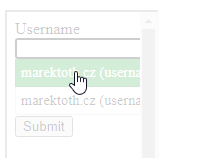
If more logins are stored on the domain, the user is shown a selection menu. In the iframe, this selection menu is also hidden for the user. Abuse of KeepassXC-Browser is possible even if multiple logins are stored.
Expected Behavior
Extension elements should be "on top" and can not be changed, for example transparency or size.
Attack Scenario
- An attacker creates via XSS exactly same login form that is used on the domain
- Then he creates an iframe that will load the same website
- The content in the iframe will be positioned where the icon is located
- The iframe will have opacity:0 - icon is invisible but is clickable
- The new login form has event onchange() and if user click on invisible icon -> form is changed and attacker receive credentials
Steps to Reproduce
Demo (invisible icon):
- Save your password on this site: URL
- Go to URL and click somewhere: URL
- Your credentials will be in alert
Debug info
KeePassXC - 2.6.6 KeePassXC-Browser - 1.7.8.1 Operating system: Windows/Mac Browser: Firefox/Chrome/Chromium

If the iframe loads a different url than the one the credentials are stored in then nothing will be filled in. Presumably the attacker would not be loading the fake form from the same domain as the legitimate site, otherwise they would have already taken control of the site and it's backend.

For example, if someone finds Stored XSS on a website he can use this method. With the XSS vulnerability, he only has client-side access, but using this vulnerability he can easily steal users' passwords. Presumably the attacker would not be loading the fake form from the same domain as the legitimate site. Why not? This method is more convenient for attackers than showing a phishing page and hoping someone will fill it out. Attackers can get the password with just one click.

The test page itself is not very user friendly. This dialog cannot be dismissed. None of the buttons work.

I made a fix where form or input fields inside forms with minimal opacity are ignored. At least that doesn't allow the credential retrieval.
Still, the hijack would be only possible if the hijacker is using an iframe from the same site and domain. The attacker would have a lot more than a few credentials.
Yes, I know, it's just a demo. But you should still see your saved credentials if you click anywhere on the website. Of course, you must first save the password on the test login form.
If only the opacity value is checked, it can still be abused in the way that the iframe is resized to 1x1 px (with opacity:1) and the content in the iframe is again positioned on the icon.
I agree, an attacker can definitely would have a lot more if he finds an XSS vulnerability, but he will never (easily) get the victim's password in plain text.
The attack surface can be reduced a lot if user doesn't allow access to all credentials automatically, and keeps the manual confirmation enabled, even if it's not as convenient.
It's also a good thing to remember that in general browsers don't allow injecting extension content scripts to iframes that are from another domain. I'd really like to see a "real" demo of this kind of hijacking.
Currently, KeePassXC-Browser fills in passwords on click, which is quite enough interaction from the user. Problematically, this can be exploited, because the extension is not "on top" in the iframe. So currently, clickjacking can be abused with KeePassXC-Browser in the default configuration.
This vulnerability is part of the analysis on the password manager that I plan to publish today https://marektoth.com/blog/password-managers-autofill/. It may make more sense in the whole context and not just part. It was focused on autofill, but currently, with KeePassXC-Browser it is possible to get a password in one click (same as chromium-based browser).
"..browsers don't allow injecting extension content scripts to iframes that are from another domain." I know and that's not the case. Let's say an attacker finds Stored XSS on amazon.com. The vulnerability will be in the product review - so the attacker can insert a malicous script for each product. The XSS is a client-side vulnerability, so the attacker can manipulate with the victim's account, but he can't find out the password - he can only change it (if is possible). By exploiting an autofill in password manager or this vulnerability, an attacker can obtain the passwords of users in plaintext for a domain. When news comes out that 100 K users logins in plaintext leaked from Amazon. It doesn't necessarily mean that an attacker got into the database at all, but that he just exploited a misconfiguration in password managers (autofill) or this type of vulnerability.
To summarize, the attacker's goal is not to display an iframe on another domain, but on the domain where he wants to steal user credentials in plaintext. And the victim doesn't have to log in to the website again or fill in a fake dialog, just click somewhere.
Before the interaction, KeePassXC still shows an access confirmation dialog by default if input fields are detected and credentials needs to be retrieved. If there's a page you cannot even see input fields and you got the dialog (or you are already logged in, who's asking them again?), it's obvious to deny the access.
Confirmation dialog is not shown by default. The video https://youtu.be/iNKa8GCIk7o shows the default configuration with the test site.
Ah yes. If you create an entry using the extension, the host is automatically allowed. Maybe we should make that optional. If you just create an entry using KeePassXC, the confirmation dialog will be shown.
Oh, you're right. I only tested KeePassXC-Browser. If someone is using the browser integration, then he is more likely to use adding credentials via the extension than KeePassXC directly.
Ah yes. If you create an entry using the extension, the host is automatically allowed. Maybe we should make that optional. If you just create an entry using KeePassXC, the confirmation dialog will be shown.
Any updates on this? The behavior hasn't changed by the look of things.

Ah yes. If you create an entry using the extension, the host is automatically allowed. Maybe we should make that optional. If you just create an entry using KeePassXC, the confirmation dialog will be shown.
Any updates on this? The behavior hasn't changed by the look of things.
Not yet.