
jsartoolkit5
 jsartoolkit5 copied to clipboard
 kalwalt
Dimensions of the NFT marker in the NFTMarkerInfo to fix marker position
Discussion started in issue #41. List of feature to add:
- [x] printing in the console of width, height, dpi of the loaded NFT marker.
- [x] width, height, dpi as data members in the arController struct inside ARToolKitJS.cpp
- [x] inject width, height, dpi to NFTMarkerInfo to transmit the data through the event mecahnism.
The model is positioned with this formula:
model.position.y = (msg.height / msg.dpi * 2.54 * 10)/2.0;
model.position.x = (msg.width / msg.dpi * 2.54 * 10)/2.0;
This is the result in the log console, you can see the width height and dpi:
THREE.WebGLRenderer 103
artoolkit.min.js:1 onload callback should be defined
artoolkit.min.js:1 onerror callback should be defined
artoolkit.min.js:1 [warning] *** Camera Parameter resized from 640, 480. ***
artoolkit.min.js:1 [info] Allocated videoFrameSize 307200
artoolkit.min.js:1 [info] Reading /markerNFT_0.fset3
artoolkit.min.js:1 [info]   Assigned page no. 0.
artoolkit.min.js:1 [info]   Done.
artoolkit.min.js:1 [info] Reading /markerNFT_0.fset
artoolkit.min.js:1 [info]
artoolkit.min.js:1 ### Surface No.1 ###
artoolkit.min.js:1 [info]   Read ImageSet.
artoolkit.min.js:1 [info] Imageset contains 9 images.
artoolkit.min.js:1 [info]     end.
artoolkit.min.js:1 [info]   Read FeatureSet.
artoolkit.min.js:1 [info]     end.
artoolkit.min.js:1 [info] NFT num. of ImageSet: 9
artoolkit.min.js:1 [info] NFT marker width: 893
artoolkit.min.js:1 [info] NFT marker width: 1117
artoolkit.min.js:1 [info] NFT marker dpi: 120
artoolkit.min.js:1 [info]   Done.
artoolkit.min.js:1 [info] points-636
artoolkit.min.js:1 [info] points-648
artoolkit.min.js:1 [info] points-615
artoolkit.min.js:1 [info] points-607
artoolkit.min.js:1 [info] points-590
artoolkit.min.js:1 [info] points-540
artoolkit.min.js:1 [info] points-508
artoolkit.min.js:1 [info] points-437
artoolkit.min.js:1 [info] points-269
artoolkit.min.js:1 [info] Loading of NFT data complete.
artoolkit.worker.js:37 loadNFTMarker ->  0
Maybe we could do the calculation of the center of the marker inside the C++ code what do you think @nicolocarpignoli ?
I think it has to be done outside it. It is enough what you did. We may add on this PR, before merging it, the use of these new parameters, so remove the y = 100 x = 100 from where we decide statically the position, and calculate it dynamically inside the code.
after that we can merge this :D !

Maybe we can find the center position from the matrix data, i have an idea in mind, will try tomorrow for sure.
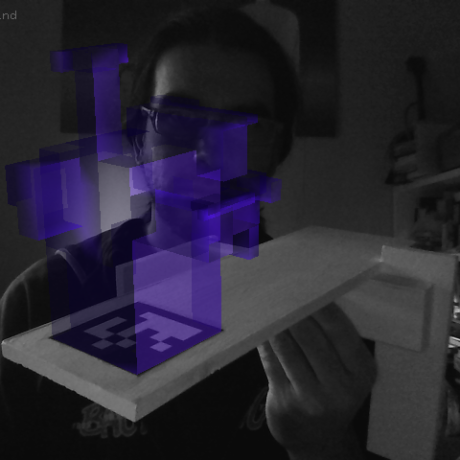
Ok so after some tests, We found out that width/height of marker are not enough: we also need width/height of 3D objects.
With that, we can fix the center the 3D object at the center of the Marker.

Practically talking, we can calculate the blue lines (distances).
If knowing exactly the 3D object position is not doable in a way so that we have certain data, I think it is not a matter on waste other time/effort.
@nicolocarpignoli have you tried doing this? If this not works, i'm thinking for another approach. Maybe we can find the center of the marker from the four corners of the markers. If we have the matrix of the marker we can do this. We have already some code like this see https://github.com/kalwalt/jsartoolkit5/blob/244b2b23286403e78fa24805b34509dc5a88052f/examples/nft_improved_worker/main_worker.js#L152-L189
@kalwalt I have tried to calculate the 3D object dimensions and use them, along with NFT marker width height and dpi.
I have to be honest: the calculation I did does not make too much sense to me, it's solely based on empirics. But it works for Flamingo + Pinball Image. We need other tests before think it is correct. Are you able to do some test with 1-2 different 3D models and 1-2 different images as nft marker?
I got the 3D model sizes like this (don't know if it's correct)
   var dimensions = new THREE.Box3().setFromObject(model);
            objPositions = {
                width: dimensions.max.x - dimensions.min.x,
                height: dimensions.max.y - dimensions.min.y,
            };
@nicolocarpignoli it seems that for the sphere not works in the same way for the flamingo model. I will try to solve this. In the meantime i will upload another example with a different model.
i'm trying also to fix the model rotation modifying the matrix in this way:
// set matrix of 'root' by detected 'world' matrix
console.log(trackedMatrix.interpolated);
var trkMatrix = new THREE.Matrix4().fromArray(trackedMatrix.interpolated);
console.log(trkMatrix);
var _transformMatrix = new THREE.Matrix4();
_transformMatrix.multiply(new THREE.Matrix4().makeRotationY(Math.PI));
_transformMatrix.multiply(new THREE.Matrix4().makeRotationZ(Math.PI));
var tmpMatrix = new THREE.Matrix4().copy(_transformMatrix);
tmpMatrix.multiply(trkMatrix);
console.log(tmpMatrix);
setMatrix(root.matrix, tmpMatrix);
//setMatrix(root.matrix, trackedMatrix.interpolated);
I'm testing with the Duck model but maybe for now is better to test with a simple mesh, not a sphere but maybe a cone or a pyramid.

I added another example threejs_worker_Flamingo_matrixUtils_gltf.html that use another approach, it position the model according to the center of the marker. see the matrixUtils.js file. But it does not works as i supposed. I think we should try another system. If the (0,0) position (origin) of the marker is on the left bottom of the NFT marker we should make a translation matrix to position the origin of the marker in the center of it, on this formula:
center.y = (msg.width / msg.dpi * 2.54 * 10)/2.0;
center.x = (msg.height / msg.dpi * 2.54 * 10)/2.0;
@ThorstenBux i'm trying doing this, to translate the world Matrix, but i can't fill correctly the tmp Matrix:
  var draw = function() {
       render_update();
       var now = Date.now();
       var dt = now - lasttime;
       time += dt;
       lasttime = now;

       if (!world) {
           root.visible = false;
       } else {
           root.visible = true;

           var tmp = new THREE.Matrix4();
           console.log(tmp);
           console.log(world);
           var array = Object.values(world);
           console.log(array);
           tmp.set(array);
           console.log(tmp);
           tmp.makeTranslation(0.1, 0.1, 0);
           console.log(tmp);

           // interpolate matrix
           for (var i = 0; i < 16; i++) {
               trackedMatrix.delta[i] = tmp.elements[i] - trackedMatrix.interpolated[i];
               trackedMatrix.interpolated[i] =
                   trackedMatrix.interpolated[i] +
                   trackedMatrix.delta[i] / interpolationFactor;
           }
           console.log(trackedMatrix.interpolated);

           // set matrix of 'root' by detected 'world' matrix
           setMatrix(root.matrix, trackedMatrix.interpolated);
       }

       renderer.render(scene, camera);
   };
@nicolocarpignoli @ThorstenBux i think that with the last two commits we are on the good road to add this feature. The only problem now is how to correctly add the values to the MatrixWorld of the model. It should be possible to set the position in this manner:
model.matrixWorld.setPosition( pos.x, pos.y, pos.z)
but the model instead to be in the supposed position, stay in the origin of the marker (the bottom left of the pinball image). I think that is something wrong with updating the matrix. I hope to solve soon.
With https://github.com/kalwalt/jsartoolkit5/pull/42/commits/86a19807000d9452ff537f8aa97775629c60d418 the model is correctly positioned! The model position is calculated thanks to the width, height and dpi of the image marker (NFT) with this formula:
model.position.y = (msg.height / msg.dpi * 2.54 * 10)/2.0;
model.position.x = (msg.width / msg.dpi * 2.54 * 10)/2.0;
previously i invereted the width wyh the height and for that reason wasn't working properly. I will abandon the other approach (that i was explaining in a previuos comment) because it was difficult to fill the position values in the World matrix.
i think i will remove some examples, not all are necessary. For instance: matrixUtils.js and his example, i will not include them, but i will create a gist if someone needs it.
with https://github.com/kalwalt/jsartoolkit5/pull/42/commits/8616afee8c77fa8faa56aae8e8cbff0fd54cf201 removed MatrixUtils.js gist available at this link
Tested on iOS,
Portrait works awesome and model is in the centre. Landscape: Model vanishes and I can't find it anymore. (Not sure if that is expected to be like that)

Landscape: Model vanishes and I can't find it anymore. (Not sure if that is expected to be like that
That's very bad. I have not checked so much in landscape mode. I assumed that if it works fine on portrait. should work fine also on landcape mode.
@ThorstenBux the model is wrong placed when you switch from portrait to landscape mode. The model is placed on the origin of the marker ( the left bottom of it). If you reload the page while in landscape mode the model is correctly placed in the center of the marker. I need to solve this, maybe forcing to update the matrix? or does it is caused by another factor?
On my Hawuei, it is repositioning good switching from landscape/portrait and back.
Apart from the strange rotation (that we can change from the application, no problem) I see a weird animation flow. It is not the correct one. But I guess it does not have anything to do with this PR
see video: https://www.dropbox.com/s/wirx7sgre1jne9g/VID_20200330_103505.mp4?dl=0
that's good that with the flamingo model switching from portrait to landscape mode and back the position is correct, maybe there are some differences in the code that make react in a different way.
I see a weird animation flow.
it is possible, i will look into this if it is caused by the actual implementation.
i rotated the model on the X axis because this should be the right position. ( you should see in a viewer) but this is less important...
I was using the alterra example with the robot. When it broke
Get Outlook for iOShttps://aka.ms/o0ukef
From: Walter Perdan [email protected] Sent: Monday, March 30, 2020 9:50:22 PM To: kalwalt/jsartoolkit5 [email protected] Cc: Thorsten Bux [email protected]; Mention [email protected] Subject: Re: [kalwalt/jsartoolkit5] Dimensions of the NFT marker in the NFTMarkerInfo to fix marker position (#42)
that's good that with the flamingo model switching from portrait to landscape mode and back the position is correct, maybe there are some differences in the code that make react in a different way.
I see a weird animation flow.
it is possible, i will look into this if it is caused by the actual implementation.
i rotated the model on the X axis because this should the right position. ( you should see in a viewer) but this is less important...
— You are receiving this because you were mentioned. Reply to this email directly, view it on GitHubhttps://nam11.safelinks.protection.outlook.com/?url=https%3A%2F%2Fgithub.com%2Fkalwalt%2Fjsartoolkit5%2Fpull%2F42%23issuecomment-605868090&data=02%7C01%7C%7Cf6e799d1a50d4680ff5808d7d4876244%7C84df9e7fe9f640afb435aaaaaaaaaaaa%7C1%7C0%7C637211550233780964&sdata=vFphoHLembXp173faqUlvjQbVTFtUWpGjK9BQZqvdWA%3D&reserved=0, or unsubscribehttps://nam11.safelinks.protection.outlook.com/?url=https%3A%2F%2Fgithub.com%2Fnotifications%2Funsubscribe-auth%2FAD765PF2TNHM5AIVH466UULRKBMM5ANCNFSM4KPHRKHA&data=02%7C01%7C%7Cf6e799d1a50d4680ff5808d7d4876244%7C84df9e7fe9f640afb435aaaaaaaaaaaa%7C1%7C0%7C637211550233790959&sdata=j6U20rU56Cyr8Bd9at2KKnQzIXGbLjSS%2BQx4R5W6SDM%3D&reserved=0.
i have this problem, the wrong position of the mesh while switching from portrait to landscape mode, also for other examples. I tried to put the code to adjust the position in the loader:
threeGLTFLoader.load("../Data/models/Flamingo.glb", function (gltf) {
// other code...
// width=2100 height=1576 dpi=150
model.position.y = (2100 / 150 * 2.54 * 10)/2.0;
model.position.x = (1576 / 150 * 2.54 * 10)/2.0;
// other code...
}
but not solve anything...
I will try another approach, I will try to do a translation matrix inside the C++, it should be possible manipulating the trans matrix...
i leave this link as a reminder https://stackoverflow.com/questions/8146082/how-to-disable-toggling-of-landscape-portrait-on-a-mobile-web-app-android-brows/18737262
Maybe we can find a simpler solution, we could force a page to reload with location.reload() see this stackoverflow article, maybe creating an EventListener that triggers a reload when changing the window mode?
i addedd in the flamingo example before the end of the tag this snippet:
// Listen for orientation changes
window.addEventListener("orientationchange", function() {
  location.reload();
  return false;
}, false);
This make to reload the page when the orientation change and consequently the model is placed correctly. I would prefer to find another solution, as reloading is a waste of time.