
mini-graph-card
 mini-graph-card copied to clipboard
 kalkih
Problems with "hours_to_show" = float value (particularly < 1.0)
I would like to be able to show 5 min cpu load graphs. But this means the hours_to_show option should be of type real number (0.083333) instead of integer. Could this be made possible perhaps? Love this very nice card btw :)

I actually think this should already possible, If I remember correctly I removed the integer check a while back, but there were some issues with the tooltip timestamps back then when hours_to_show < 1, but I think that should be fixed now as well.
A config like this should give you a data point for each minute.
hours_to_show: 0.083333
points_per_hour: 60
Give it a shot and if it works we could probably update the docs.

We could do something as follows:
- instead of
hours_to_showhave a settingtimeframe_to_show - user should be able to specify unit after the number e.g.
1h,5m,7d - the default option would stay as hours (when there is no unit)
- we could make this setting backward compatible - so take hours_to_show if it is present (but remove it from documentation)
The above should be fairly simple, right? I'd like to have such option for "point_per_hour", though it can be harder to implement.
@kalkih I can work on it next weekend as long you like the idea

Sure, that would be great and improve usability.
As you said points_per_hour, is tougher, not sure how we would go about changing it, will have to think about that one. 🤔
Something like points_per_unit maybe, but you would want to be able to specify a different unit than the one in timeframe, so maybe format like this: 6/h, 10/m, 1/d etc... ?
@kalkih hours_to_show: 0.083333 is working! But the graph is plotted from left to right somehow (current time is on the left):
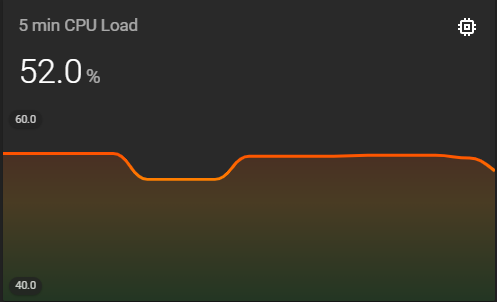
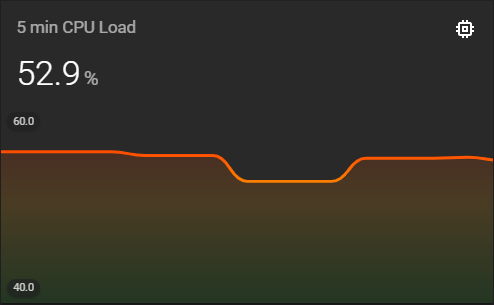
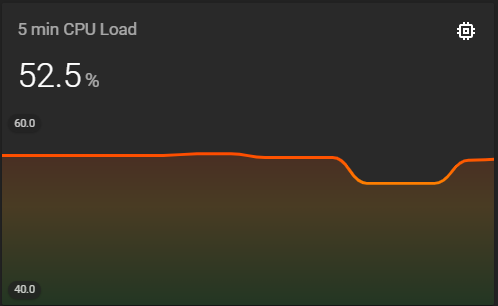
Also the time is written backwards (and without seconds):

Thanks so far, I can live with the small issues!
@kalkih yes I was thinking about something like this as you suggested 10/h etc
@QkulleQ I think graph is plotted correctly it is just the time which is shown not correct. Possible that I have introduced this bug recently as I remember I was adjusting this time by reducing the val by one min. Can take a look on the end of the week.
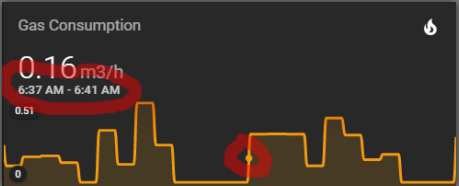
@maxwroc there's definetely something wrong with the timestamps. For an individual point the displayed time is changing every minute, like below snapshots. After a minute the same point is displayed with a different timestamp:

@QkulleQ I think graph is plotted correctly
Are you sure? The first graph of that post is the oldest snapshot. Snapshots 2 and 3 were taken after the first one. The newer points on those snapshots are added on the left side. Shouldn't that be on the right side?
I think this behavior is only happening with values below 1 for the hours_to_show option. For example the Gas Consumption graph has a 24 hour value. Here is the same graph somewhat later, new points are added to the right:
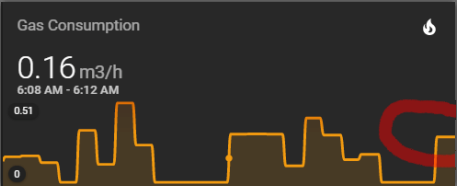
(BTW. notice the timestamp of the point has changed again)
Yeah, there's definitely something funky going on when going below 1 hours_to_show.
The timestamps and the graph is calculated separately and both seem wrong so probably more than one bug.
Another issue is that the graph only update/re-render when the entity state change, and in smaller timeframes like this it's def an issue, unless the sensor entity updates very frequently. We have the update_interval option that could solve it, but that requires the user to actually set it.
The timestamps does however update on every card re-render.
This issue has been automatically marked as stale because it has not had recent activity. It will be closed if no further activity occurs. Thank you for your contributions. If this is still an active issue, please let us know!
![stale[bot] avatar](https://avatars.githubusercontent.com/in/1724?v=4 "Published by a pub.dev verified publisher")
The issue is stalled.
There is no any reaction from the topic starter.
I cannot confirm the issue:

type: custom:mini-graph-card
entities:
  - entity: sensor.cleargrass_1_pm25
    color: green
    show_state: true
    show_points: true
hours_to_show: 0.25
points_per_hour: 120
aggregate_func: last
update_interval: 0
show:
  state: true
  points: true
  extrema: true
  name: false
  icon: false
line_width: 1
hour24: true
lower_bound: ~0
smoothing: false

 The code is provided above.
This issue has been automatically marked as stale because it has not had recent activity. It will be closed if no further activity occurs. Thank you for your contributions. If this is still an active issue, please let us know!
I think, the changing timestamp could just be because the binning is not fixed (e.g. start of minute until end of minute). This is only the case, when using group_by. If group_by is not used, the data points are calculated for bins, which constantly change, i.e. bins of equal size (1/n_points_per_hour) from now...
I suspect that the reversed order in which the times are shown is just a display/rounding issue. Maybe... But I haven't investigated.

Interesting that now I managed to reproduce the glitch with hours_to_show > 1 and "integer":
type: custom:mini-graph-card
entities:
  - entity: sensor.xiaomi_cg_1_pm25
    color: green
    show_state: true
    show_points: true
hours_to_show: 3
points_per_hour: 120
aggregate_func: last
update_interval: 0
show:
  state: true
  points: true
  extrema: true
  name: false
  icon: false
line_width: 3
hour24: true
lower_bound: ~0
smoothing: false
although earlier it was reported with values < 1...
You're also asking a lot: 120 points per hour is less than a minute, which seems to be the resolution of the interval display. 😆 Still... Or should just show the same time twice. 🤔
Just to have the info here: this is where the magic happens: https://github.com/kalkih/mini-graph-card/blob/af01df1e2a68cbdd367cf8e27ada26ea8f41d83b/src/main.js#L528
And there's some condition on points per hour and hours to show. So, this might have it's flaws. But I cannot look into this deeply right now...
120 points per hour is less than a minute, which seems to be the resolution of the interval display.
The sensor is updated every 30 sec.
Or should just show the same time twice.
This, I think.
:tada: This issue has been resolved in version 0.12.1 :tada:
The release is available on GitHub release
Your semantic-release bot :package::rocket:
![github-actions[bot] avatar](https://avatars.githubusercontent.com/in/15368?v=4 "Published by a pub.dev verified publisher")