
HoRNDIS
 HoRNDIS copied to clipboard
 jwise
jwise
unable to install on macOS Catalina
HoRNDIS is incompatible with Catalina due to the new read-only system partition. installation via the .pkg or brew will fail.
see the What's New in APFS session from WWDC19: https://developer.apple.com/videos/play/wwdc2019/710/
there may be a workaround by disabling SIP using csrutil in Recovery Mode, but I haven't had a chance to try it yet.
the "right" way to fix HoRNDIS long term is likely to migrate it to using the new DriverKit framework, documented at https://developer.apple.com/documentation/driverkit

My OS version is 10.15 beat3 it work,it's able work on Catalina. try second times or restart your machine.And if installed contected phone it always not work or can't find your network You just need to copy /Library/Preferences/SystemConfiguration/NetworkInterfaces.plist and /Library/Preferences/SystemConfiguration/preferences.plis delete these file. But if you try this,you may not connect the network anymore.and you just backup these two file,you will find it work.It's amazing. You have to remember to backup before you delete system file.

Is the installer still trying to put files in /System? It should not be doing that.
I don't believe network driver kexts are blocked just yet, but it would not surprise me if that becomes the case in 10.16. NetworkingDriverKit will be the way to go.

In 10.16 basically anything not in /Users or /Applications is write protected. The installer is attempting to write to protected locations. Using an old .kext won't work without disabling SIP, which should not be required for users.
DriverKit should be adopted before Catalina is released if this project wants to support it. If I find time to do it myself, I will, but until then if anyone has a chance to do it, it's the "right way".
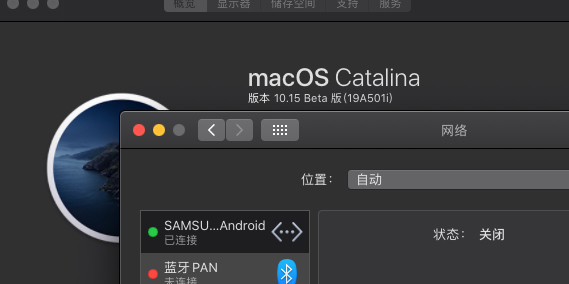
I now have HoRNDIS installed and working on the release 10.15 Catalina.
The process:
- Shutdown
- Hold command+R and press power
- Launch terminal
- csrutil disable
- Reboot
- Launch terminal
- mount -uw /
- Run the HoRNDIS 9.2 installer
- Shutdown
- Hold command+R and press power
- Launch terminal
- csrutil enable
- Reboot
Ultimately, DriverKit is the way too go.
But for now I hope that this helps others

Can one of you provide a copy of the Installer log from a failed installation, with all logs enabled, not only errors? (Keep SIP enabled and everything else on defaults.)
I'm not on Catalina yet so I can't test.
installer[28945]: Product archive /usr/local/Caskroom/horndis/9.2/HoRNDIS-9.2.pkg trustLevel=350
installer[28945]: -[IFDInstallController(Private) _buildInstallPlanReturningError:]: location = file://localhost
installer[28945]: -[IFDInstallController(Private) _buildInstallPlanReturningError:]: file://localhost/usr/local/Caskroom/horndis/9.2/HoRNDIS-9.2.pkg#HoRNDIS-kext.pkg
installer[28945]: Set authorization level to root for session
installer[28945]: Administrator authorization granted.
installer[28945]: Will use PK session
installer[28945]: Using authorization level of root for IFPKInstallElement
installer[28945]: Starting installation:
installer[28945]: Configuring volume "Macintosh HD"
installer[28945]: Preparing disk for local booted install.
installer[28945]: Free space on "Macintosh HD": 453.09 GB (453093011456 bytes).
installer[28945]: Create temporary directory "/var/folders/zz/zyxvpxvq6csfxvn_n0000000000000/T//Install.289452ieUJ2"
installer[28945]: IFPKInstallElement (1 packages)
installd[507]: PackageKit: Adding client PKInstallDaemonClient pid=28945, uid=0 (/usr/sbin/installer)
installer[28945]: PackageKit: Enqueuing install with framework-specified quality of service (utility)
installd[507]: PackageKit: ----- Begin install -----
installd[507]: PackageKit: request=PKInstallRequest <1 packages, destination=/>
installd[507]: PackageKit: packages=(
	    "PKLeopardPackage <id=com.joshuawise.kexts.HoRNDIS, version=0, url=file://localhost/usr/local/Caskroom/horndis/9.2/HoRNDIS-9.2.pkg#HoRNDIS-kext.pkg>"
	)
installd[507]: PackageKit: Set reponsibility for install to 18666
installd[507]: PackageKit: Extracting file://localhost/usr/local/Caskroom/horndis/9.2/HoRNDIS-9.2.pkg#HoRNDIS-kext.pkg (destination=/Library/InstallerSandboxes/.PKInstallSandboxManager/603D0B6A-6DB4-4042-B0B8-020C5A71589D.activeSandbox/Root, uid=0)
installd[507]: PackageKit: prevent user idle system sleep
installd[507]: PackageKit: suspending backupd
installd[507]: PackageKit: Using trashcan path /var/folders/zz/zyxvpxvq6csfxvn_n0000000000000/T/PKInstallSandboxTrash/603D0B6A-6DB4-4042-B0B8-020C5A71589D.sandboxTrash for sandbox /Library/InstallerSandboxes/.PKInstallSandboxManager/603D0B6A-6DB4-4042-B0B8-020C5A71589D.activeSandbox
install_monitor[28946]: Temporarily excluding: /Applications, /Library, /System, /bin, /private, /sbin, /usr
installd[507]: PackageKit: Shoving /Library/InstallerSandboxes/.PKInstallSandboxManager/603D0B6A-6DB4-4042-B0B8-020C5A71589D.activeSandbox/Root (1 items) to /
installd[507]: PackageKit: Executing script "./postinstall" in /private/tmp/PKInstallSandbox.tN75vt/Scripts/com.joshuawise.kexts.HoRNDIS.qKEa0q
installd[507]: ./postinstall: touch: /System/Library/Extensions: Read-only file system
install_monitor[28946]: Re-included: /Applications, /Library, /System, /bin, /private, /sbin, /usr
installd[507]: PackageKit: releasing backupd
installd[507]: PackageKit: allow user idle system sleep
installd[507]: PackageKit: Cleared responsibility for install from 28945.
installd[507]: PackageKit: Install Failed: Error Domain=PKInstallErrorDomain Code=112 "An error occurred while running the script for the package "HoRNDIS-9.2.pkg"." UserInfo={NSFilePath=./postinstall, NSURL=file://localhost/usr/local/Caskroom/horndis/9.2/HoRNDIS-9.2.pkg#HoRNDIS-kext.pkg, PKInstallPackageIdentifier=com.joshuawise.kexts.HoRNDIS, NSLocalizedDescription=An error occurred while running the script for the package "HoRNDIS-9.2.pkg".} {
	    NSFilePath = "./postinstall";
	    NSLocalizedDescription = "\U8fd0\U884c\U8f6f\U4ef6\U5305\U201cHoRNDIS-9.2.pkg\U201d\U7684\U811a\U672c\U65f6\U51fa\U9519\U3002";
	    NSURL = "file://localhost/usr/local/Caskroom/horndis/9.2/HoRNDIS-9.2.pkg#HoRNDIS-kext.pkg";
	    PKInstallPackageIdentifier = "com.joshuawise.kexts.HoRNDIS";
	}
installd[507]: PackageKit: Running idle tasks
installer[28945]: install:didFailWithError:Error Domain=PKInstallErrorDomain Code=112 "An error occurred while running the script for the package "HoRNDIS-9.2.pkg"." UserInfo={NSFilePath=./postinstall, NSURL=file://localhost/usr/local/Caskroom/horndis/9.2/HoRNDIS-9.2.pkg#HoRNDIS-kext.pkg, PKInstallPackageIdentifier=com.joshuawise.kexts.HoRNDIS, NSLocalizedDescription=An error occurred while running the script for the package "HoRNDIS-9.2.pkg".}
installd[507]: PackageKit: Removing client PKInstallDaemonClient pid=28945, uid=0 (/usr/sbin/installer)
installd[507]: PackageKit: Done with sandbox removals
installer[28945]: Install failed: The installer encountered an error that caused the installation to fail. Please contact the software manufacturer for assistance.

The post-install script needs to be changed.
sudo touch /System/Library/Extensions was deprecated a while ago for rebuilding the kextcache. The currently supported method is sudo kextcache -system-prelinked-kernel.
Since that command is trying to write to /System, it is failing and causing the Installer to throw an error — even though the kext is already installed in /Library/Extensions.
@jwise @mikhailai can you take a look? The kext and package will also need notarization. I can do some testing once I have a Catalina install set up.
Here's a version packaging the exact same binary-identical .kext together with a modified install script. This does mean the .pkg is unsigned (so you'd have to trust me and bypass Gatekeeper with the right-click-and-open method). I'll try to get a PR to the project in place soon. HoRNDIS-9.2-catalina_install.pkg.zip


Here's a version packaging the exact same binary-identical .kext together with a modified install script. This does mean the .pkg is unsigned (so you'd have to trust me and bypass Gatekeeper with the right-click-and-open method). I'll try to get a PR to the project in place soon. HoRNDIS-9.2-catalina_install.pkg.zip
Wonderful! It works. Thank you. Great job.


@d235j any updates on a PR? Catalina has a regression related to BeagleBone's USB configuration, which includes a composite adapter including Mass Storage Class, CDC-ACM (serial), RNDIS and CDC-ECM (networking, previously supported by OS X). It appears to get the CDC-ECM working, we have to disable the RNDIS support (or perhaps enumerate it after RNDIS?). Therefore, we are considering just removing CDC-ECM, which otherwise breaks the latest Windows 10 if included in the composite adapter before RNDIS. Proprietary OS vendors. :-(

@d235j I tried your binary and it worked well! Thanks so much for your job! But there is a small issue. Every time I reconnect my phone to mac, it creates a new interface in Preference -> Network. And the interface number increases. For example, it creates Ethernet Adapter (en6), after plugging out and in, it creates Ethernet Adapter (en7), and en6 is still there. Now it is alreay en15 on my laptop and I don't know how to delete old ones. Deleting in the Network panel doesn't work.

Catalina 10.15.2 straight up forbids the whole installation even when you bypass Gatekeeper because of "incompatibility".



not working in 10.15.2 update
It's working on my 10.15.2. Did had to accept something on a privacy and safety popup

not working in 10.15.2 update
It's working on my 10.15.2. Did had to accept something on a privacy and safety popup
Really?! I try again.
not working in 10.15.2 update
It's working on my 10.15.2. Did had to accept something on a privacy and safety popup
Really?! I try again.
No problem on 10.15.1 updated 10.15.2. New Mac with 10.15.2 no working. Error “ Contact software developer “.
I go to system preferences -> security & privacy. I see - System software from developer "Joshua Wise" was blocked from loading. unblock it by pressing "Allow" it's working under 10.15.2

Here's a version packaging the exact same binary-identical .kext together with a modified install script. This does mean the .pkg is unsigned (so you'd have to trust me and bypass Gatekeeper with the right-click-and-open method). I'll try to get a PR to the project in place soon. HoRNDIS-9.2-catalina_install.pkg.zip
Thank you so much, you just saved my life !

Here's a version packaging the exact same binary-identical .kext together with a modified install script. This does mean the .pkg is unsigned (so you'd have to trust me and bypass Gatekeeper with the right-click-and-open method). I'll try to get a PR to the project in place soon. HoRNDIS-9.2-catalina_install.pkg.zip
Works perfectly for me and the DJI application on Catalina. Thank you very much !

@d235j I tried your binary and it worked well! Thanks so much for your job! But there is a small issue. Every time I reconnect my phone to mac, it creates a new interface in Preference -> Network. And the interface number increases. For example, it creates Ethernet Adapter (en6), after plugging out and in, it creates Ethernet Adapter (en7), and en6 is still there. Now it is alreay en15 on my laptop and I don't know how to delete old ones. Deleting in the Network panel doesn't work.
Happens to me too.

Here's a version packaging the exact same binary-identical .kext together with a modified install script. This does mean the .pkg is unsigned (so you'd have to trust me and bypass Gatekeeper with the right-click-and-open method). I'll try to get a PR to the project in place soon. HoRNDIS-9.2-catalina_install.pkg.zip
MVP TRIGGERED

Here's a version packaging the exact same binary-identical .kext together with a modified install script. This does mean the .pkg is unsigned (so you'd have to trust me and bypass Gatekeeper with the right-click-and-open method). I'll try to get a PR to the project in place soon. HoRNDIS-9.2-catalina_install.pkg.zip
Hi @d235j, I am using your version, and it works. However, each time I disconnect and connect my device for USB tethering, it created a new network interface (en2-en8 shown in screenshot below), which is quite annoying. I realised that it doesn't recognised my phone model (Xiaomi Pocophone F1). Can you help me solve this issue, thanks in advance!


Thanks @d235j, your version does get correctly installed on Catalina.
@liho98 I'm experiencing the same issue: this is due to Android generating a new MAC address every time the USB tethering is enabled. It's called MAC Randomization and is considered an official security feature

Thanks @d235j, your version does get correctly installed on Catalina.
@liho98 I'm experiencing the same issue: this is due to Android generating a new MAC address every time the USB tethering is enabled. It's called MAC Randomization and is considered an official security feature
Great information, hopefully there will be a solution. . . But it looks difficult ... Btw thanks.
