just-the-docs
 just-the-docs copied to clipboard
 just-the-docs
Table of Contents always appears below content
Describe the bug
Documentation states that the Table of Contents should appear within the content where you use {:toc}, however this isn't happening. No ToC appears there, instead it always appears at the bottom of the content.
This actually makes sense, because looking at the default.html file, that's exactly where the ToC is placed (immediately following the content). But it doesn't use {:toc}. In fact, it looks like {:toc} doesn't do anything at all.
To Reproduce Steps to reproduce the behavior:
- Install
just-the-docs - Create a page with child pages
- See error
Expected behavior
Table of Contents should appear within the content where you use {:toc}, however this isn't happening. No ToC appears there, instead it always appears at the bottom of the content.
Screenshots
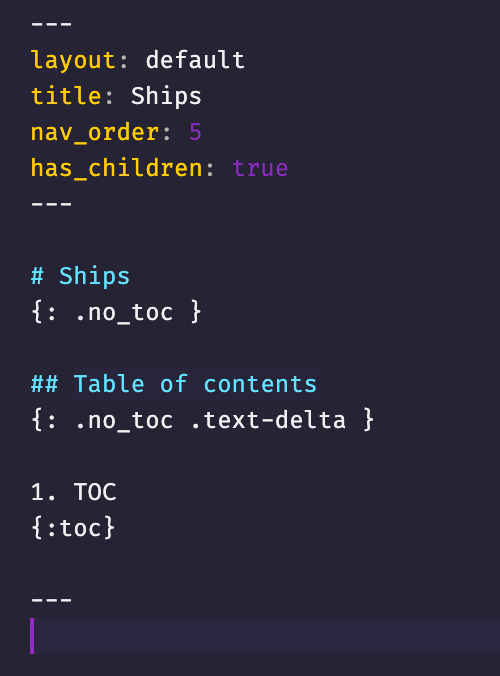 -
-

Desktop:
- OS: macOS
- Browser: Firefox
- Version: 80
Additional context I have tried this using these pages on my existing install with just-the-docs and a completely fresh one with just this page. Same problem.

I've realised that this appears to actually be caused by me using intermediary pages in a way other than intended.
The way the theme works, intermediary pages appear not to be intended to also hold actual content of their own. So if a page has child pages, the template "TOC" is used which technically appears after the content. If there is also content on this page, with headings, there will be a TOC at the top of the content and a "TOC" at the bottom.
I've adapted how I'm using it to account for this. But it would be nice if it supported having content on intermediary pages too :)
Going to close this for now due to inactivity. That being said, happy to consider a feature request in a new issue, etc. or if there are other thoughts!