
qView
 qView copied to clipboard
 jurplel
Color profile problems? Image too saturated in qView
Hi, I noticed my images are always more saturated in qView, when compared to Adobe Photoshop, Preview and Xee, to name a few. The latter three all show the image the same way, only qView is the exception.
Xee on the left, qView on the right:

Here's the color test image:


Yes, color profiles seems ignored on qView.
Two tests that must looks the same on any screen (sRGB or not):
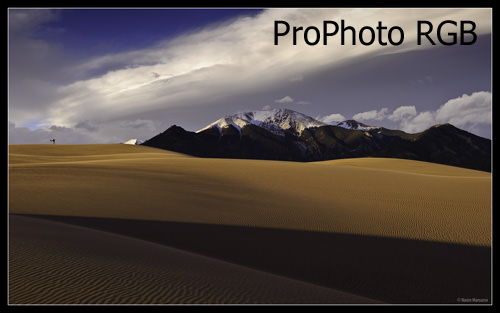
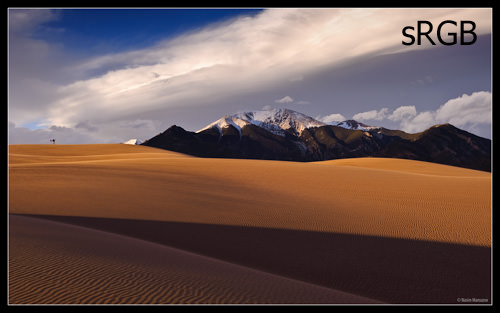

Qt does not support system color profiles. It assumes sRGB under all conditions (The colors will match if your display is set to an sRGB color profile).
relevant qt bug (from 2009!): https://bugreports.qt.io/browse/QTBUG-6582?focusedCommentId=368320&page=com.atlassian.jira.plugin.system.issuetabpanels%3Acomment-tabpanel
Other Qt projects have adopted Little CMS to support color profiles. I try to avoid dependencies as much as possible for performance reasons, but this might be an exception in the future due to just how critical it is to user experience.

My 2 cents: I would love to use qView to look at my (Adobe RGB) exported photos. Would not want to go back to Xee now ;)
Take a look into QColorSpace which was introduced with Qt 5.14 https://doc.qt.io/qt-5/qcolorspace.html
QColorSpace provides access to creating several predefined color spaces and can generate QColorTransforms for converting colors from one color space to another. QColorSpace can also represent color spaces defined by ICC profiles or embedded in images, that do not otherwise fit the predefined color spaces.
| Constant | Value | Description |
|---|---|---|
| QColorSpace::SRgb | 1 | The sRGB color space, which Qt operates in by default. It is a close approximation of how most classic monitors operate, and a mode most software and hardware support. ICC registration of sRGB. |
| QColorSpace::SRgbLinear | 2 | The sRGB color space with linear gamma. Useful for gamma-corrected blending. |
| QColorSpace::AdobeRgb | 3 | The Adobe RGB color space is a classic wide-gamut color space, using a gamma of 2.2. ICC registration of Adobe RGB (1998) |
| QColorSpace::DisplayP3 | 4 | A color-space using the primaries of DCI-P3, but with the whitepoint and transfer function of sRGB. Common in modern wide-gamut screens. ICC registration of DCI-P3 |
| QColorSpace::ProPhotoRgb | 5 | The Pro Photo RGB color space, also known as ROMM RGB is a very wide gamut color space. ICC registration of ROMM RGB |

Does that mean qView will be able to display CMYK images correctly too? Currently they are really off, which is understandable if it's trying to force them into sRGB.


I have not looked into it yet. I have been busy with school but I am going to try to sift through some issues over winter break.
I was a Xee3 user but it is generally broken on modern macOS and Apple SoCs. Found qView but noticed this issue immediately and was pretty baffled since the bulk of Apple devices since 2015 have used the Display P3 gamut, but realized since it's Qt that it doesn't benefit from ColorSync and would require integrating littleCMS which can be non-trivial especially when you get into things like moving the window between displays with different device profiles.
Ended up building a photo viewer with AppKit for myself that basically behaves the way Xee3 did. Wanted to wish you folks the best with adopting color management in your app though. Seems like a great app in all other respects.

@nexusCFX Is your viewer open source? I would love to try it out!
Due to my employment and the nature of what the app is, I don't believe I can release it as an open source project at this time, there would be some troublesome approvals and evaluations needed which I don't care to do for such a small project. That is also why I cannot offer assistance in doing the littleCMS integration for qView despite my interest in doing so.
@nexusCFX Is your viewer open source? I would love to try it out!
Due to my employment and the nature of what the app is, I don't believe I can release it as an open source project at this time, there would be some troublesome approvals and evaluations needed which I don't care to do for such a small project. That is also why I cannot offer assistance in doing the littleCMS integration for qView despite my interest in doing so.
I am considering trying out imagemagick for image loading--it would simplify deployment significantly, probably have better performance, and support many more formats. Do you know if it would solve the color profile problem?

@jurplel
If you don't want new dependency (like lcms2), use just this Qt function prior displaying a picture:
void QImage::convertToColorSpace(const QColorSpace &colorSpace)
Qt doesn't support all ICC profiles but it works for majority of common cases.
In any case, you need to implent getting monitor's ICC profile on every platform and/or let the user to select, whether to render images as sRGB or P3 (in case detection of the monitor's profile failed).
There could be also option not to use color conversion for quick performance.
Yes, it is exactly for that purpose.
It will work for all Qt-supported color profiles, where QImage::colorSpace().isValid() == true
Some old, third party Qt plug-ins do not load color profile, because QColorSpace is available since Qt 5.14
I am sending you another test images:
https://webkit.org/blog-files/color-gamut/Flowers-ProPhoto.jpg
https://webkit.org/blog-files/color-gamut/Flowers-sRGB.jpg
Now they look different in qView, but after colorspace conversion they should look almost identical.
Examples how to auto-detect monitor's ICC profile:
on Windows: WcsGetDefaultColorProfile https://gitlab.gnome.org/GNOME/gimp/-/blob/master/libgimpwidgets/gimpwidgetsutils.c#L675
on Linux/X11:
XGetWindowProperty
https://invent.kde.org/graphics/gwenview/-/blob/master/lib/cms/cmsprofile.cpp#L247
Usage of ICC profile in Qt: QColorSpace::fromIccProfile

In any case, you need to implement getting monitor's ICC profile on every platform
@novomesk Do you know if Little CMS helps with this part? If I understand correctly, qView would still need its own platform-specific monitor ICC profile detection - Little CMS just handles the color conversion part right?

lcms2 can do the conversion, but profile detection needs specific code for each platform.
I got Windows/macOS ICC profile detection working in #521. Just using QColorSpace::fromIccProfile / QImage::convertToColorSpace, not Little CMS.
@jdpurcell that's awesome to hear! chance of a release any time soon?
@lorenzofanchi I don't know about release plans but the automated (aka "nightly") builds are a good option. The most recent build for #521 is located here if you'd like to try it. At the bottom of that page, the Artifacts section has download links for each platform (they are only links when signed into GitHub by the way, otherwise they are just plain text).
Note that color space conversion is not yet enabled by default; go to Options -> Image tab to configure it.