
jupyterlab
 jupyterlab copied to clipboard
 jupyterlab
Kernel Status UX
Description
The kernel status is not as clear as it could be.
- The kernel status appears on tabs (which is good), but where the X is, which I find confusing.


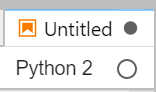
- Multiple kernel status have a filled in gray dot as the status. It would be good to use colors and/or icons to help enumerate the various statuses (e.g. busy, idle, starting, dead). This is for both the toolbar and the tab.

-
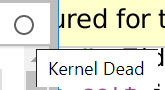
The status icon at times is out of sync between the notebook toolbar and the tab
-
There is sometimes a delay in status at times.
Reproduce
Reproducer for 3:
Run the following notebook cell
while True:
    pass
Click the stop bottom
Reproducer for 4: If you go from a kernel that is very fast to launch (e.g. the standard python3 one) to one that is very slow to launch, you can see a "kernel dead" status for a long time, despite the new kernel name being there. This is not-trivial to make a reproducer for, so if someone needs one I can make one if the issue is not obvious to experts what is going on.
Context
- Operating System and version: Windows
- Browser and version: Chome
- JupyterLab version: 1.1.3

This may be easier to tackle after #7252 helps disambiguate connection status from kernel status.

Thanks. Related to this is also https://github.com/jupyterlab/jupyterlab/issues/7030.
There is also a difference with how jupyter vs. ipython handle errors. In
~/.ipython/profile_default/ipython_config.py add some invalid python code (e.g. print xxx).
Jupyter will say the kernel failed then restart the kernel and try again. Any information related to the failure is logged to stderr/out of the process and is not shown in the UI.
ipython will print a similar error (NameError: name 'xxx' is not defined), but will start the process anyway.
The problem is:
- The information about failures is not where the user encounters the failure in jupyter
- ipython can handle startup issues while jupyter cannot
The current UX in JupyterLab 2.0 is the following:

See discussion in https://github.com/jupyter/jupyter_server/issues/197 about a long term solution, but I think at the very least we should show a busy indicator while it is starting.

If we are making changes to the indicator, can we choose different values for:
- Busy
- Idle
- Starting
- Dead (I don't see this in the status list, but I see this can be a status)
I propose that
- Dead is a redish
- Starting is a yellow or orange color
- Busy/Idle are left as is for now

For reference / inspiration, RetroLab has a small plugin to show the status similar to the classic notebook:
https://github.com/jupyterlab/retrolab/blob/0f7c026472e64b9f9073cce47a00c072d6a84af5/packages/notebook-extension/src/index.ts#L151-L206
https://user-images.githubusercontent.com/591645/120521468-359f1300-c3d5-11eb-8fe4-a7c84230f9b5.mp4


For reference, JupyterLite 0.6.0 introduced its own status indicator, currently with 3 states, mostly to help users debug their setup when something goes wrong in their browser and inspect the kernel logs:
https://github.com/user-attachments/assets/f6516bc6-c39e-4e10-98d2-d60f7d2dd187
Some users find it more useful than the default kernel status indicator, so sharing that here for reference.
At some point it would be great to improve the lab kernel status indicator, if people would like to give it a shot then please feel free!