
jsconsole
 jsconsole copied to clipboard
 jsoverson
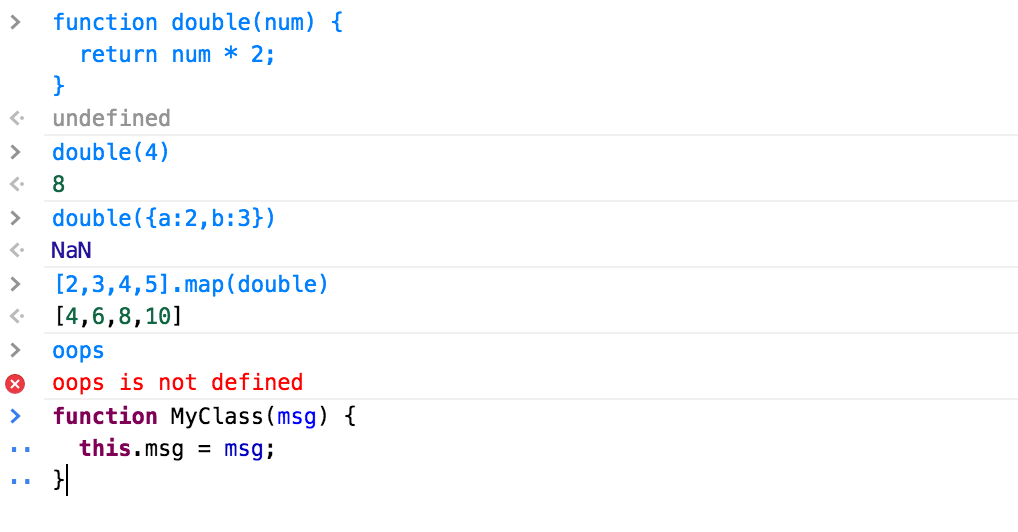
JavaScript console/repl styled after chrome devtools.
jsconsole
Extensible repl based on CodeMirror. Defaults to evaluating JavaScript in the page's context but exposes a mechanism to override the evaluation logic.
Usage
Initialization
<html>
<head>
  <!-- codemirror dependencies -->
  <link rel="stylesheet" href="./bower_components/codemirror/lib/codemirror.css">
  <link rel="stylesheet" href="./bower_components/codemirror/theme/eclipse.css">
  <script src="./bower_components/codemirror/lib/codemirror.js"></script>
  <script src="./bower_components/codemirror/mode/javascript/javascript.js"></script>

  <!-- jsconsole -->
  <link rel="stylesheet" href="./styles/console.css">
  <script src="./dist/console.js"></script>
</head>
<body>
  <div id=container></div>
  <script>
    var elementId = 'container';
    var repl = new Console(elementId);
  </script>
</body>
</html>
This will set up a devtools-like repl that can be interacted by a user.
Programmatic API
Console()
var repl = new Console(elementId, { mode: "javascript", theme: "eclipse" });
.exec()
repl.exec("string of code")
.evaluate()
Override .evaluate() to provide your own evaluation mechanism. Must return an output object that consists of:
completionValue- the return value of the evaluated codeerror- whether or not the code caused an errorrecoverable- whether or not the error can be recovered from (since the code is attempted to be evaluated on every press ofenter)
// default logic
repl.evaluate = function(code) {
  var out = {};
  try {
    out.completionValue = eval.call(null, code);
  } catch(e) {
    out.error = true;
    out.completionValue = e;
    out.recoverable = (e instanceof SyntaxError && e.message.match('^Unexpected (token|end)'));
  }
  return out;
}
.parseOutput()
Override .parseOutput() to alter the output of an evaluation.
parseOutput receives the output of an evaluation and must return an object that includes:
value- the value as it was received.type- the type of the outputclass- the class applied to each line of the outputformatted- the formatted string as it should be output in the console
repl.parseOutput = function(value) {
  var type = typeof value;
  if (value instanceof Error) type = 'error';
  if (value === null) type = 'null';
  var output = {
    value : value,
    type : type,
    class : 'type-' + type
  };

  switch (type) {
    case "string":
      output.formatted =  '"' + value + '"';
      output.class = "string";
      break;
    case "undefined":
      output.formatted = "undefined";
      break;
    case "null":
      output.formatted = "null";
      break;
    case "object":
    case "array":
      // Todo: pretty print object output
      output.formatted = JSON.stringify(value);
      break;
    case "error":
      output.formatted = value.message.trim();
      break;
    default:
      output.formatted = value.toString().trim();
  }
  return output;
}
Future
Themes. Support for varying themes would be nice. There is support to configure the codemirror themes but there is enough on top of that to theme separately.
Dependencies
CodeMirror : ~5.1.x
 jsoverson