

 jpush
jpush
linker command failed with exit code 1 (use -v to see invocation)
你的运行环境
Xcode 9.2
-
插件版本: "jcore-react-native": "^1.2.5", "jpush-react-native": "^2.1.12",
-
react-native 版本: "react-native": "0.50.3",
期望效果
实现jpush-react-native消息推送功能
实际效果
Xcode 编译报错: Undefined symbols for architecture x86_64: "_kJPFNetworkIsConnectingNotification", referenced from: -[RCTJPushModule init] in RCTJPushModule.o "_kJPFNetworkDidRegisterNotification", referenced from: -[RCTJPushModule init] in RCTJPushModule.o "_JCOREDisplayVersion", referenced from: +[JPUSHService commonSetupWithOption:appKey:channel:apsForProduction:advertisingIdentifier:] in libjpush-ios-3.0.7.a(JPUSHService.o) "_JCOREGetBuildVersion", referenced from: +[JPUSHService commonSetupWithOption:appKey:channel:apsForProduction:advertisingIdentifier:] in libjpush-ios-3.0.7.a(JPUSHService.o) "_kJPFNetworkDidSetupNotification", referenced from: -[RCTJPushModule init] in RCTJPushModule.o "_kJPFNetworkDidCloseNotification", referenced from: -[RCTJPushModule init] in RCTJPushModule.o -[RCTJPushModule reactJSDidload] in RCTJPushModule.o "_kJPFNetworkDidLoginNotification", referenced from: -[RCTJPushModule init] in RCTJPushModule.o -[RCTJPushModule reactJSDidload] in RCTJPushModule.o "_kJPFNetworkDidReceiveMessageNotification", referenced from: -[RCTJPushModule init] in RCTJPushModule.o ld: symbol(s) not found for architecture x86_64 clang: error: linker command failed with exit code 1 (use -v to see invocation)
重现步骤
- 在项目根目录执行 yarn add jpush-react-native jcore-react-native 安装插件
- 在项目根目录执行 react-native link 安装依赖 执行中并输入key值已完成自配置
- 在ios项目跟目录执行 pod install 集成插件 4.打开Xcode的Build Settings的Search Paths的Header Search Paths添加路径:$(SRCROOT)/../node_modules/jpush-react-native/ios/RCTJPushModule 5.打开Xcode的Build Phases的Link Binary With Libraries添加如下库: libz.tbd CoreTelephony.framework Security.framework CFNetwork.framework CoreFoundation.framework SystemConfiguration.framework Foundation.framework UIKit.framework UserNotifications.framework libresolv.tbd 6.把UserNotifications.framework的Status改为Optional 7.把Capabilities的Push Notifiactions 值改为ON,并Steps都为√ 8.把node_modules>jpush-react-native>ios>RCTPushModule.xcodeproj添加到Xcode项目的Libraries文件夹中 9.把node_modules>jpush-react-native>ios>RCTPushModule整个文件夹添加到Xcode项目的项目根目录下
Debug logs
ios Xcode编译报错: Ld /Users/samcms/Library/Developer/Xcode/DerivedData/nnapp-dkdeqhvvcosmxqfxmtrdqiugfrvn/Build/Products/Debug-iphonesimulator/JPushRN/JPushRN.framework/JPushRN normal x86_64 cd /Users/samcms/Desktop/nnapp/ios/Pods export IPHONEOS_DEPLOYMENT_TARGET=8.0 export PATH="/Applications/Xcode.app/Contents/Developer/Platforms/iPhoneSimulator.platform/Developer/usr/bin:/Applications/Xcode.app/Contents/Developer/usr/bin:/usr/local/bin:/usr/bin:/bin:/usr/sbin:/sbin" /Applications/Xcode.app/Contents/Developer/Toolchains/XcodeDefault.xctoolchain/usr/bin/clang -arch x86_64 -dynamiclib -isysroot /Applications/Xcode.app/Contents/Developer/Platforms/iPhoneSimulator.platform/Developer/SDKs/iPhoneSimulator11.2.sdk -L/Users/samcms/Library/Developer/Xcode/DerivedData/nnapp-dkdeqhvvcosmxqfxmtrdqiugfrvn/Build/Products/Debug-iphonesimulator/JPushRN -L/Users/samcms/Desktop/nnapp/ios/Pods/../../node_modules/jpush-react-native/ios/RCTJPushModule -F/Users/samcms/Library/Developer/Xcode/DerivedData/nnapp-dkdeqhvvcosmxqfxmtrdqiugfrvn/Build/Products/Debug-iphonesimulator/JPushRN -F/Users/samcms/Library/Developer/Xcode/DerivedData/nnapp-dkdeqhvvcosmxqfxmtrdqiugfrvn/Build/Products/Debug-iphonesimulator/React -filelist /Users/samcms/Library/Developer/Xcode/DerivedData/nnapp-dkdeqhvvcosmxqfxmtrdqiugfrvn/Build/Intermediates.noindex/Pods.build/Debug-iphonesimulator/JPushRN.build/Objects-normal/x86_64/JPushRN.LinkFileList -install_name @rpath/JPushRN.framework/JPushRN -Xlinker -rpath -Xlinker @executable_path/Frameworks -Xlinker -rpath -Xlinker @loader_path/Frameworks -mios-simulator-version-min=8.0 -dead_strip -Xlinker -object_path_lto -Xlinker /Users/samcms/Library/Developer/Xcode/DerivedData/nnapp-dkdeqhvvcosmxqfxmtrdqiugfrvn/Build/Intermediates.noindex/Pods.build/Debug-iphonesimulator/JPushRN.build/Objects-normal/x86_64/JPushRN_lto.o -Xlinker -export_dynamic -Xlinker -no_deduplicate -Xlinker -objc_abi_version -Xlinker 2 -fobjc-arc -fobjc-link-runtime -ljpush-ios-3.0.7 -lresolv -lz -framework CFNetwork -framework CoreFoundation -framework CoreGraphics -framework CoreTelephony -framework Foundation -framework Security -framework SystemConfiguration -framework UIKit -weak_framework UserNotifications -framework CFNetwork -framework CoreFoundation -framework CoreGraphics -framework CoreTelephony -framework Foundation -framework React -framework Security -framework SystemConfiguration -framework UIKit -single_module -compatibility_version 1 -current_version 1 -Xlinker -dependency_info -Xlinker /Users/samcms/Library/Developer/Xcode/DerivedData/nnapp-dkdeqhvvcosmxqfxmtrdqiugfrvn/Build/Intermediates.noindex/Pods.build/Debug-iphonesimulator/JPushRN.build/Objects-normal/x86_64/JPushRN_dependency_info.dat -o /Users/samcms/Library/Developer/Xcode/DerivedData/nnapp-dkdeqhvvcosmxqfxmtrdqiugfrvn/Build/Products/Debug-iphonesimulator/JPushRN/JPushRN.framework/JPushRN
Undefined symbols for architecture x86_64: "_kJPFNetworkIsConnectingNotification", referenced from: -[RCTJPushModule init] in RCTJPushModule.o "_kJPFNetworkDidRegisterNotification", referenced from: -[RCTJPushModule init] in RCTJPushModule.o "_JCOREDisplayVersion", referenced from: +[JPUSHService commonSetupWithOption:appKey:channel:apsForProduction:advertisingIdentifier:] in libjpush-ios-3.0.7.a(JPUSHService.o) "_JCOREGetBuildVersion", referenced from: +[JPUSHService commonSetupWithOption:appKey:channel:apsForProduction:advertisingIdentifier:] in libjpush-ios-3.0.7.a(JPUSHService.o) "_kJPFNetworkDidSetupNotification", referenced from: -[RCTJPushModule init] in RCTJPushModule.o "_kJPFNetworkDidCloseNotification", referenced from: -[RCTJPushModule init] in RCTJPushModule.o -[RCTJPushModule reactJSDidload] in RCTJPushModule.o "_kJPFNetworkDidLoginNotification", referenced from: -[RCTJPushModule init] in RCTJPushModule.o -[RCTJPushModule reactJSDidload] in RCTJPushModule.o "_kJPFNetworkDidReceiveMessageNotification", referenced from: -[RCTJPushModule init] in RCTJPushModule.o ld: symbol(s) not found for architecture x86_64 clang: error: linker command failed with exit code 1 (use -v to see invocation)

Should link both dependencies: react-native link jpush-react-native jcore-react-native

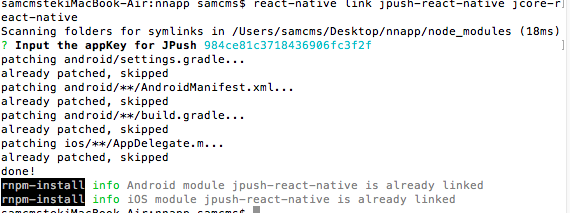


花了一天时间,目前配置应该算是成功了,能发起本地推送,也能接收到极光官网发起的推送。报错的原因主要是自动link的时候,我感觉除了AppDelegate.m里面自动配置了,其他很多东西都没有自动配置进去,还是需要手动配置,但是手动配置的东西不太全,所以容易出错,可以去搜两篇完整一点的博客对照着一点一点来试。


Build Phases -》Link Binaries With Libraries
以下2个可以手动添加,都在iOS 12.1下存在 libresolv.tbd UserNotifications.framework
加上就没这个错误了
