
svelte-stripe
 svelte-stripe copied to clipboard
 joshnuss
Document how styling works
It seems there is no default styles.. How do we inject the styles or configs for svelte?


Hi @northkode,
Which component are you using? <Card/>?
I think I need to add info about styling to the docs site.

Hey there, I'm using
<CardNumber />
<CardExpiry />
<CardCvc />
Also i'm having issues with the Payment Element.. but i'm trying to work my way through the docs.
For styling those components, take a look at this example: https://github.com/joshnuss/svelte-stripe-js/blob/main/src/routes/examples/credit-card/index.svelte
All those components accept a classes and style props. See options for classes.
A general approach is to add a "base" class:, ie <CardNumber classes={{base: 'input'}}/>, and then define a CSS style for .input. And don't forget to use :global(.input) since these inputs are outside svelte's domain.
And let me know if you find any rough patches in the docs. They are quite new and I am looking for improve them.
Also what issue were you having with <PaymentElement>?
Ok Sounds good.. i think i see something missin with the payment element.. it accepts an option param where we can pass fields in to control what is shown.. it looks like you dont allow that to be sent in via the mount function, that eventually calls elements.create('type', options)
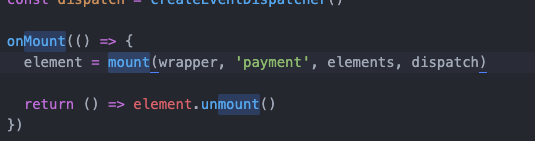
if we can expose a export let options on the PaymentElement we can pass that into the 5th param of your mount call

https://stripe.com/docs/js/elements_object/create_payment_element#payment_element_create-options
I think in the case of PaymentElement those options are passed when calling stripe.elements()
https://github.com/joshnuss/svelte-stripe-js/blob/58b4d1c28f2c9307d2346150efeed7737b6e331a/src/lib/PaymentElement.svelte#L11
I updated your component locally.. to support the feature and now the options work
for example
let paymentOptions = {
	readOnly:true,
	fields: {
	    billingDetails: {
	      name: 'never',
	      email: 'never',
	    }
  	}
}
<PaymentElement options={paymentOptions}/>
And now my form is read only.. so if possible it would be good if you could make this upgrade official :D
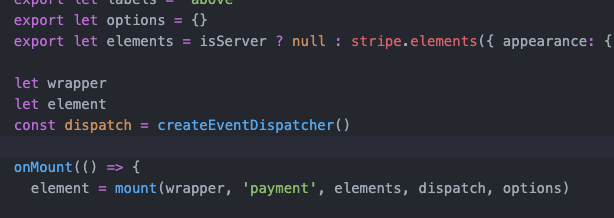
Ah, I see what you mean now. The component should be taking more options.
I'll open a PR
On Fri., Dec. 17, 2021, 8:26 p.m. northkode, @.***> wrote:
I updated your component locally.. to support the feature and now the options work
for example
let paymentOptions = { readOnly:true, fields: { billingDetails: { name: 'never', email: 'never', } } } <PaymentElement options={paymentOptions}/>
And now my form is read only.. so if possible it would be good if you could make this upgrade official :D
— Reply to this email directly, view it on GitHub https://github.com/joshnuss/svelte-stripe-js/issues/17#issuecomment-997118133, or unsubscribe https://github.com/notifications/unsubscribe-auth/AAABCVKR4T73QNWAYJEQHV3URPPMXANCNFSM5KJ72NOA . Triage notifications on the go with GitHub Mobile for iOS https://apps.apple.com/app/apple-store/id1477376905?ct=notification-email&mt=8&pt=524675 or Android https://play.google.com/store/apps/details?id=com.github.android&referrer=utm_campaign%3Dnotification-email%26utm_medium%3Demail%26utm_source%3Dgithub.
You are receiving this because you commented.Message ID: @.***>
Awesome Thanks! Appreciate the work on this. Definitely saved me some time.
I have a few more suggestions.. maybe ill try and submit a pr.. Things like
changing the `let element` to a export
so we can bind on it and listen to events on the stripe element, like "change" events
EDIT: I see you do this via the mount call.
pass $$props into the component so i can style the wrapper div of the Payment Element etc.
Right now Payment Element is unuseable cause i can't actually call the required function of 'confirmPayment etc`
I have added this locally so I can get around this issue
  export function confirmPayment(){
    stripe.confirmPayment({
      elements,
      confirmParams: confirmOptions // this is a new export prop
    })
    .then(function(result) {
      if (result.error) {
        dispatch('error',result.error)
      }else{
        dispatch('success',result)
      }
    });
  }
EDIT: I see how you intended for this to be used.. elements is exported and I can run the function from outside of this component.. maybe ill refactor mine.
Hi,
I deployed a new version 0.0.12 that adds an options prop to <PaymentElement/>.
For <PaymentElement/> and confirmPayment(), have a look at this example code:
https://github.com/joshnuss/svelte-stripe-js/tree/main/src/routes/examples/payment-element
Is there an options prop to <PaymentElement/>? How can I achieve this with svelte-stripe?
      // Pre-fill customer data using the defaultValues option. Passing in the email
      // is required for this integration. The other fields are optional.
      <PaymentElement
        options={{
          defaultValues: {
            billingDetails: {
              email: '[email protected]',
              name: 'John Doe',
              phone: '888-888-8888',
            }
          }
        }}

@hex looks like those options are missing. I will add them.
Will let you know when it's in. Thanks for reporting.