
jquery-timepicker
 jquery-timepicker copied to clipboard
 jonthornton
Dropdown does not align properly when using noneOption and MinTime together
If timepicker configuration includes a couple of none options and a MinDate, when clicking on the input field, the dropdown will scroll down to and just show the last NoneOption instead than start from the top.
An example code is:
$("#timepickerInput").timepicker({ "noneOption": [ { "label": "OFF", "value": "OFF", "className": "black" }, { "label": "HOL", "value": "HOL", "className": "green" }, { "label": "EDU", "value": "EDU", "className": "yellow" }, { "label": "BANK", "value": "BANK", "className": "blue" }, { "label": "SICK", "value": "SICK", "className": "red" } ], "timeFormat": "H:i", "minTime": "8:00", "maxTime": "23:30" });
This will show:
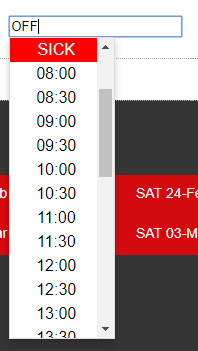
instead than:
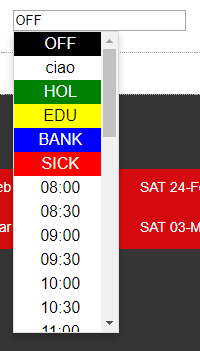
Can replicate. The only way to solve the issue if to remove the MinTime
