
birdfont
 birdfont copied to clipboard
 johanmattssonm
Input: clickable areas of buttons/menus seem to have an offset
Some buttons/menus have an offset on their "hitboxes" that makes it difficult to click them sometimes. It's a really annoying thing as it often feels that the application is unresponsive or simply doesn't do what I want it to do. I've attached a screenshot on which I've marked the approximate hitboxes of some buttons. The same thing doesn't apply for example to the buttons of some popup dialogs (like the version dialog). I'm using windows free version 3.21.1.
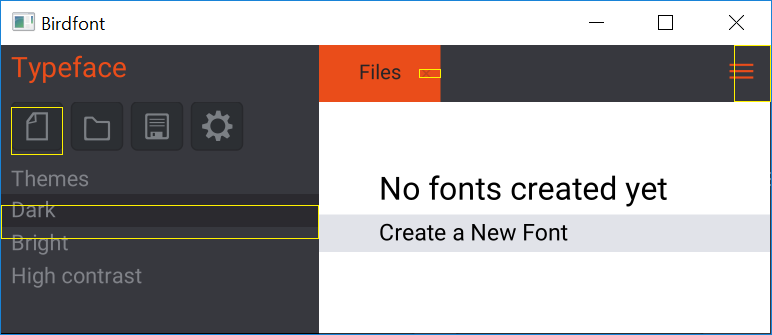

I made an attempt to fix this yesterday. A fix should be available in version 3.21.3.

What you mean on "attempt"? An actual fix or a hack? 😄
The offset is still there but it has been reduced to a few (3-4) pixels for the theme selector and the top-right menus. Now the offset is small just like for the tool buttons.
Thank you for the testing. I need look a bit closer in order to see the offset and the whole UI in Birdfont is one big hack.
I suspected the existence of those hacks. :-D I've programmed rendered UIs from scratch many times and doing the same ATM for an opensource project to make it cross platform and scalable. I want to render the toolbar icons from font files (svg would be better but for TTF files there is a very simple stb_truetype rasterizer), this is why I was looking for a font editor that isn't as complex/buggy/bad as FontForge (if it is still as bad as it was a few years ago when I tried it).
Certain bugs (like these offset issues) simply never happen in a UI when implemented well. The code to handle rendering and input in a consistent way in a UI hierarchy is surprisingly small (or should be small) and rock solid once you got it right. Implementing it the wrong way is actually much-much more work.
There is another bug where the scrollbar stays on the right side of the window after hiding/closing the scrolled area/tab and that suggests that it isn't only the code that has issues but also the data representation (hierarchy). If the scrollbar and scrolled view would be on a parent panel (or the scrollbar was on the scrolled view as a child) then hiding the parent would prevent such a bug in a bulletproof way.
However, in this case of birdfont I'm simply a user with mediocre skills in the area (fonts). If I can get some simple things done in the editor then I'm happy. I've submitted the bug reports only because I've seen that you are selling commercial licenses and I think you need to up your game (at least on windows - I haven't tried to mac version on my macbook).
Hi. have not forgot this issue and I have tried to reproduce it but without success so far; it works on my computer. Here is an example of the active area when I move the pointer over buttons in the toolbox. I have set the scaling of my desktop to 125%. Does it look different on your installation? http://birdfont.org/misc/Birdfont-2019-03-25%2016_31_35-scale120.mp4
I've downloaded the current latest version (3.23.4) just to check this issue. For me the input boxes have a few pixels offset. 3-4 pixels, perhaps only 2 in some cases. I use 2 high DPI monitors:
- Dell S2417DG 24" 2560x1440 (150% win10 scale)
- Dell UP3216Q 32" 3840x2160 (200% win10 scale)
If the bug is scaling related then a larger scale might make it more visible. I recommend testing GUI with 150% and 175% because these scales are quite far from 100% (which makes it easy to spot bugs) and unlike in case of 200% the scale factors (1.5 and 1.75) aren't whole numbers (and they bring out more bugs than whole scale factors).
Hi. The good news is that I might have found the problem for the toolbox issue but I have not been able to test it because I can't reproduce it on my computer. I haven't found something that might cause the issue with the menu but I hope that I am at least making some kind of progress on this issue. Here is a version with a fix: https://birdfont.org/download/birdfont-3.24.3-free.exe