
Snap
 Snap copied to clipboard
 jmoenig
rename all doesn't always work (at all)
I assume this is because I've used it in a dropdown, but I don't know.
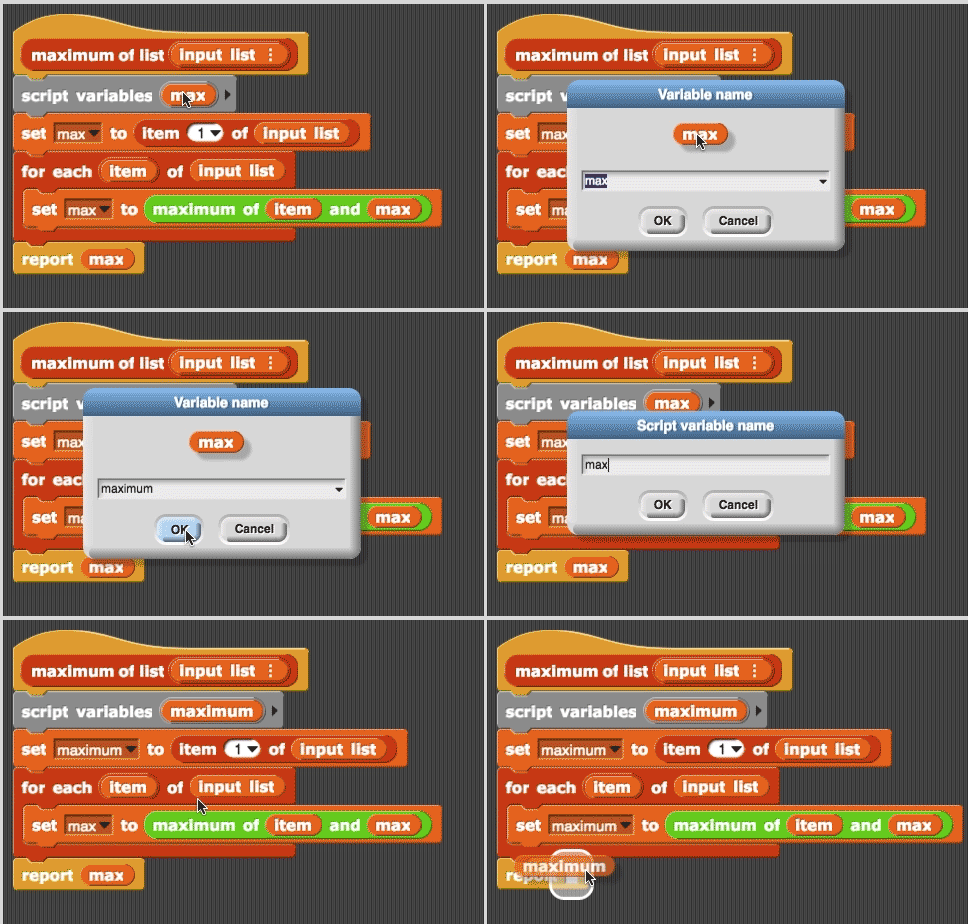
This particular instance of snap has been buggy all day. Earlier it cleaned-up within a block editor by putting things above the hat block and then they were all crammed on top of each other when I reopened it. This instance of snap has been open for about 4.5 hours.

I'm finding that sometimes rename all works, sometimes it will change only the variable in the hat box and not close the dialog box, and sometimes it doesn't to anything at all.
This happened to me just now and the console shows this exception
blocks.js?version=2018-03-09:3332 Uncaught TypeError: script.refactorVarInStack is not a function
at blocks.js?version=2018-03-09:3332
at Array.forEach (

Still having this problem. It works for input variables but not for script variables.
Yes Mary, I can reproduce your issue. The "rename all" for script variables is not working inside the block editor.
While this problem is not fixed... a workaround is to move the whole script to the "script area" (out of the block editor), "rename all" there (is working fine) and move again to the "block editor".
Joan

Thanks, but it's the input variables that I've been trying to change. Maybe if I pull a script out and then put a script variables block on there with variables of the same names and then changed them, it would work. I can try that.
There doesn't seem to be any way to rename all for globals either.
Mostly I've been getting it to work sometimes, and doing the rest by hand. I haven't found any pattern to when it works yet, but I'll post something if I do. At this point, it seems to work for some variables and not others—even within the same block definition and regardless of input type. Reopening the project doesn't seem to impact which work and which don't.
Hi Mary, But in your issue (the fist post and the video sample) you are trying to rename a script variable. And this is what I can reproduce: I can't rename a script variable into the block editor.
I can't reproduce (it's working fine for me) renaming input variables.
Ah yes, I've run into this issue in different ways over time, it seems. The issue of renaming input variables is unpredictable; sometimes it works, and sometimes it doesn't. Brian was there with me and can confirm. ;) Thanks!
Yeah, refactoring variables seems unnecessarily complicated in the source code, I believe you that it sometimes doesn't work. It's only my list to revisit this when I get around to it. Bear with me!

Hi Jens! Just popping on to say that I'm running into this again tonight in v7 with renaming ITEM in FOREACH. I tried to "rename all" and clicking OK does nothing (the dialog box remains open). Thanks!