
drawio-desktop
 drawio-desktop copied to clipboard
 jgraph
Heavy CPU load from draw.io windows client
Preflight Checklist
- [ x] I agree to follow the Code of Conduct that this project adheres to.
- [x ] I have searched the issue tracker for a feature request that matches the one I want to file, without success.
Describe the bug In our organization, we use draw.io for UML diagrams and embed them in Confluence. I installed the draw.io Windows 10 client to be able to work offline and save the .drawio files to my laptop. I open these files in the draw.io client by double clicking on them.
I now noticed in the Windows task manager, even when I'm not working in the draw.io client, that each draw.io client session consumes about 25% of CPU capacity, which is a lot! If two .drawio files are open, the two draw.io processes consume 2x25% = 50% of CPU capacity The .drawio files I was working on were created using the webversion of draw.io and each contained a class model with maybe 20 classes.
So I closed both draw.io session windows (clicked the 'X' in the top right corner of the window) and thought the matter solved. But even though draw.io was not visible in the taskbar anymore and seemed terminated, I noticed in the Windows task manager that both processes were still running and still consuming +/- 50% of my CPU capacity. It was only when I killed these two processes that my laptop started behaving normal again and the ventilator on my cpu stopped turning like crazy. Maybe you can check what is causing this abnormal CPU behaviour. In the meantime, I'll revert to the draw.io webclient and uninstall the Windows client.
To Reproduce Steps to reproduce the behavior: see description above
Expected behavior
- No CPU load or very limited when I'm not changing anything in draw.io
- draw.io processes stop running when I close the application.
Screenshots

draw.io version (In the Help->About menu of the draw.io editor):
- draw.io Windows 10 client version 13.7.3 (see screenshot)
Desktop (please complete the following information):
- OS: Windows 10
- Browser: Firefox version 78.3 64bit
Additional context none


Hello,
I have exactly the same problem.
draw.io version (In the Help->About menu of the draw.io editor):
draw.io Windows 10 client version 13.7.3

To be honest, since I reported this issue, I haven't been able to reproduce this behavior. The drawi.io client now runs as can be expected. I did install a newer version of Firefox since and am now running Firefox ver. 81.0.1 and no longer the Firefox ESR. No idea if this Firefox ESR contributed to the problem.
But you reported "I installed the draw.io Windows 10 client" and then mention Firefox. Are you using the desktop version, or using it in a web browser?

I do use the Windows 10 client. In some cases, these client applications use settings or libraries from the default webbrowser (like proxy settings etc.). I'm not a specialist, but I just thought I'd mention it for those who are ;-)
The problem is in the draw.io background processes. I openend a couple of diagrams and for some - not all - I noticed a background process running at +/- 23% of CPU each. Closing the draw.io client didn't work. I had to kill them manually. But it's hard to reproduce. I tried it a second time and opened like 7 diagrams. Each time a draw.io background process was visible for a second or so and then disappeared again. No CPU issues there. So if you are looking for workarounds:
- Retry the client until you don't have any CPU issues anymore, or
- use the draw.io web application.
I can easily reproduce this when opening multiple draw.io files and copy pasting content from one into the other, at that point the background process starts eating the CPU. After further testing, I found even that, even if it says 20% utilization or something on task manager, if you go to detailed options, it is 100% taking a single logical processor of the CPU. After forcing this process to stop, the logical element of the CPU became available as well, as can be seen on the picture below. The processor in question is the third one on the top row.
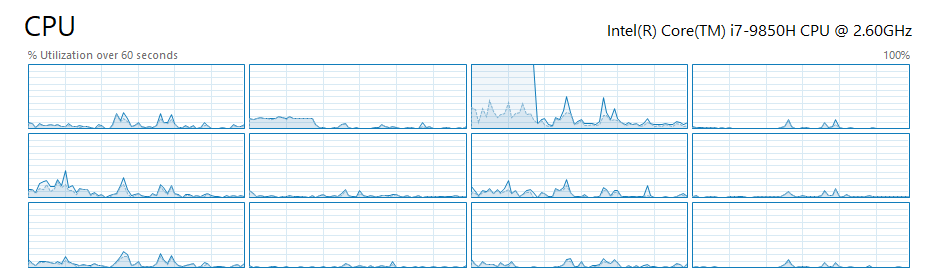
Reproduced on Windows 10 using the desktop app v13.7.9

copy/paste between different diagrams would be the trigger ?
Apparently one of the triggers. I experienced the issue without copying between client sessions
Same issue on 13.7.9. Multiple sessions opened. No copy paste between client sessions.

I have had this issue in the past. Updated to 14.1.8 and I can no longer reproduce this issue through copy-paste between instances of the app. Could be fixed now.

Same here. Since I upgraded to draw.io 14.1.8, I didn't experience any unusual CPU load anymore. Cool & thanks!
I encounter the issue with version 14.1.8. I noticed that I could kill the background process eating the CPU and this would not close my diagrams. And I could keep on working.

Have the exact same issue on ver 14.1.8 (win 10) also. I'm also able to kill the background process and keep working on the diagram.

I can confirm this issue using only one diagram. 14.4.3. In my case this makes the software very unstable.


Is this maybe https://github.com/jgraph/drawio/issues/2443 ? If it happens with one diagram, we need that diagram to test it.
I noticed this old discussion when trying to find information on the same problem. So, it seems this CPU load problem has either re-appeared or it has never been fixed (I have not used drawio for long): When I open more than one diagram, each drawio process starts eating ~15 % CPU, and what's worse, they don't close when I close the diagrams. Only way is to end them in task manager. I have current latest version of drawio, 20.2.3, and Windows 10 (21H1)

Today, I once more tried to reproduce this issuen (see my post of 13 jan. 2021), but everything functioned as could be expected. I'm running diagrams.net 14.4.3 on windows 10 home edition version 21H2
This is definitely reproducible problem! I have a luxury of trying this in three computers, all different:
- Dell Precision 3541, Intel i7-9750H, Windows 10 21H1
- Lenovo Yoga S740-14IIL, Intel i7-1065G7, Windows 11 21H2
- Custom desktop based on AMD Ryzen 9 3900X, Windows 11 21H2
I did a fresh install of Drawio 20.2.3 (Using Windows Installer in https://github.com/jgraph/drawio-desktop/releases/tag/v20.2.3). In computers 2 and 3 I had even never earlier used drawio, so it was absolutely fresh install.
After installing I created several new blank diagrams: Open Drawio, Create new blank, name it diagram1, diagram2 etc. save and close. So, I did not even put any shapes in them. After creating several diagrams, I started clicking them open from File Explorer, and watching Task Manager. First diagram creates just Drawio with 4 subprocess. Opening successive diagrams add always one more subprocess (5, 6, etc). However, opening successive diagrams creates additional drawio background processes. In computers 1 and 3 these background processes are always left on, and they do not end until manually from Task Manager. In computer 2, this was not always happening. Usually it required 3 or 4 diagrams to open, and approximately one time out of three I was able to click all diagrams (6) open without background processes left on. I noticed there was always the same behaviour with background processes when the problem occurred: Firstly, everytime a new diagram is opened, it starts a background process drawio for a short time, and then killed. But often it starts two (or even more) processes, and one is left on. In computers 1 and 3 this happens always when opening the second diagram; in computer 2 it seems to be quite random but still very much reproducible.
So, it is not likely that I just happen to own the only three computers that have this problem :) What common nominator could I have with these three computers that is different to your systems: Well, I have Finnish keyboard, but even if I set the keyboard to English, the problem remains. Otherwise I use English language in Windows. In computers 2 and 3 I have even hardly any programs installed. In computer 3 I don't even have office programs.
The CPU load for each background process depends also on the computer: Computer 1, ~15 % Computer 2, > 25 % Computer 3, ~5 % So, perhaps my Ryzen 9 based desktop is powerful enough to not needing to consume a big proportion of CPU for each background process, but still the basic problem is the same.
I frequently have this problem and it's still an issue with the latest version
 (that's with no visible draw.io windows open!)
See also #1076





I just updated to version 20.3.0 and the problem is GONE! I tested in two computers that right before update the problem existed, and after installing update 20.3.0 there were no additional draw.io background processes consuming CPU anymore.
@davidjgraph Did you do something specific for this problem? If not, please try to analyse what change could have affected this behaviour and take it into account also in the future updates. And anyway, thanks a lot :)
We tried a large number of things to fix this issue across many months. The key problem is we never reproduced the error. So, yes, we probably did fix it, but we have no idea why...