
vscode-jest
 vscode-jest copied to clipboard
 jest-community
when open project by symbol link path, Testing file tree and specify test file to run doesn't use real path.
Environment
vscode-jest version: 4.2.1node -v: v14.17.1npm -voryarn --version: 3.0.1npm ls jestornpm ls react-scripts(if you haven’t ejected):- your vscode-jest settings if customized:
- jest.jestCommandLine? [fill]
- jest.autoRun? [fill]
- anything else that you think might be relevant? [fill]
- Operating system: [fill] Ubuntu
Prerequisite
- are you able to run jest test from the command line? [fill]
- how do you run your tests from the command line? (for example:
npm run testornode_modules/.bin/jest) [fill]
Steps to Reproduce
- open project within symbol link
- run specified test file
Relevant Debug Info
Jest doesn't know symbol link now. https://github.com/facebook/jest/issues/12071 But WebStorm convert symbol link path to real path.
Expected Behavior
- run it
Actual Behavior
- jest alerts No Tests Found because it doesn't know symbol link.
The fastest (and the most fun) way to resolve the issue is to submit a pull-request yourself. If you are interested, feel free to check out the contribution guide, we look forward to seeing your PR...

Got the same problem here! Thank you for opening this bug issue! It would be nice to add the problem in the README until the bug is fixed.
Can I create a MR for that observation in the README? Will anyone accept something like that?

hmm... do you have a sample repo to demonstrate the issue? a trivial symlink (same directory) seems to work just fine.

@connectdotz After some tests, I find that only cross-filesystem symbol link has this problem. By the way, I use Ubuntu.
This is what the test file tree is like:
 But I cannot reproduce second problem, which is test cannot be run. Maybe my real project has some special settings.
@zyf0330 Are you able to run jest in the terminal? If jest failed in the terminal as well, then the root cause is in jest, and you will have better luck following up there (looks like you already opened an issue there).
if you have a demo project, can you share the link? It will help whoever working on this issue.
Works in terminal. It is related to the extention.
Em ter., 23 de nov. de 2021 19:33, ConnectDotz @.***> escreveu:
Are you able to run jest in the terminal? If jest failed in the terminal as well, then the root cause is in jest, and you will have better luck following up there (looks like you already opened an issue there).
if you have a demo project, can you share the link? It will help whoever working on this issue.
— You are receiving this because you commented. Reply to this email directly, view it on GitHub https://github.com/jest-community/vscode-jest/issues/798#issuecomment-977233026, or unsubscribe https://github.com/notifications/unsubscribe-auth/AAHFMWEHFMTKS4A77HNJWCDUNQJDNANCNFSM5IDMZJQA .
@evandrojr, or whoever encountered a similar issue, please create a sample repo so we can evaluate if and how to address this. thanks.
The problem I had is using a symlink to access the repo and then running the tests. The symlink is outside the repo as it points to the repo.
Then "cd" to the symlink and run the tests using the extension. Command line works just fine.
Everything is ext4, no need to use a different FS.
like: % cd company/a/b/c works (no symlink)
% cd a/b/c (does not work using symlink "a" to dir company/a)
Sorry, but the source code is confidential.
@evandrojr https://github.com/evandrojr, or whoever encountered a similar
issue, please create a sample repo so we can evaluate if and how to address this. thanks.
— You are receiving this because you were mentioned. Reply to this email directly, view it on GitHub https://github.com/jest-community/vscode-jest/issues/798#issuecomment-979363580, or unsubscribe https://github.com/notifications/unsubscribe-auth/AAHFMWD5EKS4IRAYE7OGCEDUNZUCTANCNFSM5IDMZJQA .
I assume this is from the symlink bug? I can run my tests but the test explorer output is really annoying. I don't want my test results to be 20 levels deep...
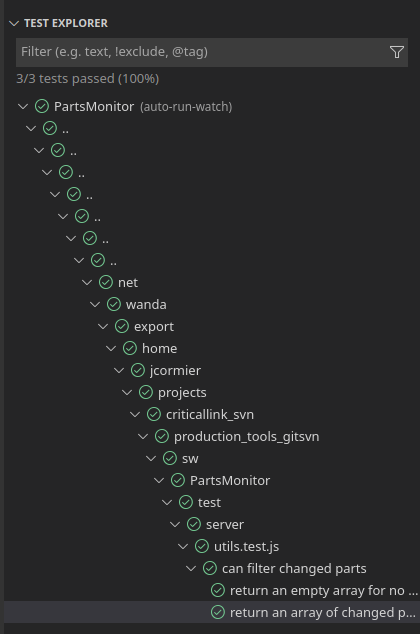
$ pwd
/home/jcormier/projects/criticallink_svn/production_tools_gitsvn/sw/PartsMonitor
$ ls -la /home/jcormier/projects
lrwxrwxrwx 1 jcormier engineer 40 Mar 16  2018 /home/jcormier/projects -> /net/wanda/export/home/jcormier/projects

Opening project dir without going through symlink does fix it...
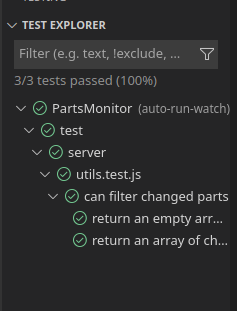
$ pwd
/net/wanda/export/home/jcormier/projects/criticallink_svn/production_tools_gitsvn/sw/PartsMonitor
I have the same issue on windows. My corporate environment require to use a windows junction. Every project is accessible under this junction.
this plugin doesn't supports this symlink: tests are show with a "../../../C:/path/to/project/without/the/junction". The decoration of the editors doesn't work either (I suppose there is a mismatch between the file in the editor and the file path assumed by this plugin).
If I open the project directly without using the junction, it works correctly.
