
ghprb-plugin
 ghprb-plugin copied to clipboard
 jenkinsci
Credentials dropdown does not show newly created credentials
Attempted to add a new (Jenkins Credential Provider) Credentials but upon saving the new credential it does not appear in the Credentials dropdown.
Jenkins ver. 2.63 and GitHub Pull Request Builder 1.37.0 with plain credentials plugin 1.4 and Credentials plugin version 2.1.13

This is only true for when I create a api.github.com credential. When creating a global one this appears in the list.

I had the same issue when using an SSH based authentication, but it worked fine with Username/Password credentials. Still, there's something going awry here...


@karianna Jenkins 2.73.3; in my experience with setting up the Jenkins system configuration for GitHub plugin, the credential "Kind" field must be "Secret text". I tried adding two or three other types of credentials, but they do not subsequently appear in the Credentials dropdown. See "2. At Credential level" section discussion here: https://support.cloudbees.com/hc/en-us/articles/224543927-GitHub-webhook-configuration

This is happening to me also. Trying to add credentials with username and password. But it is not showing me the added credentials. Need Help!!


For me, When I create multi-branch pipeline and choose source type as Bitbucket, the Bitbucket Branch Source plugin does not list the credential of type "secret text" "SSH with user and private key"
The documentation needs to be updated to make it clear that 'Secret Text' cannot be used with this plugin -- it must be a username / password credential.

Me too; username/password is what I'm using but when you add credentials it doesn't get added to the drop down box. First time coming back to Jenkins after 5 years and it doesn't seem to have got any easier :(!


Anyone struggling with the issue of trying to add credentials with username and password but not showing the creds on the dropdown, try this it worked for me.
Jenkins > Credentials > System > Global Credentials (or whatever group you want to have access or your access allow) > Add Credentials.
Then go back to the Source Code Management section of the project, and select the credentials from the dropdown.


Unfortunately when using BitBucket, the use of "SSH with user and private key" is still not possible. Although I can create the credentials, I cannot use them in the multi-branch pipeline

I have the same issue when using BitBucket and "SSH with user and private key"

Still happening... Even doing what @lawrence615 says doesn't work for me...


same as @ppamorim... still happening for me in Jenkins v2.121... @lawrence615 's solution did not work unfortunately. I'm trying to add username/password credentials for subversion.

looks like it is resolved for me.
It turns out the credentials show up in drop down when I select Scope as Global (Jenkins, nodes, items, all child items, etc) instead of System (Jenkins and nodes only) .
FYI, parameters that I selected are:
Domain: Global credentials (unrestricted)
Kind: Username with password
Scope: Global (Jenkins, nodes, items, all child items, etc)
Username:
Credentials showed up as soon as I added them from Jenkins Credentials Provider pop-up.
+1
SSH credentials not showing up either.
Jenkins 2.122 Pullrequest Builder Plugin 1.4.26

After wasting a lot of time, I found the missing step for my case: After adding the credentials, you need navigate to /configure and scroll down to SSH remote hosts Here, you need to add a new host and associate the newly created credentials. I hope this helps !


I had a situation also with ssh keys and the GitHub plugin for Jenkins, but before claiming that I "fixed it", lets consider that our issues might be in fact different problems that apparently look the same.
In fact my problem was quite silly. When you add an SSH user with private key credential, it will be listed in the format <user> <description> in the dropdown. Initially I thought my key was not being listed because it was not there by ID, or description, but turns out the listing format is just different to what i was looking for.

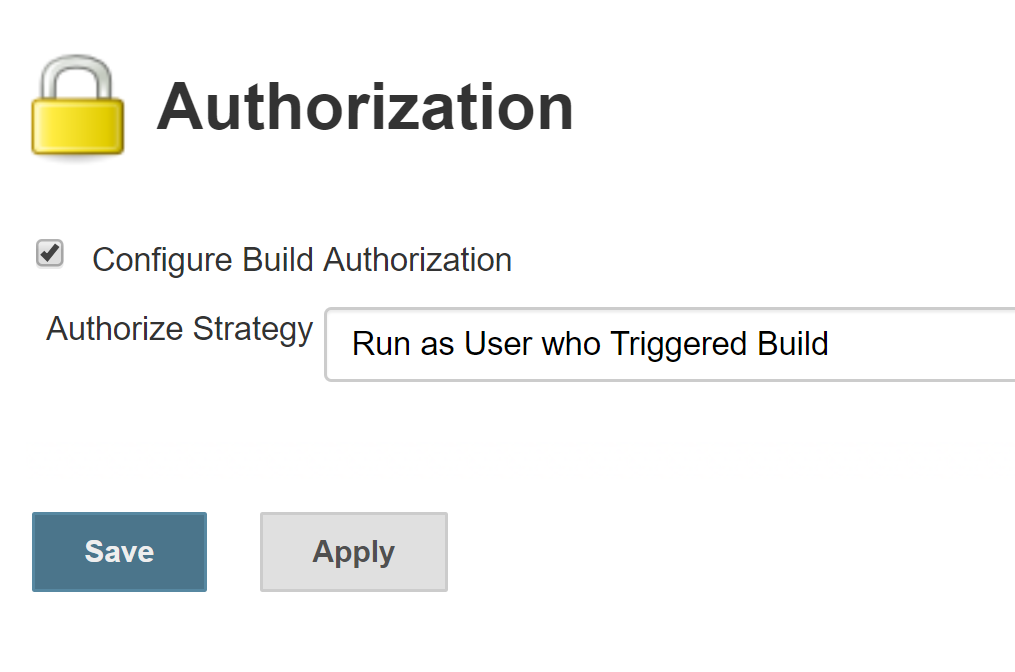
For me it seems the problem was that I had "Authorization" plugin installed and enabled for my project. The issue was fixed when I updated "Authorization Strategy" and set it to "Run as who Triggered Build".

same issue when using BitBucket and "SSH with user and private key" jenkins 2.121.2

To all who are still struggling with above, this is the solution (as of version 2.122):
- Navigate to Jenkins > Credentials > System > Global Credentials
- Add Credential
- Select Secret Text from dropdown menu
- Add description (name of account, reason, etc.)
- In secret text box, deposit your Github Personal Access Token (GPAT)
- Save and navigate back to Jenkins > Global Configuration
- Find your Github Server Access section and select your credentials from it, then click Test Connection
Your GPAT should automatically validate your account name & resources it has access to along with setting a rate limit for the API. Good luck.

Can someone please confirm it works for BitBucket and SSH Username with private key and what is the workaround?

