
consult-jump-project
 consult-jump-project copied to clipboard
 jdtsmith
Quickly jump between projects, their files and buffers with consult
consult-jump-project
Quickly jump between projects, their files and buffers with consult.
In action:
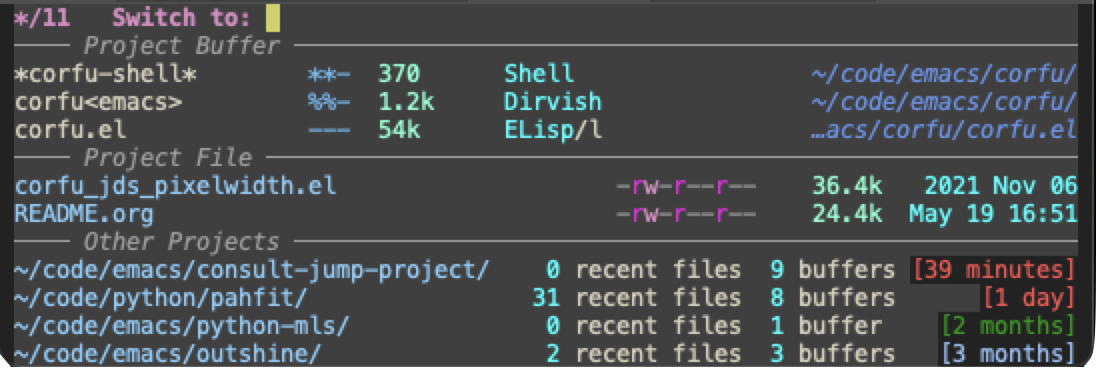
And from a non-project buffer:

;; Consult-jump-project provides a single interactive command of the
;; same name which provides a narrowable list of project-related
;; targets, ala consult-buffer (which it uses):
;;
;;   - project files (f)
;;   - project buffers (b)
;;   - other projects (p)
;;
;; If the file from which consult-jump-project is invoked is not in
;; any project, you are prompted only with the full list of projects
;; known to Emacs (via project.el).  While selecting projects, a
;; preview is provided in the form of a dired buffer visiting its
;; root.  Information on the number of recent files and buffers, and
;; the abbreviated age of the newest of these is shown.
;;
;; Upon selecting a project, the interface is re-entered, allowing you
;; to select one of its recent files or open buffers, or to switch to
;; yet another project.
;;
;; Usage: simply bind `consult-jump-project` to a convenient key, e.g. C-x p j
;;
;; Inspiration from: consult, consult-project-extra.
Install
For now, simply use straight or a local load-path from a cloned directory:
(use-package consult-jump-project
  :load-path "~/code/emacs/consult-jump-project/"
  ;; :straight (consult-jump-project :type git :host github :repo "jdtsmith/consult-jump-project")
  :custom (consult-jump-direct-jump-modes '(dired-mode))
  :bind ("C-x p j" . consult-jump-project))
Customization
Customize the variable consult-jump-direct-jump-modes to a list of modes (symbols) from which to jump directly to the project's dired buffer, if a project is selected, rather than prompting for files/buffers from that project to visit.
E.g. (dired-mode) would indicate that invoking jump from a dired buffer and selecting a project would go directly to the project's dired buffer.
vc-annotate-background and vc-annotate-color-map can be used to alter project age coloration. Set the former to nil to remove the background color from the age.
Related Packages
- consult: required dependency
- consult-project-extra: Similar package from which this was inspired. Main differences are the color-coded "project age" and the project selection, which is always available from the same interface.
 jdtsmith