
OneLife
 OneLife copied to clipboard
 jasonrohrer
Full screen mouse scaling incorrect on monitor wider than 16:9
I've gotten to the bottom of the issue raised in #237.
When I enable both DRAWN and NATIVE, here's what happens:
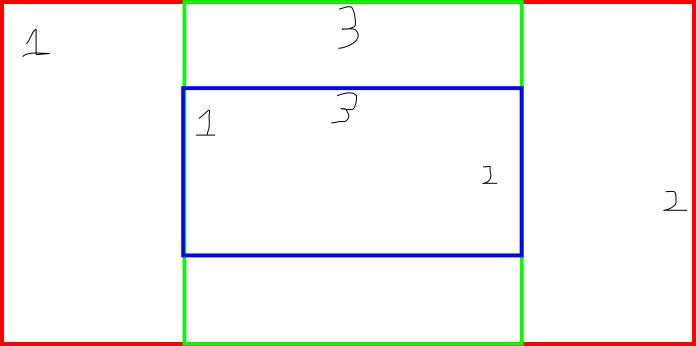
The red region represents my entire ultrawide screen area. The NATIVE cursor moves freely around that entire region.
The blue region appears to be the same aspect ratio as the red region, but is scaled to fit within the width of the game area. The DRAWN mouse cursor moves freely around the blue region, but I can never reach parts of the game area that are above or below the blue region.
I hand-placed three examples (labeled 1,2,3) of where the mouse cursor is on screen (in the red region), and where it appears in the game (in the blue region).
Seems to me that the mouse location (both x and y) is being scaled to stay inside the game area.
(For reference, my monitor has a 32:9 aspect ratio.)

Are there any official builds coming up that might incorporate this? For now, I'm running my own local build, but it would be nice to have this in the Steam build.
would love to get this officially fixed, very challenging playing this windowed

Ah, thanks for investigating this!
I see the pull request. My problem with it is that I think that it might be a work-around for some kind of OS behavior that we're not fully understanding.
I should be able to emulate this by forcing my window size to ultra-wide, like if I do 1280x640 or 1280x480.
And when I do this, I see NATIVE and DRAWN pointers sticking together, even though NATIVE can move outside the game area.
Thus, I think that there's something else going on at the OS level in these ultra-wide situations, where it's auto-scaling the mouse coordinates somehow, to pre-compensate for software that doesn't understand big mouse coordinates. Or something...
Since you're working with the code, have you done some print-outs to see what mouse coordinates are actually being reported to SDL?
Like when screenToWorld is called:
void screenToWorld( int inX, int inY, float *outX, float *outY ) {
What are the raw OS inX and inY numbers being reported? And what are the screenWidth and screenHeight values occuring in there?
We should also look at log.txt output, which talks about what resolution it's picking for the game to run in.

I also wonder if it has something to do with this kind of thing:
https://learn.microsoft.com/en-us/windows/win32/hidpi/high-dpi-desktop-application-development-on-windows
In your R/G/B diagram above, where is the game image being drawn? Is that the green area?
In your R/G/B diagram above, where is the game image being drawn? Is that the green area?
Yeah. Green is the game area.
Thus, I think that there's something else going on at the OS level in these ultra-wide situations, where it's auto-scaling the mouse coordinates somehow, to pre-compensate for software that doesn't understand big mouse coordinates.
I admit that I may have forgotten some things about this in the last year, but the impression that hangs with me was that there is scaling logic to handle constraining the 16:9 game area to fit on monitors that assumed too-tall was possible but too-wide was not.
I also wonder if it has something to do with this kind of thing: {link to high DPI docs}
As far as I can recall, inX and inY were just raw monitor pixel coordinates, with absolutely no OS shenanigans, high DPI or otherwise. I tested this under Linux using the same 32:9 monitor with the same results both before and after my patch.
Further analysis
I think the key lines where the taller-but-not-wider asymmetry creeps in are these: https://github.com/jasonrohrer/minorGems/blob/master/game/platforms/SDL/gameSDL.cpp#L3554-L3557
        // relative to center,
        // viewSize spreads out across screenWidth only (a square on screen)
        float x = (float)( inX - (screenWidth/2) ) / (float)screenWidth;
        float y = -(float)( inY - (screenHeight/2) ) / (float)screenWidth;
Notice screenWidth in both denominators. On a monitor that's wider than the game area, this means that you're vertically constrained to the same fraction of the screen to which you're horizontally constrained. On a 32:9 monitor, this means that you can only reach the middle 50% of each axis.
My revision
It would definitely be possible to change the logic there to scale by height instead of width in the case of an ultrawide monitor, but I wasn't sure I could reasonably contain the fallout from such an approach.
Instead, I took the approach of truncating the mouse position to the width of the game area and scaling by the width of the game area so as not to violate the taller-but-not-wider assumptions that exist in the codebase.
The arithmetic was designed to cause no change in behavior on a monitor that's taller than or equal to 16:9.
Thanks for the additional info! I will look into this in more depth next week.
One last observation that may give more confidence? 2HOL has been running with this fix (I confirmed their code base hasn't patched the code since the original PR) since November and has received no complaints to my knowledge.
On my system, I'm seeing much worse behavior than just mouse position when I run in an ultrawide video mode.
For example, I've been testing with 1280x640 and 1440x720. I see the native-vs-drawn discrepancy that you describe, but even worse, the bottom of the game image is cut off (and there's a small black bar above the game image).
Thus, sideways letterboxing really isn't working at all.
More testing:
On a 32:9 aspect ratio (3840x1080), the full game image is displayed and not cut off.
But on other wide aspect ratios, like 1440x720, your mouse fix works, but the bottom of the game image is still cut off.
Okay, I think I uncovered the root cause of the problem. There was always code in place to handle the "wider than expected" case, but that only ran in a spot that would handle the "requested window wider than expected" case. It needed to be run again after constructing the screen in fullscreen mode, because we'll often get our native resolution back in that case, which won't match what we requested, and the native resolution might be wider. So that "handleTooWide" code is now run twice. First, to process the requested window size (from settings/screenWidth and settings/screenHeight) and then later to process the size of the screen or window that was actually created for us.
In my tests, this fixes the problem, but I have a bit more testing to do.