
react-checkbox-tree
 react-checkbox-tree copied to clipboard
 jakezatecky
mark any node selected programmatically by using its value
Note: This is more like a question if this feature is already present and I don't know otherwise you can consider this as a feature request.
Currently, when we have expandOnClick property set with the onClick method then we are able to click on node label and that node gets expanded and selected as well (gets highlighted).
I need to make the first node as selected after the tree has been loaded by using its value.

The node's value could be added to the expanded property to have it expand after load. As far as marking a node as selected, there are a couple options.
The "simplest" way to make a node that has children selected is to get a ref to the component and manually call onChange:
class Widget extends Component {
  constructor(props) {
    super(props);
    this.tree = React.createRef();
  }

  componentDidMount() {
    this.tree.current.onCheck({ value: '<first-node-value>', checked: true });
  }

  render() {
    return (
      <CheckboxTree ... ref={this.tree} />
    );
  }
}
Another option exists that is a little more complicated and depends on the checkModel. For checkModel="leaf", you could recursively iterate through the first node's children to get all the leaf nodes to populate the checked property with those values. If checkModel="all", then you would simply add all node values (starting with the parent) instead of just of the leaf nodes.

First of all, very thanks for the quick response. It is highly appreciated.
I tried the first way but really didn't work. Maybe I should explain it in more detail so that it is easy for you to understand.

I have treeView as above. I have updated the CSS to remove the collapse and expand arrow icons and update some color as well.
If you see in the image the Node-3 is opened because it has the children. That was a custom requirement and was able to fulfill by adding its value to the expanded array.
But my actual requirement is to highlight the Node-1 when the tree loads as below.
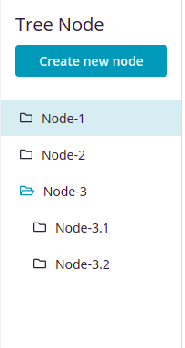
I am able to highlight the node only when I select it but I want to highlight it when tree loads without clicking on it.
I did something like below to solve my problem.
useEffect(() => {
    if (tree.current !== null) {
      const currentTree = ReactDOM.findDOMNode(tree.current);
      // below line makes first node of the tree focused after the tree load
      (currentTree?.firstChild?.firstChild as HTMLElement)?.querySelector<HTMLElement>('.rct-node-clickable')?.focus();
    }
  }, [nodes, tree]);

return (
  <CheckboxTree
	ref={tree}
	nodes={nodes}
	.....
  />
)
In this way, I was able to make the first node focused after the tree loads. Please let me know in case there is a better solution to this.