

 jaegertracing
Clarify that duration filter is applied to individual spans and not traces
Created from https://github.com/jaegertracing/jaeger/issues/709#issuecomment-504775710
Scatter plot displays traces which are outside of the specified duration from the query filter. This confuses users. The duration filter should contain some clarification on what it actually means.
cc @tiffon @yurishkuro @golonzovsky

I am very confused about min/max duration filter,Can you explain it more?Thank you very much!

I guess, confusion stems from labeling a trace by Duration, showing the corresponding figure on the list view and labeling the button "Find Traces" and not "Find Spans". I guess, users then expect that the "Max Duration" filter field applies to this trace duration, which is apparently not the case as it indeed applies to individual spans (right?).
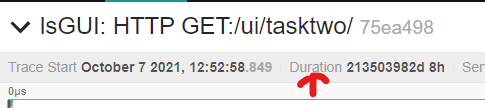
The picture also shows a use case for a hypothetical filter by "Max Trace Duration". Due to my own buggy software, I've recorded a single faulty span/trace with a Duration of 213503982d 8h which renders the normally most helpful diagram to complete uselessness. I'd really like to remove this trace from the result-set shown in the UI and a Max Trace Duration filter would be really nice to have in this particular case.
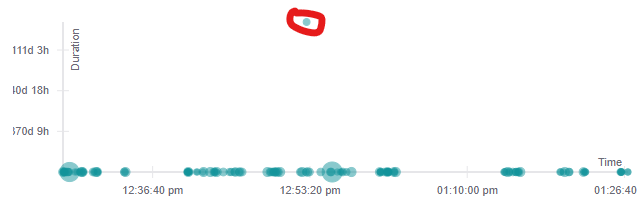
Thanks for considering such a new feature, Martin
UI v1.14.0

Hello, any movement on this issue? I am also coming here because I got confused by the meaning of duration. I think a good improvement would be the following wording changes

- I don't think we should rename Search title
- I don't mind using "Span Duration"
- We can rename the button to "Find Traces with Matching Spans"
- We can add a note below the search button: "Note: the above conditions apply to individual spans. Jaeger will return complete traces containing any of the spans matching the search criteria."
