to-google-translate
 to-google-translate copied to clipboard
 itsecurityco
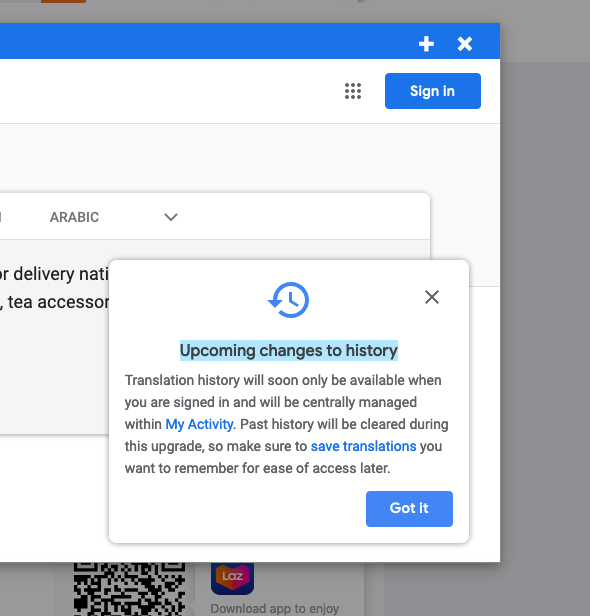
Anoying alert message ontop of modal window!
Each time I translate selected text, either by context menu or by shortcut key there is following message:
"Upcoming changes to history : Translation history will soon only be available... etc." ,
in top of the result, so I have to close the message to read it. It appears even if I am logged in to google.
Firefox 68.0.1 / with addons installed: "Privacy badger" Linux Mint 19.3

Hello @nadapez ,
You need to change the open in setting option to page instead of modal. This is a message of Google website and I'm unable to remove this message box at the moment.
Regars

Why not inject some CSS rule to hide it? You have "<all_urls>" permission so you should be able to. Right? I really want to use the modal and this message is driving me crazy.

It is theoretically possible and already implemented in some other add-ons like https://addons.mozilla.org/en-US/firefox/addon/dictionary-anywhere/ (it allows you to write custom css rule for google translate page and I managed to remove alert from the modal)
I never developed an firefox add-on before but I will give this a shot too see if this can be done in this add-on as well.

Actually in my case (in the toolbar popup), I've managed to get rid of it.
The problem was, that because I'm using "I don't care about cookies" addon (or maybe the uBlock?), the message was always hidden when I visited Google Translated directly. But once I disabled it and then closed the message on Google Translate page, it stopped being displayed in the toolbar window as well!
Well, I am still using such tools to remove cookies, local storage etc so that's not an option for me :)
But just to show and close the message, then you can enable it again. The problem is that those addons cannot hide the message in another addon window, that's why it was showing there and not on the Google Translate page. But once you close it there, it won't be shown again :)
+1
 I understand, that is google;s side problem..
but Is there any option to run script and press cross automatically?
I understand, that is google;s side problem..
but Is there any option to run script and press cross automatically?