
cyberduck
 cyberduck copied to clipboard
 iterate-ch
`Error parsing line 250-Listing` when attempting to download
Describe the bug Attempting to download from a specific FTP server (with and without “Compatibility Mode” profile) always fails. Logs say:
Error parsing line 250-Listing [path to file]
To Reproduce Steps to reproduce the behavior:
- Go to menu Settings ▸ General ▸ Transfer Files and set the dropdown menu to Open single connection
- Connect to FTP server
- Double click PDF file.
Then, try again by activating FTP (Compatibility Mode) in menu Settings ▸ Profiles and then connecting using protocol FTP (Compatibility Mode).
Expected behavior PDF file should start downloading, but Tranfers Window reports Transfer incomplete (0 B of 0 B)
Screenshots
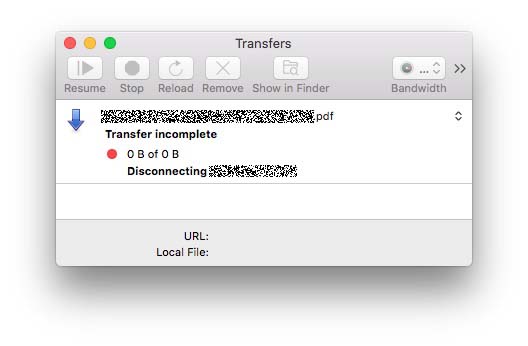
Desktop (please complete the following information):
- OS: macOS
- Version 10.13.6 (17G14042)
Log Files cyberduck.log

Looks like an interoperability issue with MLST
2022-09-09 10:05:04,171 [RbC6Jbks-transfer-1] INFO  ch.cyberduck.transcript.request - MLST /thispdf.pdf
2022-09-09 10:05:04,202 [RbC6Jbks-transfer-1] INFO  ch.cyberduck.transcript.response - 250-Listing /thispdf.pdf
     Type=file;Size=15420153;Modify=20220908132347.923; thispdf.pdf
250 End
2022-09-09 10:05:04,203 [RbC6Jbks-transfer-1] WARN  ch.cyberduck.core.ftp.list.FTPMlsdListResponseReader - No match for 250-Listing /thispdf.pdf
2022-09-09 10:05:04,203 [RbC6Jbks-transfer-1] ERROR ch.cyberduck.core.ftp.list.FTPMlsdListResponseReader - Error parsing line 250-Listing /thispdf.pdf

Then, try again by activating FTP
Did you Retry the transfer, or did you reconnect and download the file with a fresh transfer?

Hi, I'm experiencing this issue too, any advise on resolving this?
Using Cyberduck 8.5.3 MacOS 12.6.2
2023-01-05 09:58:38,579 [hjInPQFX-transfer-1] INFO  ch.cyberduck.transcript.request - MLST /__CHILDR2023-01-05 09:58:38,579 [hjInPQFX-transfer-1] INFO  ch.cyberduck.transcript.request - MLST /TESTFILE.zip
2023-01-05 09:58:38,753 [hjInPQFX-transfer-1] INFO  ch.cyberduck.transcript.response - 250-Listing /TESTFILE.zip
     Type=file;Size=65160121;Modify=20221007113928.000;TESTFILE.zip
250 End
2023-01-05 09:58:38,754 [hjInPQFX-transfer-1] WARN  ch.cyberduck.core.ftp.list.FTPMlsdListResponseReader - No match for 250-Listing /TESTFILE.zip
2023-01-05 09:58:38,754 [hjInPQFX-transfer-1] ERROR ch.cyberduck.core.ftp.list.FTPMlsdListResponseReader - Error parsing line 250-Listing /TESTFILE.zip
2023-01-05 09:58:38,753 [hjInPQFX-transfer-1] INFO  ch.cyberduck.transcript.response - 250-Listing /TESTFILE.zip
     Type=file;Size=65160121;Modify=20221007113928.000;TESTFILE.zip
250 End
2023-01-05 09:58:38,754 [hjInPQFX-transfer-1] WARN  ch.cyberduck.core.ftp.list.FTPMlsdListResponseReader - No match for 250-Listing /TESTFILE.zip
2023-01-05 09:58:38,754 [hjInPQFX-transfer-1] ERROR ch.cyberduck.core.ftp.list.FTPMlsdListResponseReader - Error parsing line 250-Listing /


Did you
Retrythe transfer, or did you reconnect and download the file with a fresh transfer?
I just tried again and got it to work with the “FTP (Compatibility mode)” profile. What I was not aware of when filing the bug is that, if one connected to an affected server via a bookmark, simply activating the profile "FTP (Compatibility Mode)" does not change how Cyberduck will connect to it. One has to then edit the bookmark and change the server type from "FTP" to the then newly available type "FTP (Compatibility Mode)".
After having done so, I reconnected via the edited Bookmark and attempted to download the file with a fresh transfer, which this time worked.
I still consider awkward that, on an affected server, downloading via Quicklook works with plain FTP whereas a regular download will fail unless using FTP (Compatibility Mode).
I just tried again and got it to work with the “FTP (Compatibility mode)” profile. What I was not aware of when filing the bug is that, if one connected to an affected server via a bookmark, simply activating the profile "FTP (Compatibility Mode)" does not change how Cyberduck will connect to it. One has to then edit the bookmark and change the server type from "FTP" to the then newly available type "FTP (Compatibility Mode)".
After having done so, I reconnected via the edited Bookmark and attempted to download the file with a fresh transfer, which this time worked.
I still consider awkward that, on an affected server, downloading via Quicklook works with plain FTP whereas a regular download will fail unless using FTP (Compatibility Mode).
I love you, this seemed to have solved the "Transfer incomplete" issue I've been having for a long time.
