
ionic-cli
 ionic-cli copied to clipboard
 ionic-team
bug: header changing style and tabs become scaled when serving via labs
Bug Report
Ionic version:
[ ] 4.x [x] 5.x
Current behavior:
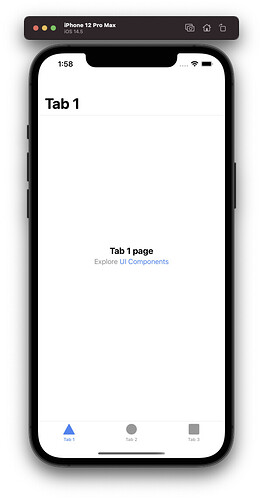
When I generate a fresh ionic app setup (angular), the styling of the header gets all messed up after refreshing the page whilst running the app in ionic labs. When I run the app on an iOS emulator device, the header is also without the proper styling (event turns grey at one point). See the below image and video. I have this problems in all the browsers (Chrome, Safari, Firefox and Edge).
EDIT: I just noticed it also messes with the styling of the tab bar. It's harder to see, but the icons and text increase in size (or the tab bar has less padding) when the page is refreshed.
Expected behavior:
The header remaining the same after a refresh.
Steps to reproduce:
- Generate a new angular tabs project.
- Install
@ionic/laband serve viaionic serve --lab. - Refresh the page and start changing the tabs.
Related code:
N/A
Other information:
Note the header and tab bar on the iOS device.
https://user-images.githubusercontent.com/6512556/119985127-8b814e80-bfc2-11eb-8fbf-0c9887c01e48.mov
When deploying the app to a iOS emulator device, the styling is also messed up.
Ionic info:
Ionic:

   Ionic CLI                     : 6.14.1 (/Users/myname/.nvm/versions/node/v15.12.0/lib/node_modules/@ionic/cli)
   Ionic Framework               : @ionic/angular 5.6.8
   @angular-devkit/build-angular : 12.0.2
   @angular-devkit/schematics    : 12.0.2
   @angular/cli                  : 12.0.2
   @ionic/angular-toolkit        : 4.0.0

Utility:

   cordova-res : not installed
   native-run  : 1.3.0

System:

   NodeJS : v15.12.0 (/Users/myname/.nvm/versions/node/v15.12.0/bin/node)
   npm    : 7.6.3
   OS     : macOS Big Sur

Thanks for the issue. Are you able to reproduce this in an app and provide a link to the repo? I cannot reproduce this in a blank Ionic Angular tabs application with Ionic Lab.
edit: Could you also please describe what the issue you are seeing is when deploying to an iOS simulator? The screenshot is too small and I cannot determine what is the issue is there.

@liamdebeasi Thank you for the response! I can give you a repo, but its just the angular starter app with @ionic/lab installed. Regarding the image. The iOS simulator also shows the the enormous Tab1 header with loads of white space above it like labs does. See:

That is the collapsible large title on iOS, not a bug. Native apps have this too:
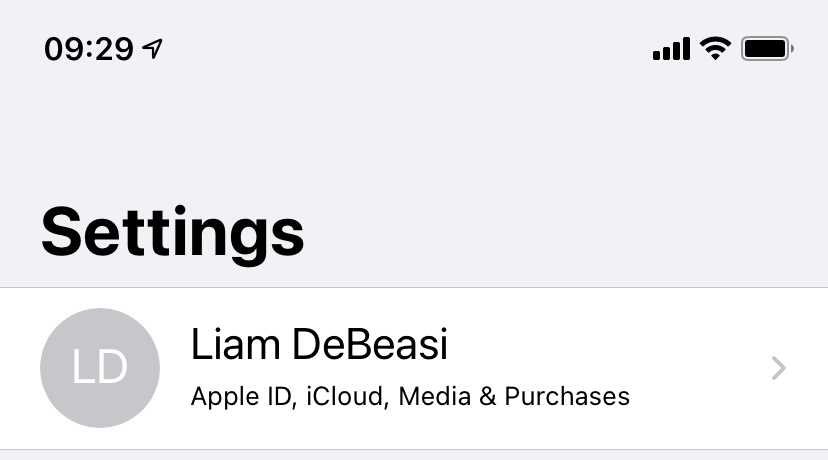
Is this what you are referring to?
Yes it was. Alrighty then, that is my bad 😅 .
But the lab devices got me confused. Because you can see the following in the video:
- The iOS device first loads the same styling as the android device and keeps it while changing the active tab.
- Then after a full page refresh it changes the styling of the iOS device (which I now know that it is the correct styling) and keeps it when changing the active tab.
- When I removed the
ion-headerand its content from thetab1page, it reloads the same styling as the android device again and keeps it whilst changing the active tab. - Then, after a full page refresh. It loads the android style again, but now with the header text centered?
- And now, when I change the active tab. It jumps to the iOS styling for tab number two and three. And when I change back to tab number one it turns grey all of the sudden.
Doesn't seem right to me.
Can you make sure you are using the latest versions of the Ionic CLI and Ionic Labs?
npm i -g @ionic/cli@latest
npm i @ionic/lab
I am not seeing the behavior you describe on my end.
I wasn't using the latest version correct. I updated it to the latest, see below.
➜  ionic-angular-header-issue git:(master) ✗ ionic info

Ionic:

   Ionic CLI                     : 6.16.1 (/Users/mac/.nvm/versions/node/v15.12.0/lib/node_modules/@ionic/cli)
   Ionic Framework               : @ionic/angular 5.6.8
   @angular-devkit/build-angular : 12.0.2
   @angular-devkit/schematics    : 12.0.2
   @angular/cli                  : 12.0.2
   @ionic/angular-toolkit        : 4.0.0

Utility:

   cordova-res : not installed globally
   native-run  : 1.3.0

System:

   NodeJS : v15.12.0 (/Users/mac/.nvm/versions/node/v15.12.0/bin/node)
   npm    : 7.6.3
   OS     : macOS Big Sur
But I can still reproduce the first (Android styling) load and the grey color of the header. The jumping of the header text size, when switching active tab, is of course normal because I only removed the ion-header in the first tab.
https://user-images.githubusercontent.com/6512556/119994149-9e008580-bfcc-11eb-8d3a-d9aa03e95d42.mov
Thanks, I can reproduce this behavior. This appears to be an issue with Ionic Lab not Ionic Framework, so I am going to move it to the appropriate repo.
Hi everyone,
We recently deprecated Ionic Labs in favor of using the built-in browser tools for mobile emulation. These tools more accurately simulate a mobile environment than Ionic Labs does. We have documentation for getting set up with the browser dev tools on our documentation website: https://ionicframework.com/docs/developing/previewing
I am going to close this, but let me know if there are any questions.