
gcalcli
 gcalcli copied to clipboard
 insanum
`--use_reminders` doesn't take default reminders into consideration
Example: I have an event in an hour with a default notification (which for this calendar is 15 minutes). If I run gcalcli remind --use_reminders 60 ..., I get a notification for it. The behavior I'd expect is for the notification not to trigger until 15 minutes before the event.
Workaround: change event reminder by a minute to make it not the default.
In the code in the function Remind, event['reminders'] for me was {'useDefault': True} which caused the if statement checking if the event has overrides to be false. I think it needs more logic to check the value of useDefault and figure out what the default reminder is.

I presume this is using a verison below 4.0.0a5 - gcalcli remind command is broken in master. (if self.options['military'] at gcalcli/gcalcli/py:1373 raises KeyError. (see PR to fix).
@Lense gcalcli remind, from what I can tell, is intended to be run with cron or something similar. So that every minute, your command would check for events happening within the next 60 minutes and then ping a message using notify-send (by default). I'd be happy to debug whether or not the Google default reminder is getting properly handled by the Remind function, alongside the overridden reminders you can set yourself using the --reminder option - but I just wanted to check whether I was clear in your expectation here.

Sorry, it was using 4.0.0a4 (from the arch package). I just tested with git master and it has the same issue.
I am using it in a crontab, but I don't think that has an effect on this behavior.
To clarify what I mean, here are steps that will reproduce what I'm talking about:
- go into google calendar settings for a calendar and add an Event notification (for me there was a default one of 15 minutes)
- create a new event more than the default notification period in the future (like 60 minutes).
- run
gcalcli remind --use_reminders 2880 ...where 2880 is more than the time until the event (in this case, 2880 > 60). Note: this can optionally be in a crontab.
This causes there to be an event notification even though I don't think there should.
@Lense I'm not able to reproduce this from current master. Following your steps exactly, I get the notification if I don't use --use_reminders (because the upcoming event is within the 2880) window, and I do not get the notification without --use_reminders because the reminder for the notification is set to 15 minutes and the event is still 59ish minutes away. That's the expected, behavior, I believe.
I did, however, repro #332. :)

...and I do not get the notification without
--use_reminders...
Did you mean "with --use_reminders" there?
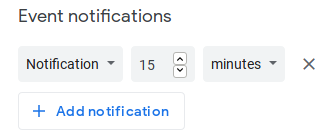
I want to show my setup more clearly.
Calendar (not event) settings:
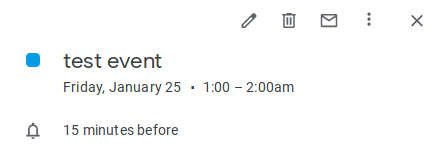
Event as shown in web ui:
Running gcalcli:
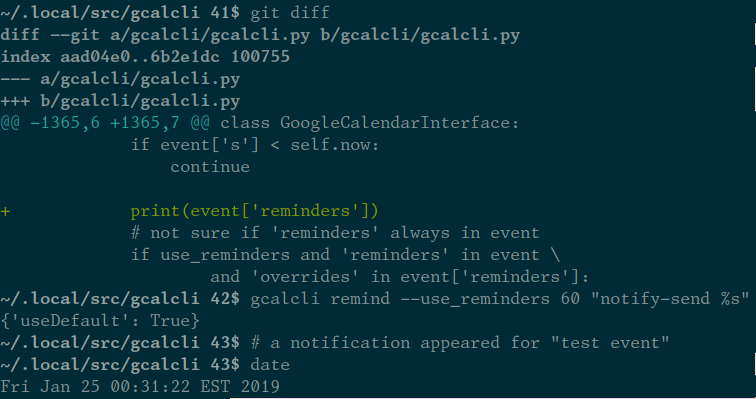
For me, even though the event web UI shows a reminder for 15 minutes, the API just responds with {'useDefault': True} and no specific reminder, because of my calendar settings.
btw, https://github.com/insanum/gcalcli/commit/7448d398de06b22d4722f55feead5bee1e8d838d#diff-13fd5f4053ca653f5144e7c1281f56bdR300 seems to change the type of cmd from a str to a list of strs, which causes the remind commands I'd been using in this issue to raise a TypeError. Changing the nargs argument to ? seems to make them work again for me.
Ok, yes, I had changed it to a '*' so that people could put their command in without quoting it, but in fact, it's probably better to keep enforcing the quotes.
Sorry about the confusing typo, I tried rewording several times in order to make it less confusing and in the end I really botched it!
To be clear: I set up, like you, an event with a reminder which is for 15 mins before the event, but the event is set for 60 mins in the future. Then, I try the remind command twice:
$ gcalcli remind 65 "notify-send %s"
^^^ produces notification
$ gcalcli remind --use_reminders 65 "notify-send %s"
^^^ does not produce notification
That is, I believe, the expected behavior, but it's not the behavior you're reporting.
I can also see that if I add your patch to print event['reminders'] that I actually have a different structure than you do, my printout is like this:
{u'overrides': [{u'minutes': 15, u'method': u'popup'}], u'useDefault': False}
Now, if I create an event that doesn't have any reminders, then I do get the behavior you report. But isn't that also expected, that if we don't have any reminders, we can't decide to respect them?
Maybe the issue here is that gcalcli knows about the reminders that a gcalcli user has set, but doesn't seem to be reading the 'default' reminders from google.
Maybe the issue here is that gcalcli knows about the reminders that a gcalcli user has set, but doesn't seem to be reading the 'default' reminders from google.
Yes, I'd say that's exactly the issue.
I should clarify: when I created the event in my second screenshot, I didn't add any reminder. The screenshot was showing the default reminder.
The web UI has logic to check the calendar's default reminders and show them the same way as event-specific reminders. gcalcli does not have that behavior, which is the purpose of this issue.
Upon closer study, I think you issue may actually be a duplicate of #327, but viewed from a different perspective.
I also have this issue, with an event added to my calendar automatically. The event shows a reminder of 30 minutes in the web interface. This event has the structure
event['reminders'] = {'useDefault': True}
but also
event['gcalcli_cal']['defaultReminders'] = [{'method': 'popup', 'minutes': 30}]
Which is probably why it has a reminder shown on the web interface (A side note is that all of my other events, which have useDefault set to false and some reminders in overrides also have the same 30 minute reminder in defaultReminders).
A quick patch that works for me is:
            # not sure if 'reminders' always in event
            if use_reminders and 'reminders' in event:
                if 'overrides' in event['reminders']:
                    reminders = event['reminders']['overrides']
                elif 'gcalcli_cal' in event
                         and 'defaultReminders' in event['gcalcli_cal']:
                    reminders = event['gcalcli_cal']['defaultReminders']
                else:
                    continue
                if all(event['s'] - timedelta(minutes=r['minutes']) > self.now
                        for r in reminders):
                    # don't remind if all reminders haven't arrived yet
                    continue
Is this something worth a pull request? Though probably there are better ways to handle the different cases, and I have no idea how this is related to #327.
