
immich
 immich copied to clipboard
 immich-app
[BUG] Not able to sync all images from iOS to Immich server
The bug
Hi there, First let me say how glad I am that I found Immich! A great product! And as with all great products there is always some polishing to be done.
So I am trying to upload my collection of 11 982 photos + videos from the Immich iOS app to the Immich server. I do have it set up on a subdomain. It all goes very well up until there are 31 images left in the Remainder section.
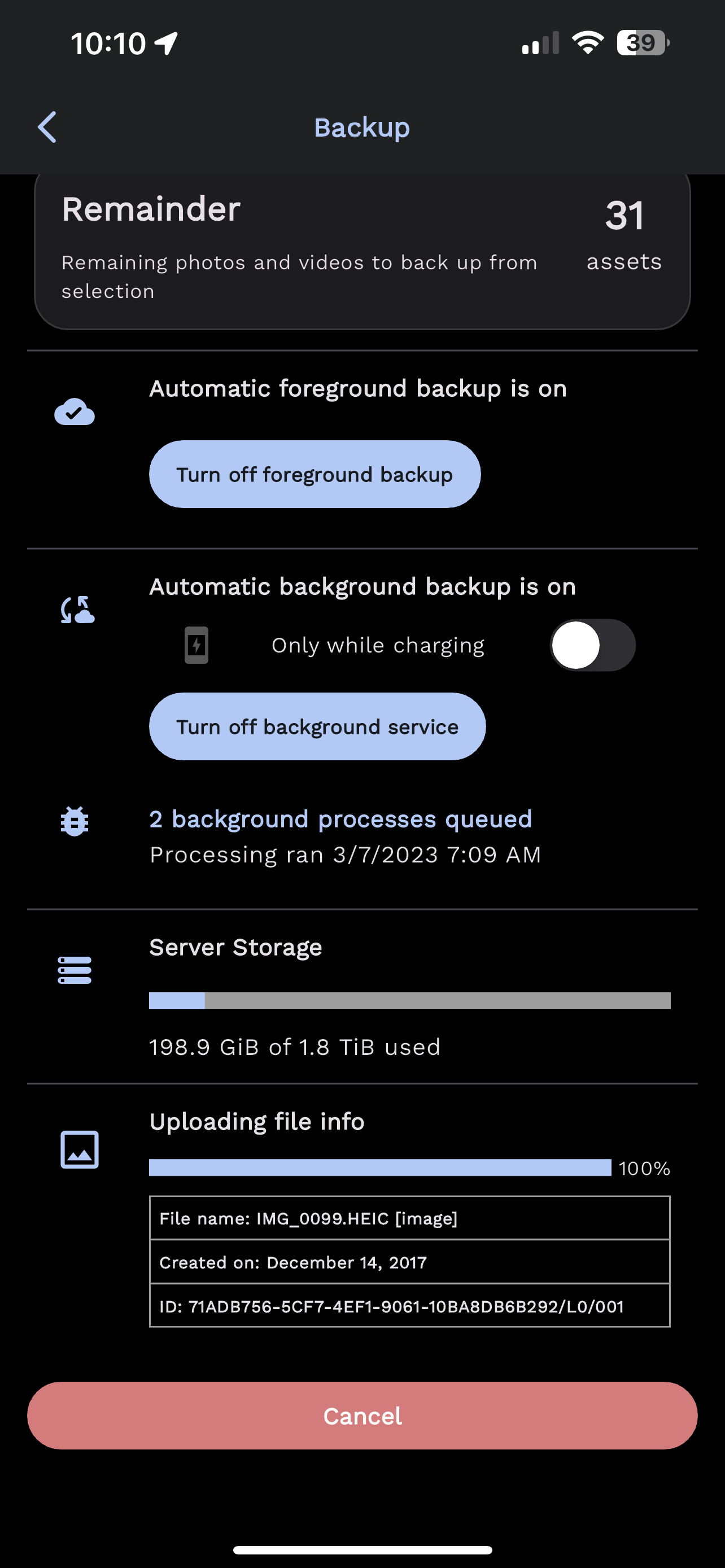
So from there the process goes nowhere.
In the Immich server docker logs I can see the following errors appearing, apparently for all the 31 images:
2023-03-07 10:13:40 [Nest] 1 - 03/07/2023, 8:13:40 AM ERROR [ExceptionsHandler] Could not find any entity of type "AssetEntity" matching: { 2023-03-07 10:13:40 "where": { 2023-03-07 10:13:40 "ownerId": "ffb0e981-4be2-442f-8981-5b3f3af8dcdb", 2023-03-07 10:13:40 "checksum": { 2023-03-07 10:13:40 "type": "Buffer", 2023-03-07 10:13:40 "data": [ 2023-03-07 10:13:40 169, 2023-03-07 10:13:40 154, 2023-03-07 10:13:40 99, 2023-03-07 10:13:40 131, 2023-03-07 10:13:40 125, 2023-03-07 10:13:40 67, 2023-03-07 10:13:40 160, 2023-03-07 10:13:40 107, 2023-03-07 10:13:40 151, 2023-03-07 10:13:40 88, 2023-03-07 10:13:40 208, 2023-03-07 10:13:40 40, 2023-03-07 10:13:40 74, 2023-03-07 10:13:40 83, 2023-03-07 10:13:40 37, 2023-03-07 10:13:40 8, 2023-03-07 10:13:40 159, 2023-03-07 10:13:40 159, 2023-03-07 10:13:40 174, 2023-03-07 10:13:40 29 2023-03-07 10:13:40 ] 2023-03-07 10:13:40 } 2023-03-07 10:13:40 }, 2023-03-07 10:13:40 "relations": [ 2023-03-07 10:13:40 "exifInfo" 2023-03-07 10:13:40 ] 2023-03-07 10:13:40 } 2023-03-07 10:13:40 EntityNotFoundError: Could not find any entity of type "AssetEntity" matching: { 2023-03-07 10:13:40 "where": { 2023-03-07 10:13:40 "ownerId": "ffb0e981-4be2-442f-8981-5b3f3af8dcdb", 2023-03-07 10:13:40 "checksum": { 2023-03-07 10:13:40 "type": "Buffer", 2023-03-07 10:13:40 "data": [ 2023-03-07 10:13:40 169, 2023-03-07 10:13:40 154, 2023-03-07 10:13:40 99, 2023-03-07 10:13:40 131, 2023-03-07 10:13:40 125, 2023-03-07 10:13:40 67, 2023-03-07 10:13:40 160, 2023-03-07 10:13:40 107, 2023-03-07 10:13:40 151, 2023-03-07 10:13:40 88, 2023-03-07 10:13:40 208, 2023-03-07 10:13:40 40, 2023-03-07 10:13:40 74, 2023-03-07 10:13:40 83, 2023-03-07 10:13:40 37, 2023-03-07 10:13:40 8, 2023-03-07 10:13:40 159, 2023-03-07 10:13:40 159, 2023-03-07 10:13:40 174, 2023-03-07 10:13:40 29 2023-03-07 10:13:40 ] 2023-03-07 10:13:40 } 2023-03-07 10:13:40 }, 2023-03-07 10:13:40 "relations": [ 2023-03-07 10:13:40 "exifInfo" 2023-03-07 10:13:40 ] 2023-03-07 10:13:40 } 2023-03-07 10:13:40 at /usr/src/app/node_modules/typeorm/entity-manager/EntityManager.js:604:39 2023-03-07 10:13:40 at processTicksAndRejections (node:internal/process/task_queues:96:5) 2023-03-07 10:13:40 at async AssetService.uploadFile (/usr/src/app/dist/apps/immich/apps/immich/src/api-v1/asset/asset.service.js:74:35) 2023-03-07 10:13:40 at async AssetController.uploadFile (/usr/src/app/dist/apps/immich/apps/immich/src/api-v1/asset/asset.controller.js:60:29)
Do you have any idea why this might be happening?
I have already tried reinstalling the server from scratch 3 times (inc deleting containers + volumes) without any improvements.
Let me know If I can provide you with any additional info.
The OS that Immich Server is running on
MacOS Docker - latest immich container version
Version of Immich Server
1.50.1
Version of Immich Mobile App
1.50.0 build.88
Platform with the issue
- [X] Server
- [ ] Web
- [X] Mobile
Your docker-compose.yml content
version: "3.8"

services:
  immich-server:
    container_name: immich_server
    image: altran1502/immich-server:release
    entrypoint: [ "/bin/sh", "./start-server.sh" ]
    volumes:
      - ${UPLOAD_LOCATION}:/usr/src/app/upload
    env_file:
      - .env
    environment:
      - NODE_ENV=production
    depends_on:
      - redis
      - database
    restart: always

  immich-microservices:
    container_name: immich_microservices
    image: altran1502/immich-server:release
    entrypoint: [ "/bin/sh", "./start-microservices.sh" ]
    volumes:
      - ${UPLOAD_LOCATION}:/usr/src/app/upload
    env_file:
      - .env
    environment:
      - NODE_ENV=production
    depends_on:
      - redis
      - database
    restart: always

  immich-machine-learning:
    container_name: immich_machine_learning
    image: altran1502/immich-machine-learning:release
    volumes:
      - ${UPLOAD_LOCATION}:/usr/src/app/upload
      - model-cache:/cache
    env_file:
      - .env
    environment:
      - NODE_ENV=production
    restart: always

  immich-web:
    container_name: immich_web
    image: altran1502/immich-web:release
    entrypoint: [ "/bin/sh", "./entrypoint.sh" ]
    env_file:
      - .env
    restart: always

  redis:
    container_name: immich_redis
    image: redis:6.2
    restart: always

  database:
    container_name: immich_postgres
    image: postgres:14
    env_file:
      - .env
    environment:
      POSTGRES_PASSWORD: ${DB_PASSWORD}
      POSTGRES_USER: ${DB_USERNAME}
      POSTGRES_DB: ${DB_DATABASE_NAME}
      PG_DATA: /var/lib/postgresql/data
    volumes:
      - pgdata:/var/lib/postgresql/data
    restart: always

  immich-proxy:
    container_name: immich_proxy
    image: altran1502/immich-proxy:release
    environment:
      # Make sure these values get passed through from the env file
      - IMMICH_SERVER_URL
      - IMMICH_WEB_URL
    ports:
      - 2283:8080
    logging:
      driver: none
    depends_on:
      - immich-server
    restart: always

volumes:
  pgdata:
  model-cache:
Your .env content
###################################################################################
# Database
###################################################################################

DB_HOSTNAME=immich_postgres
DB_USERNAME=[redacted]
DB_PASSWORD=[redacted]
DB_DATABASE_NAME=immich

# Optional Database settings:
# DB_PORT=5432

###################################################################################
# Redis
###################################################################################

REDIS_HOSTNAME=immich_redis

# Optional Redis settings:
# REDIS_PORT=6379
# REDIS_DBINDEX=0
# REDIS_PASSWORD=
# REDIS_SOCKET=

###################################################################################
# Upload File Location
#
# This is the location where uploaded files are stored.
###################################################################################

UPLOAD_LOCATION=[redacted]

###################################################################################
# Reverse Geocoding
#
# Reverse geocoding is done locally which has a small impact on memory usage
# This memory usage can be altered by changing the REVERSE_GEOCODING_PRECISION variable
# This ranges from 0-3 with 3 being the most precise
# 3 - Cities > 500 population: ~200MB RAM
# 2 - Cities > 1000 population: ~150MB RAM
# 1 - Cities > 5000 population: ~80MB RAM
# 0 - Cities > 15000 population: ~40MB RAM
####################################################################################

# DISABLE_REVERSE_GEOCODING=false
# REVERSE_GEOCODING_PRECISION=3

####################################################################################
# WEB - Optional
#
# Custom message on the login page, should be written in HTML form.
# For example:
# PUBLIC_LOGIN_PAGE_MESSAGE="This is a demo instance of Immich.<br><br>Email: <i>[email protected]</i><br>Password: <i>demo</i>"
####################################################################################

PUBLIC_LOGIN_PAGE_MESSAGE=

####################################################################################
# Alternative Service Addresses - Optional
#
# This is an advanced feature for users who may be running their immich services on different hosts.
# It will not change which address or port that services bind to within their containers, but it will change where other services look for their peers.
# Note: immich-microservices is bound to 3002, but no references are made
####################################################################################

IMMICH_WEB_URL=http://immich-web:3000
IMMICH_SERVER_URL=http://immich-server:3001
IMMICH_MACHINE_LEARNING_URL=http://immich-machine-learning:3003

####################################################################################
# Alternative API's External Address - Optional
#
# This is an advanced feature used to control the public server endpoint returned to clients during Well-known discovery.
# You should only use this if you want mobile apps to access the immich API over a custom URL. Do not include trailing slash.
# NOTE: At this time, the web app will not be affected by this setting and will continue to use the relative path: /api
# Examples: http://localhost:3001, http://immich-api.example.com, etc
####################################################################################

#IMMICH_API_URL_EXTERNAL=http://localhost:3001
Reproduction steps
1.Start backing up images from iOS app.
2. At some point the backup stop.
Additional information
No response

Are you absolutely sure that you had a fresh database? That doesn't sound like so.

Sounds to me also like a db sync issue that's why I made sure to delete the postgre volume and even changed db credentials. The setup started anew with the setting up of the admin and etc. I'll try a new installation with the isolated problematic images.

Are you accessing the server through dns or local ip? Can you track down that file to make sure it is not corrupted? If possible, can you share the file for debugging?

Pretty sure this is related to uploading live photos. There is a bug in the asset upload logic and it does not handle the situation where the motion part is duplicate and the still part is missing. I believe this is a live photo and somehow the motion part of the live photo has already been uploaded independently.

So I tried reinstalled the whole system again, deleting all the possible volumes and containers again. Out of the 31 problematic images I did isolate 2 and included them in another album. With the new installation I started by uploading these 2 images and it was successful. I continued to upload the other 11K photos and videos and at the end in the Remainder there are now 29 photos that are not able to re synched.
I was originally hosting Immich through a sub domain(ex. https://immich.domain.com) that is pointing my traffic to my reverse proxy. With my last attempt I did the test only via my local ip (ex. 192.168.2.286) and that was the result.
I have no issues sharing the photo but as it succeeded uploading when uploaded from another album I am pretty sure it is not corrupted.
Can you see what 29 are failing to upload and see if you can find it in the timeline in immich? I believe you can click the icon in currently uploading section of the backup screen to make it show a thumbnail.
(or get the date from the image file itself and then use that to locate it in the timeline)
I just checked 3 out of the failing ones and I can say the following. The 3 images have in common the fact that they are edited. So In my Recents album I do have an image IMG_1238 from June 3rd 2022 and the next image in the Photos app is an image with the same name IMG_1238, same date but it is just an edited copy of the other one. On the second img I can choose "revert to the original" but yet again it is not uploading.
Might be related?
They are live photos, right? Live photos are actually two assets, a picture and a short video. I'm guessing both photos are linked to the same video and the video has already been uploaded. So I think we may not support this case - uploading a second picture that is linked to the same motion asset as another live photo.
Yes, they are live photos. And it sounds logical to me that this is the case - two photos linking to the same motion video. Apparently to me it is a fairly common case and I can see others with the same issue. Hope it can be handled somehow in the future - either by choosing one of the linked photos or by handling the linked asset.
So do you have any suggestion to me beside deleting the edited photos?
Yeah, I agree it would be nice to support that use case. I think we almost do, just need to make a few tweaks:
- On the mobile side, upload the still and motion parts independently
- On the server, don't delete the motion asset unless it's the last one :smile:
- We already support auto-linking, but we might need to double check that it works with multiple photos.
In the interim, I would probably move your edits to a separate folder/album, which you could exclude on the backup screen.
Thank you for your answer. I hope it gets fixed. BTW As a side effect on every app start the app tries to upload the same images and piles assets that increase my dedicated storage space.
Addendum: I went on to delete my dupes and as initially 2 of those were isolated in another album, now it shows a negative value

Yeah, the negative issue is a known bug that should hopefully get fixed soon. It is purely cosmetic.
Files not getting cleaned up sounds like a bug though. If a file is a duplicate it should get deleted and not sit around in your upload folder.
It may be worth writing a server command to list files in the upload folder that aren't used in the database do you can safely remove them

i saw a similar bug. To reproduce,
- take a photo
- duplicate the photo in photos app
- edit the duplicated photo.
if 1 photo is already backed up and the 2nd photo is the last one in the backup queue, it'll get stuck at 100% and wont upload until you delete the other photo on immich.
Workaround:
- download the photo from immich to files app or similar
- delete the photo on immich
- upload the edited photo
- add the downloaded photo from files app to photos
- upload the deleted photo.

I'm having the same issue as OP, docker logs are similar if not identical. There is no way I'm manually editing 6k photos to walkaround this, a fix should be made on the app itself.


I'm having the same issue as OP, docker logs are similar if not identical. There is no way I'm manually editing 6k photos to walkaround this, a fix should be made on the app itself.
Thank you for raising this issue up, will put this in the queue to fix it next release
@alextran1502 hi, are there any updates on this? i'm still having problems. the logs are still full of these errors and the last 50ish images are never uploaded. if those are dupes, the server should discard them and mark them as uploaded. or at least the iOS app should display them in a separate list so i know which ones have the problem. thanks
EntityNotFoundError: Could not find any entity of type "AssetEntity" matching: {
    "where": {
        "ownerId": "9311ddce-19d2-4ea9-8984-c4f63a9a30ed",
        "checksum": {
            "type": "Buffer",
            "data": [
                88,
                2,
                135,
                37,
                52,
                54,
                64,
                224,
                5,
                122,
                55,
                56,
                56,
                104,
                139,
                109,
                55,
                19,
                195,

            ]
        }
    },
    "relations": [
0=e 1=x 2=i 3=f 4=I 5=n 6=f 7=o
    ]
}
    at /app/immich/server/node_modules/typeorm/entity-manager/EntityManager.js:638:39
    at runMicrotasks (<anonymous>)
    at processTicksAndRejections (node:internal/process/task_queues:96:5)
    at async AssetService.uploadFile (/app/immich/server/dist/apps/immich/apps/immich/src/api-v1/asset/asset.service.js:75:35)
    at async AssetController.uploadFile (/app/immich/server/dist/apps/immich/apps/immich/src/api-v1/asset/asset.controller.js:62:29)
[Nest] 536  - 05/19/2023, 4:45:57 AM   ERROR [ExceptionsHandler] Could not find any entity of type "AssetEntity" matching: {
    "where": {
        "ownerId": "9311ddce-19d2-4ea9-8984-c4f63a9a30ed",
        "checksum": {
            "type": "Buffer",
            "data": [
                157,
                172,
                178,
                62,
                53,
                118,
                125,
                77,
                74,
                199,
                154,
                170,
                107,
                73,
                220,
                103,
                2,
                165,
                90,

            ]
        }
    },
    "relations": [
0=e 1=x 2=i 3=f 4=I 5=n 6=f 7=o
    ]
}
Did you happen to run some CLI import before these photos, which contain the video portion of the LivePhotos? It might cause this issue if there is duplication of the video portion
@alextran1502: Did you happen to run some CLI import before these photos, which contain the video portion of the LivePhotos? It might cause this issue if there is duplication of the video portion
I only ever used the iOS app to upload/import my photos to Immich as all my photos are in Apple Photos.
EDIT: However, in the albums list, I checked them all, including Live Photos, Slow-mo, Bursts, Portrait and Panoramas (the system albums)
Please try the following
- Choose only recents album and upload
- Try recent and exclude live photo albums
- Try upload on a brand new Immich instance
Let me know how that goes
@alextran1502 I tried only checking the recents album and it went from 61 "remainder" assets to 45 but now its stuck at 45. I can't start from scratch, my library is over 100GB which I don't want to transfer again. There is also another user on this instance, my girlfriend. We have some common photos/videos (way more than 45), could those interfere?
EDIT: Also from what I see, the stuck assets are videos -- not photos (.mov)
There are some weird edge cases related to live photos that cause this problem. We can look into it again though. The situation is trying to backup a live photo, which is two parts (1) motion and (2) photo/still. If the motion is already uploaded we try to return the id for the still, but sometimes it doesn't exist. The motion part could have been uploaded via a CLI import, or it could be apart of another asset (an edited photo, etc.). Those are the files that are having problems.
We can look into it again though
please do. i currently can't trust the app to do what it should as the background tasks get stuck for the same reason (if they start at all; that's a thing for another topic). it's crucial for Immich that the mobile apps work as they should. i would help but the app is not iOS native. thank you all for your work
still happening on v1.58.0 (both app and server)
EDIT: somehow it went from the remaining 45 assets to only 6. maybe the upload process shuffled the asset order so the stuck files were more down the pile? the app also crashed a few times during this and I can only hope for a native app instead of the current clunky and Android-looking one. maybe that would fix all these problems? 🤞🏻
There was an attempted fix for this in 1.58. Can you re-examine the mobile app and immich-server logs when the backup runs and fails to see if it is the same error or not?
@jrasm91 there is a clear improvement proven by the fact that I went from 45 to 6 assets not uploaded (all are videos). however right now I don't see any error/warning in logs (on server) mobile logs seem also clean but I've uploaded the exported CSV here.
as of right now, the apps keeps looping through those 6 remaining videos uploading them over and over again, never finishing. the phone is also burning hot and slows down until I kill the app.
happy to provide whatever else is needed to help fix this, including testing beta builds of the iOS app if TestFlight is setup.