
browser-extension
 browser-extension copied to clipboard
 hypothesis
Extension fails to inject client on tabs that were open prior to installing extension
Steps to reproduce:
- Uninstall Hypothesis extension and open a new window
- Open a couple of tabs
- Install the Hypothesis extension
- Switch back to the tabs opened in step (2) and try to activate Hypothesis
Expected result: Sidebar appears Actual result: The browser action lights up but the sidebar does not appear
I believe what is happening is that the TabState data structure which holds Hypothesis-related state for each open tab does not get populated with state for existing tabs. Therefore state.getState(<some existing tab ID>)>.ready returns false on this line: https://github.com/hypothesis/browser-extension/blob/c2617c3375cc2e991266556b96bd27f679b604ba/src/common/hypothesis-chrome-extension.js#L222 and injecting the sidebar bails out early.
The fix would be to populate the TabState store for existing tabs when the extension loads.

This issue is particularly annoying during development when the extension is continually being reloaded.
It could also make for a crappy / broken-feeling first-run experience, although we haven't heard that many (any?) actual complaints about it.
This issue is particularly annoying during development when the extension is continually being reloaded.
It could also make for a crappy / broken-feeling first-run experience, although we haven't heard that many (any?) actual complaints about it. - Robert Knight (hypothesis dev)
@robertknight:
I am experiencing this issue and I've been scratching my head about it for days now. I've asked about it in the Hypothesis Slack channel and the response: *crickets* . (The world's smallest violin 🎻plays a requiem).
My build
browser-extension v1.106, client v1.106, v1.107, and v1.108 (latest at the time of writing), h (updated 20 nov. 2018)
- Yes, the browser-extension repo is properly linked to the client repo.
- Yes the client is using
SIDEBAR_APP_URL=http://localhost:5000/app.html - Yes I have set up OAuth with h and the client_id / client_url are correct.
Aside – Angular deprecations
After altering package.json to use "angular": "1.6.9" (notice the lack of ^) to resolve the
$compileProvider.preAssignBindingsEnabled(true) deprecation issue in Angular 1.7.x, I run into the exact problem you described.
Hopefully I can elaborate a bit.
The Issue: Chrome Tab Errors
I've gotten it to properly authenticate the local extension with the local client (clicking login in the sidebar now brings up the popup below, notice the "client_id" parameter is correct):

Clicking "Allow" does not reload the sidebar and login as expected. It closes the popup window, but the extension sidebar stays static. Inspecting the Chrome extension itself, I find there are several errors in querying the current tab.id and using it to reload, or setState of the tab:

Chrome stack trace (click to show)
Unchecked runtime.lastError while running browserAction.setBadgeBackgroundColor: No tab with id: 107902043.
    at BrowserAction.update (chrome-extension://cdibkphlpkbdeaeaglpbhajnbhpckdfm/extension.bundle.js:3274:27)
    at TabState.onTabStateChange [as onchange] (chrome-extension://cdibkphlpkbdeaeaglpbhajnbhpckdfm/extension.bundle.js:3719:21)
    at TabState.setState (chrome-extension://cdibkphlpkbdeaeaglpbhajnbhpckdfm/extension.bundle.js:4591:12)
    at onTabUpdated (chrome-extension://cdibkphlpkbdeaeaglpbhajnbhpckdfm/extension.bundle.js:3788:13)
_generated_background_page.html:1 Unchecked runtime.lastError while running browserAction.setBadgeText: No tab with id: 107902043.
    at BrowserAction.update (chrome-extension://cdibkphlpkbdeaeaglpbhajnbhpckdfm/extension.bundle.js:3283:25)
    at TabState.onTabStateChange [as onchange] (chrome-extension://cdibkphlpkbdeaeaglpbhajnbhpckdfm/extension.bundle.js:3719:21)
    at TabState.setState (chrome-extension://cdibkphlpkbdeaeaglpbhajnbhpckdfm/extension.bundle.js:4591:12)
    at onTabUpdated (chrome-extension://cdibkphlpkbdeaeaglpbhajnbhpckdfm/extension.bundle.js:3788:13)
_generated_background_page.html:1 Unchecked runtime.lastError while running browserAction.setTitle: No tab with id: 107902043.
    at BrowserAction.update (chrome-extension://cdibkphlpkbdeaeaglpbhajnbhpckdfm/extension.bundle.js:3285:25)
    at TabState.onTabStateChange [as onchange] (chrome-extension://cdibkphlpkbdeaeaglpbhajnbhpckdfm/extension.bundle.js:3719:21)
    at TabState.setState (chrome-extension://cdibkphlpkbdeaeaglpbhajnbhpckdfm/extension.bundle.js:4591:12)
    at onTabUpdated (chrome-extension://cdibkphlpkbdeaeaglpbhajnbhpckdfm/extension.bundle.js:3788:13)
_generated_background_page.html:1 Error in response to tabs.get: TypeError: Cannot read property 'id' of undefined
    at Object.updateTabDocument [as callback] (chrome-extension://cdibkphlpkbdeaeaglpbhajnbhpckdfm/extension.bundle.js:3820:29)
    at TabState.onTabStateChange [as onchange] (chrome-extension://cdibkphlpkbdeaeaglpbhajnbhpckdfm/extension.bundle.js:3720:18)
    at TabState.setState (chrome-extension://cdibkphlpkbdeaeaglpbhajnbhpckdfm/extension.bundle.js:4591:12)
    at onTabUpdated (chrome-extension://cdibkphlpkbdeaeaglpbhajnbhpckdfm/extension.bundle.js:3788:13)
_generated_background_page.html:1 Unchecked runtime.lastError while running tabs.get: No tab with id: 107902043.
    at TabState.onTabStateChange [as onchange] (chrome-extension://cdibkphlpkbdeaeaglpbhajnbhpckdfm/extension.bundle.js:3720:18)
    at TabState.setState (chrome-extension://cdibkphlpkbdeaeaglpbhajnbhpckdfm/extension.bundle.js:4591:12)
    at onTabUpdated (chrome-extension://cdibkphlpkbdeaeaglpbhajnbhpckdfm/extension.bundle.js:3788:13)
_generated_background_page.html:1 Unchecked runtime.lastError while running browserAction.setIcon: No tab with id: 107902043.
Extension failing to inject tabs
It seems the extension wants to reload/update the sidebar "tab", which involves changing the background color, the app icon, etc., but it can't find the correct "TabID".
My Hypothesis: (hey-o!)
Perhaps this is because there are package version mismatches somewhere in the build process for the client or browser extension, or perhaps it is using deprecated methods provided by the chrome.tabs API, but ¯\_(ツ)_/¯ (i.e. I just don't know...)
tl;dr version
Expected: clicking "Allow" would reload the extension sidebar and log me in
Actual Outcome: clicking "Allow" does nothing, throws a few different chrome errors, sidebar is not logged in, does not change status. TabState.setState and many other Tab related errors are thrown.
Forcing Angular 1.6.9, I receive the TabState.setState issue

Video demo
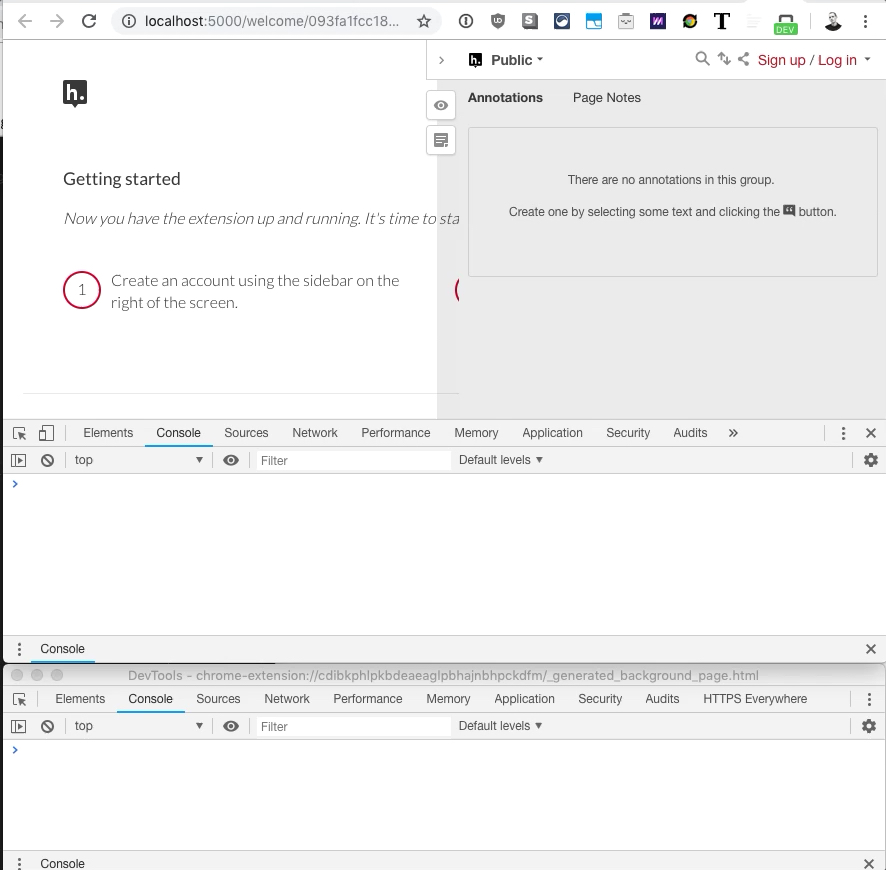
In the video below, I'm using Chrome Devtools to inspect the login at http://localhost:5000/welcome/093fa1fcc18c092d and the Hypothesis browser extension (local unpacked) at chrome-extension://cdibkphlpkbdeaeaglpbhajnbhpckdfm/_generated_background_page.html
Github doesn't allow embedding GIFs or videos, links to your favorite provider
Preview
Lastly, thanks!
I really appreciate your ongoing work on this entire project. It's great software with amazing support and talented developers behind it. I hope to help contribute to the Hypothesis platform, so please let me know if there is any other information I can provide to help resolve this issue. My work depends on it! Thank you! 🙏
edited for clarity

Hello @hwknsj,
A few pointers:
- The Node 11 build issue in the client has been fixed. I suggest you revert any local changes you may have made to the client or browser extension (with the exception of configuring the OAuth client ID for the browser extension) and make sure you have the latest version of the client and browser extension repos checked out. I also suggest you also remove your
node_modules/directories in the client/browser extension repos and re-install dependencies to make sure you have the right version of everything - When configuring the OAuth client for the browser extension, the redirect URL/origin field should be the URL of the extension (note that the ID will be different in my build than yours). This is why clicking "Allow" in the auth popup is not working.
This is what my local OAuth client config looks like:
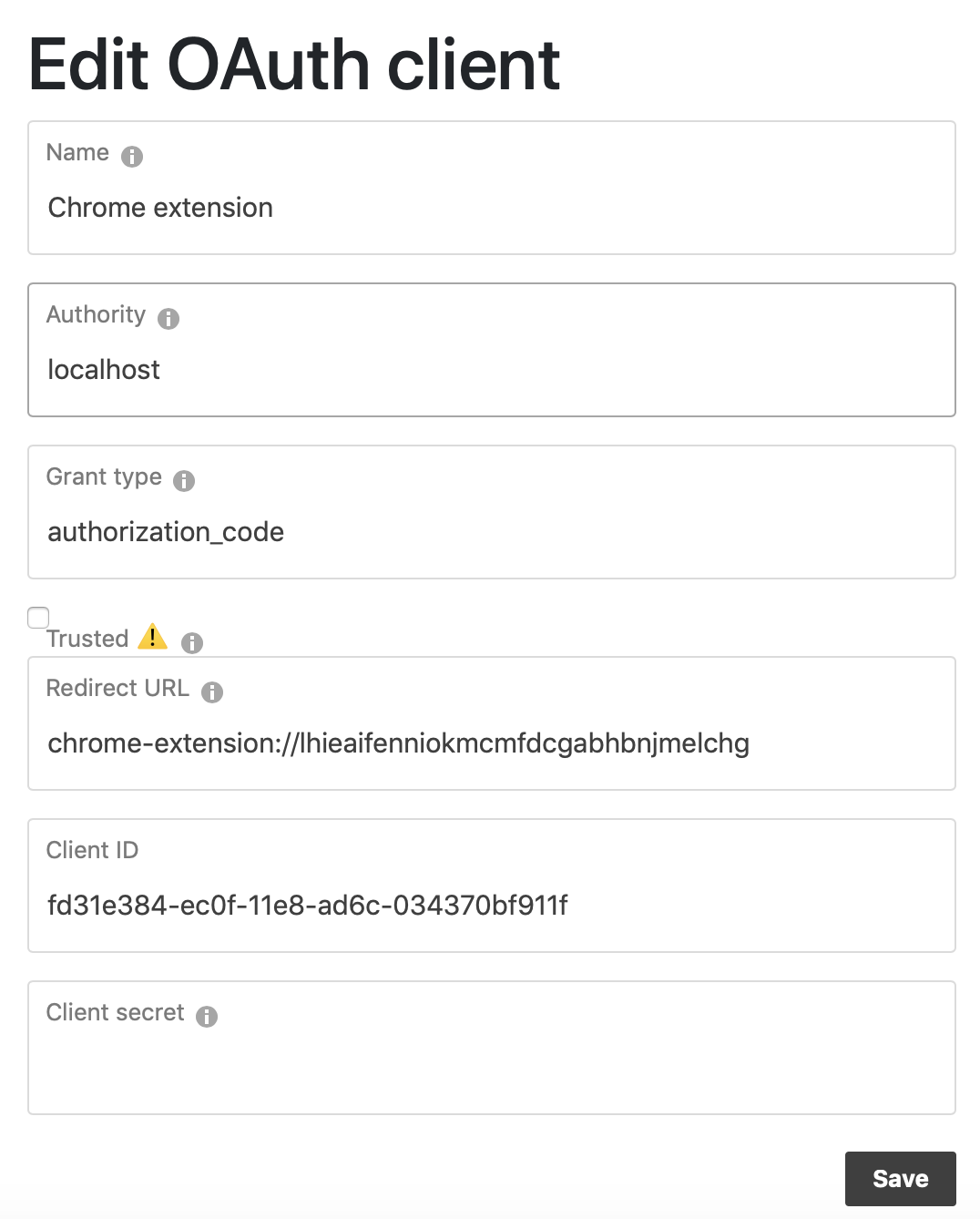
If after doing all of the above and rebuilding and reloading the extension you are still seeing the error, I would suggest trying to trace where the tab ID is coming from in the first place and why it is (no longer) valid at the point where it gets used.
@robertknight I've tried all the things you've suggested (reinstalling dependencies, re-cloning the repos etc.) but I have not tried changing the redirect URL to chrome-extension://xxxx. That's brilliant, I have a feeling that will do the trick!
Thanks so much for the help, I'll let you know how it goes!
@robertknight Wouldn't simply adding adding a ready: true to the state when handling the browser action fix the issue of not injecting the client?
https://github.com/hypothesis/browser-extension/blob/1ae6ed57fa6a545233c3b164a6ff5a8101c014c5/src/background/tab-state.js#L73
Like this:
  this.activateTab = function (tabId) {
    this.setState(tabId, { state: states.ACTIVE, ready: true });
  };
I tried this and it seemed to work, but not sure if this change would cause any other issues.

This issue was resolved in https://github.com/hypothesis/browser-extension/pull/1190.