
hughfenghen.github.io
 hughfenghen.github.io copied to clipboard
Published
20 hours ago •
 hughfenghen
hughfenghen
js 构造 H264 自定义 SEI 信息
背景 Webcodecs支持了Web编码,加上开源的muxer(如mp4box.js)就能使用原生js封装视频文件了; 而在直播场景经常需要在视频流中插入自定义SEI,开放对视频流的操作能力是Webcodecs的动机之一(WebRTC~~做不到~~); 以下是为了 验证 自定义SEI确实可行,仅是学习笔记,若想在生产使用,需完成标注未完成的任务;
NALU 组成结构
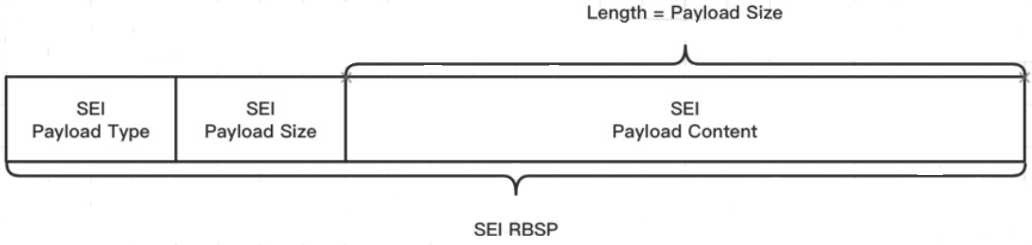
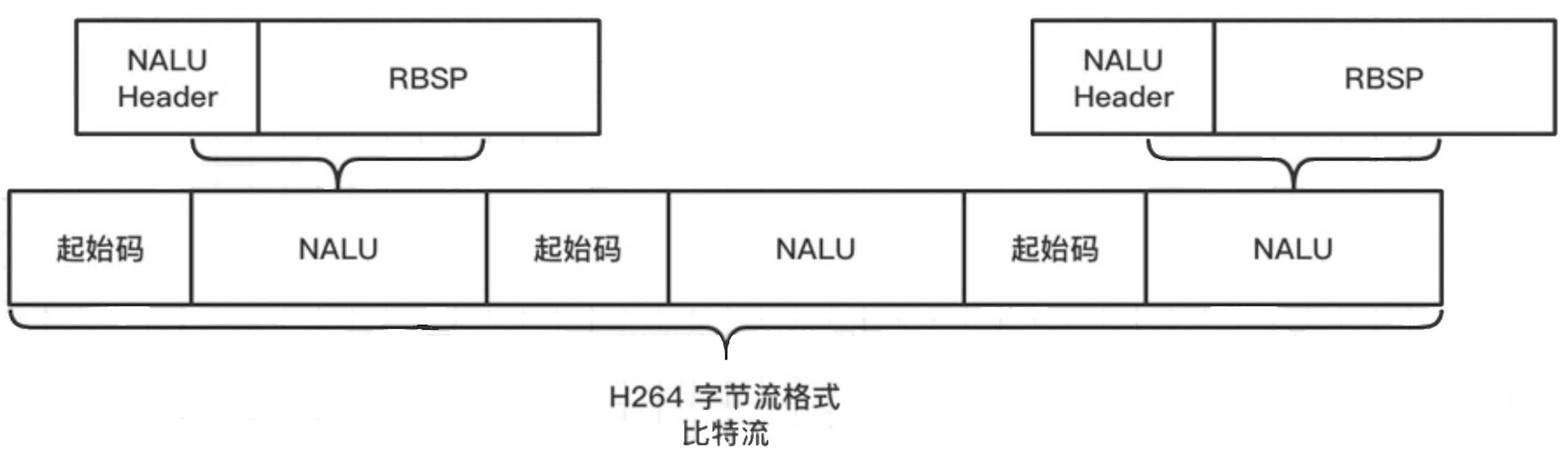 SEI 是一种特殊的 NALU
SEI 组成结构
代码实现
function buildStrSEINALU (str) {
  const txtEncoder = new TextEncoder()
  let uuidStr = ''
  for (let i = 0; i < 16; i++) {
    uuidStr += ((Math.random() * 16) | 0).toString(16)
  }
  const uuidBuf = txtEncoder.encode(uuidStr)
  const strBuf = txtEncoder.encode(str)
  const seiPayloadSize = uuidBuf.byteLength + strBuf.byteLength

  const seiBuf = new Uint8Array([
    // annexb start code;1. 不支持avcC
    0, 0, 0, 1,
    // naul header sei type
    6,
    // payload type, User Data Unregistered
    5,
    // payload size;2. size可能超过255,需要多个字节表示(小端序)
    seiPayloadSize,
    // payload uuid;3. uuidBuf、strBuf 防竞争字节 检查替换
    ...uuidBuf,
    // payload content
    ...strBuf,
    // end flag
    0x80
  ])

  return seiBuf
}

// 使用示例
const encoder = new VideoEncoder({
  output: (chunk) => {
    let buf = new ArrayBuffer(chunk.byteLength)
    chunk.copyTo(buf)
    // 连接H264裸流数据与SEI
    buf = concatAB(buf, buildStrSEINalu('hello Webcodecs'))
    // 查看 mp4box.js 文档
    outputFile.addSample(vTrackId, buf, opts)
  }
})
未完成的任务
- 支持 avcC
- avcC 不需要起始码,[size, seiType(6), seiData] 拼接即可(size 4 字节大端序),更简单
- size可能超过255,需要多个字节表示(小端序)
- uuidBuf、strBuf 防竞争字节 检查替换
- 支持HEVC
参考
- 如何理解和使用 SEI(媒体补充增强信息)?
- AnnexB 和 avcC
- VideoEncoder MDN
- Webcodec + mp4box demo
- Concatenates two ArrayBuffers
- mp4box.js
