
accelerate
 accelerate copied to clipboard
 huggingface
Can I use this package with fast.ai?
Hi! It's so exciting! Great job! May I know if I can use this package with fast.ai? Any Document for that? Thanks! :)

Hi there! It's probably not compatible with fastai as the fastai library uses their own DataLoader and Optimizer classes (different from the PyTorch ones). We're thinking of how we can best add support for fastai so stay tuned!

Hi @sgugger ! Is the latest 0.5.1v usuable with fastai library? it would be of great help of it is. Thanks :)

This issue has been automatically marked as stale because it has not had recent activity. If you think this still needs to be addressed please comment on this thread.
Please note that issues that do not follow the contributing guidelines are likely to be ignored.
![github-actions[bot] avatar](https://avatars.githubusercontent.com/in/15368?v=4 "Published by a pub.dev verified publisher")
Support for fastai is included in this PR: https://github.com/fastai/fastai/pull/3646

@muellerzr thank you for the information. the above PR, does it also enable deepspeed which is supported in Accelerate. It would be really helpful if that feature of Accelerate is also supported.
Until fastai v3 includes using raw torch optimizer instead of fastai's optimizer, it will not since DeepSpeed needs to prepare the optimizer as well. (This isn't too far on the horizon however)
Is there any news on this?
Here on the fastai docs, they say that it is possible to use accelerate with fastai. I tried it and it works. I am able to train the model faster. The only problem is that the losses go down way more slowly, and the accuracy barely improves when I run from CLI (as opposed to running the same exact script from IDE, that in my understanding is not using accelerate). Is it some sort of bug on fastai side?

@costantinoai when you say in notebook do you mean using the notebook_launcher? Or training on a single GPU
Thanks for your prompt reply.
I didn't mention the notebook. I am training on command line with accelerate, and on IDE (Spyder) without accelerate, using the exact same learning rate. From command line it runs faster, but from IDE the losses go down more quickly. I am following the instructions on the link I posted in the previous comment.
I am training on multiple GPUs.
We can't do much without seeing the code you trained with, can you provide a sample? And perhaps use a dataset that's public to try and recreate it? Like one of the distributed app examples in the fastai docs here:
https://docs.fast.ai/distributed_app_examples
from fastai.vision.all import *
from fastai.distributed import *
from fastai.vision.models.xresnet import *

seed = 42
np.random.seed(seed)
torch.manual_seed(seed)
set_seed(seed)

path = rank0_first(untar_data, URLs.IMAGENETTE_160)

dls = DataBlock(
    blocks=(ImageBlock, CategoryBlock),
    splitter=GrandparentSplitter(valid_name='val'),
    get_items=get_image_files, get_y=parent_label,
    item_tfms=[RandomResizedCrop(160), FlipItem(0.5)],
    batch_tfms=Normalize.from_stats(*imagenet_stats)
).dataloaders(path, path=path, bs=256)

learn = Learner(dls, xresnet50(n_out=10), metrics=[accuracy,top_k_accuracy]).to_fp16()

with learn.distrib_ctx():
    learn.fit_flat_cos(10, 1e-3, cbs=MixUp(0.1))
This is the output from the IDE:
█epoch train_loss valid_loss accuracy top_k_accuracy time
0 1.908173 1.659667 0.469299 0.884841 00:15
1 1.695591 1.779498 0.455541 0.859618 00:15
2 1.563728 1.492779 0.529682 0.911592 00:15
3 1.454441 1.340691 0.576051 0.921274 00:15
4 1.367462 1.156232 0.633121 0.941656 00:15
5 1.304150 1.322979 0.586497 0.931465 00:15
6 1.259541 1.182015 0.630064 0.939108 00:15
7 1.210832 0.965723 0.703694 0.956433 00:16
8 1.153964 0.917298 0.706242 0.962038 00:15
9 1.076719 0.741100 0.772739 0.975541 00:15
This is from CLI:
epoch train_loss valid_loss accuracy top_k_accuracy time
0 2.037336 2.129916 0.251337 0.783804 00:09
1 1.847129 1.756666 0.391393 0.888719 00:08
2 1.730803 1.470617 0.511332 0.913675 00:08
3 1.645328 1.358904 0.573211 0.923860 00:09
4 1.569303 1.579135 0.514897 0.932264 00:08
5 1.509306 1.229748 0.605806 0.938375 00:09
6 1.448912 1.239085 0.614464 0.934301 00:09
7 1.398038 1.169346 0.629997 0.948307 00:09
8 1.349530 1.052467 0.668449 0.949580 00:09
9 1.294319 0.942007 0.711994 0.964859 00:09
Running the same exact script. Any idea?
What's the output of accelerate env here?
And thanks for the clear reproducer!
Accelerateversion: 0.10.0- Platform: Linux-4.15.0-76-generic-x86_64-with-glibc2.27
- Python version: 3.9.12
- Numpy version: 1.22.3
- PyTorch version (GPU?): 1.11.0 (True)
Acceleratedefault config:- compute_environment: LOCAL_MACHINE
- distributed_type: MULTI_GPU
- mixed_precision: fp16
- use_cpu: False
- num_processes: 3
- machine_rank: 0
- num_machines: 1
- main_process_ip: None
- main_process_port: None
- main_training_function: main
- deepspeed_config: {}
- fsdp_config: {}
@costantinoai first thing I can see here is set fp16 to no in the accelerate config if you're going to use fastai's to_fp16 and see how that changes things. (Or use learn.to_fp16() in the script ran w/o accelerate launch and use accelerate launch w/ fp16 config in the other)
This is the output from CLI with fp16 set to no:
epoch train_loss valid_loss accuracy top_k_accuracy time
0 2.037301 2.129598 0.251592 0.782786 00:09
1 1.847155 1.756253 0.390374 0.887955 00:08
2 1.730854 1.466629 0.513369 0.912911 00:08
3 1.645347 1.365647 0.571174 0.923860 00:08
4 1.569351 1.582687 0.516425 0.931500 00:08
5 1.509384 1.225409 0.609626 0.938375 00:08
6 1.449147 1.243672 0.612172 0.934810 00:08
7 1.398242 1.166874 0.627706 0.949071 00:08
8 1.349698 1.050111 0.671760 0.950344 00:08
9 1.294484 0.942374 0.712758 0.965623 00:08
here the output of accelerate env
Accelerateversion: 0.10.0- Platform: Linux-4.15.0-76-generic-x86_64-with-glibc2.27
- Python version: 3.9.12
- Numpy version: 1.22.3
- PyTorch version (GPU?): 1.11.0 (True)
Acceleratedefault config:
- compute_environment: LOCAL_MACHINE
- distributed_type: MULTI_GPU
- mixed_precision: no
- use_cpu: False
- num_processes: 3
- machine_rank: 0
- num_machines: 1
- main_process_ip: None
- main_process_port: None
- main_training_function: main
- deepspeed_config: {}
- fsdp_config: {}
Another try. Here I had to set batch_size = 128. I removed to_fp16() from the script, and fp16 from accelerate config.
Output from IDE:
epoch train_loss valid_loss accuracy top_k_accuracy time
0 1.857560 1.647078 0.463439 0.876943 00:28
1 1.622556 1.722324 0.465987 0.886879 00:27
2 1.480505 1.309122 0.576560 0.929427 00:28
3 1.384628 1.259759 0.597707 0.929682 00:28
4 1.294337 1.146112 0.643057 0.951847 00:28
5 1.236357 1.290318 0.609427 0.943694 00:28
6 1.195054 1.099133 0.653503 0.937325 00:28
7 1.150930 1.384553 0.592357 0.942675 00:28
8 1.081379 0.837243 0.724076 0.975796 00:28
9 0.973760 0.667712 0.785478 0.979363 00:28
Output from CLI:
epoch train_loss valid_loss accuracy top_k_accuracy time
0 1.943128 1.829030 0.394703 0.858925 00:13
1 1.740283 1.568947 0.493761 0.907818 00:12
2 1.602451 1.346644 0.558951 0.929972 00:12
3 1.511948 1.667851 0.485358 0.895340 00:12
4 1.440611 1.292857 0.580087 0.935829 00:13
5 1.373091 1.243592 0.612936 0.926407 00:13
6 1.313898 1.161405 0.640438 0.939649 00:14
7 1.259829 1.344184 0.558187 0.951617 00:13
8 1.199563 0.918490 0.709957 0.966132 00:13
9 1.133808 0.780938 0.765215 0.972498 00:14
Thanks @costantinoai! Will look into this over the week, I may open a new issue on this since this thread is mostly for when TPU support + deepspeed is added to fastai, since the current one just supports multi-gpu
Yep, I also did some testing at the time and I realized the batch size problem. But thanks for looking into this! Indeed, I guess that more clear information about this common mistake in the documentation would be helpful to others in the future 😄
Hey @costantinoai , so you don't look insane I'll reiterate what I said, so hopefully others can find it.
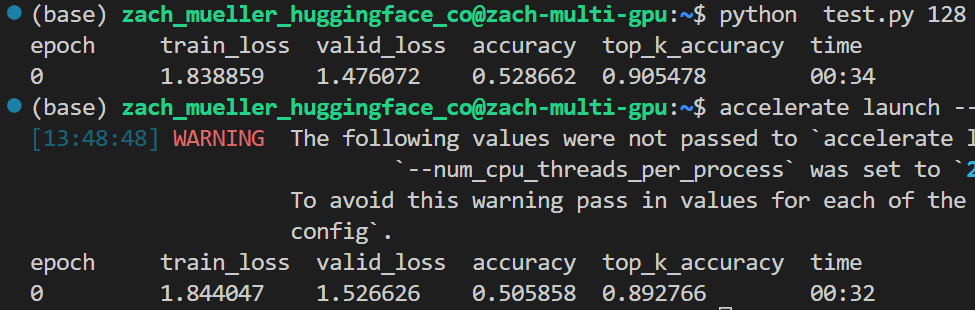
When benchmarking, it's very important to take into account the batch size. So if I test with a bs of 64 on two GPUs, I should test on a single GPU with a bs of 128, and you will get similar results:
I'll be writing a benchmarking doc on all of this soon :)