
splashr
 splashr copied to clipboard
 hrbrmstr
Error on Windows
Originally posted here https://stackoverflow.com/questions/47739932/r-splashr-error-on-windows
Hi, I'm trying to get Splashr working following this tutorial. https://rud.is/b/2017/02/09/diving-into-dynamic-website-content-with-splashr/
Ive installed Docker for windows successfully, Docker SDK for Python and (hopefully) the dependent Python packages. I've set the path for Python in System Variables and tried this R code with both Python 2.7 and 3.6 but get the same error:
library(splashr)
install_splash()
Error in py_call_impl(callable, dots$args, dots$keywords) : DockerException: Credentials store error: StoreError('Unexpected OS error "The handle is invalid", errno=9',)
Detailed traceback: File "C:\Python36\lib\site-packages\docker\api\image.py", line 381, in pull header = auth.get_config_header(self, registry) File "C:\Python36\lib\site-packages\docker\auth.py", line 50, in get_config_header authcfg = resolve_authconfig(client._auth_configs, registry) File "C:\Python36\lib\site-packages\docker\auth.py", line 97, in resolve_authconfig authconfig, registry, store_name File "C:\Python36\lib\site-packages\docker\auth.py", line 142, in _resolve_authconfig_credstore 'Credentials store error: {0}'.format(repr(e))
I'm using Windows 10 Pro Version 1703
R version 3.4.3
R Studio Version 1.1.383
Thanks in advance

I currently have splashr running on Windows 10 but I didn't use the install_splash function. Instead I installed Docker for Windows here and then installed the container from the command line as mentioned in the README:
docker pull scrapinghub/splash:3.0
docker run -p 5023:5023 -p 8050:8050 -p 8051:8051 scrapinghub/splash:3.0
Remove the sudo command as I did above and it all seems to work nicely.

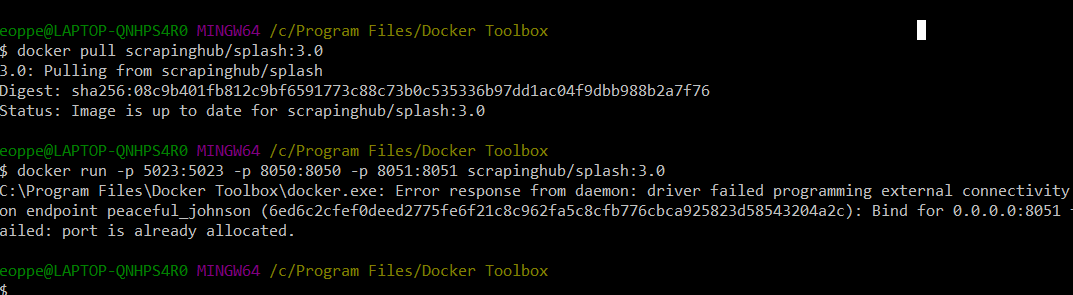
hey guys, on a semi-related note, do any of you understand what's going on here? I'm on windows 10 too, and I've gotten similar errors to @Symeboy and I haven't been able to fix it. Any ideas?
