
svelte-material-ui
 svelte-material-ui copied to clipboard
 hperrin
Menu & MenuSurface rendering issue
Describe the bug
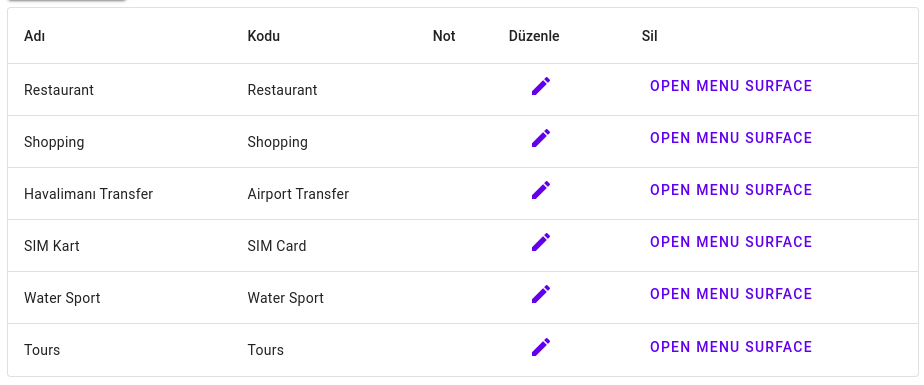
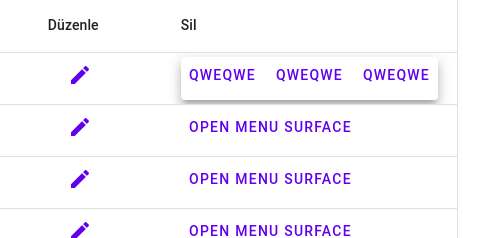
i dont really know if its really a bug. i wanted to use menu or menu surface on datatable with openable windows to select an action about whole row. like edit and delete. for that i wanted to use these. whenever i click on the button at the end of the row, menu pops out only on first row. its working but not in every row. buttons in rows only activates on first rows menu.
codes are exactly same as website.
<script lang="ts">
  import MenuSurface, { MenuSurfaceComponentDev } from '@smui/menu-surface';
  import Textfield from '@smui/textfield';
  import Button from '@smui/button';

  let surface: MenuSurfaceComponentDev;
  let name = '';
  let email = '';
</script>
<LayoutGrid>
  <Cell span={12}>
    <Button variant="raised" on:click={newSector}>Sectorler</Button>
    <DataTable
      stickyHeader
      bind:dataRows={datas}
      table$aria-label="Sector List"
      style="width: 100%;"
    >
      <Head>
        <Row>
          <CellX>Adı</CellX>
          <CellX>Kodu</CellX>
          <CellX>Not</CellX>
          <CellX>Düzenle</CellX>
          <CellX>Sil</CellX>
        </Row>
      </Head>
      <Body>
        {#each datas as data, index (index)}
          <Row>
            <CellX>
              {#if data.updated == true}
                <Icon
                  style="color:orange;vertical-align:middle"
                  class="material-icons">notifications</Icon
                >
              {:else if data.created == true}
                <Icon
                  style="color:green;vertical-align:middle"
                  class="material-icons">notifications</Icon
                >
              {/if}
              {data.name}
            </CellX>

            <CellX>{data.code}</CellX>
            <CellX>
              {data.note}
            </CellX>
            <CellX>
              <script>
              </script>
              <Button
                on:click={() => {
                  preparingEditSectorModal(data.id);
                }}
              >
                <Icon class="material-icons">edit</Icon>
              </Button></CellX
            >

            <CellX>
              <div
                class={Object.keys(anchorClasses).join(" ")}
                use:Anchor={{
                  addClass: (className) => {
                    if (!anchorClasses[className]) {
                      anchorClasses[className] = true;
                    }
                  },
                  removeClass: (className) => {
                    if (anchorClasses[className]) {
                      delete anchorClasses[className];
                      anchorClasses = anchorClasses;
                    }
                  },
                }}
                bind:this={anchor}
              >
                <Button
                  on:click={() => {
                    surface.setOpen(true);
                    console.log("qweqwe", event.currentTarget);
                  }}>Open Menu Surface</Button
                >
                <MenuSurface
                  bind:this={surface}
                  anchor={true}
                  bind:anchorElement={anchor}
                >
                  <Button>QWEQWE</Button>
                  <Button>QWEQWE</Button>
                  <Button>QWEQWE</Button>
                </MenuSurface>
              </div>
            </CellX>
          </Row>
        {/each}
      </Body>
    </DataTable>
  </Cell>
</LayoutGrid>
Expected behavior i expect to see a data rows with an action button at the end which contain edit, delete buttons in it. **Screen
Desktop (please complete the following information):
- OS: Manjaro Gnome
- Browser : Google Chrome, Chromium, Firefox, Brave
- Version: all latest
Additional context probably i have to render menu for every row. but i dont know. i couldnt find an information about it.

I have similar but more worst bug with anchor:
https://discord.com/channels/833139170703704115/1171451696031989781/1171451696031989781
