
operating-system
 operating-system copied to clipboard
 home-assistant
Virtualbox 6.1.32, EFI boot error
Describe the issue you are experiencing
I update to 7.4 and as had been the case lately, updates to new home assistant os versions crashes the virtualbox emulator.
I decided to update from 30 to 32 and was unable to boot at all.
I did a clean install of 7.4 and the issue remained. Downgrading virtualbox to .30 fixed the issue
Here's a photo of the issue

Now the system does keep booting. CPU usage on host is very high and the boot takes a very long time. Eventually giving this error
waiting for the home assistant cli to be ready Followed by Cannot connect to the docker daemon at Unix:///var/run/docker.sock. is the docker deamon running?
What operating system image do you use?
ova (for Virtual Machines)
What version of Home Assistant Operating System is installed?
7.4
Did you upgrade the Operating System.
No
Steps to reproduce the issue
- Install virtualbox 6.1.32
- Try booting an existing or new home assistant os. I tried 7.4, 7.3 and 6.x
- Booting will fail
...
Anything in the Supervisor logs that might be useful for us?
Can't get logs if you can't get to cli
Anything in the Host logs that might be useful for us?
N/a
System Health information
N/a
Additional information
I tried older versions to rule out the grub change being the cause

This sounds very much like #1705.
Downgrading virtualbox to .30 fixed the issue
Hm, so probably a VirtualBox issue then?


This sounds very much like #1705.
Downgrading virtualbox to .30 fixed the issue
Hm, so probably a VirtualBox issue then?
I don't see any of those rcu errors on my install.
There's definitely an incompatibility issue between virtualbox efi and home assistant EFI. The virtualbox changelog doesn't list anything about EFI
The virtualbox changelog doesn't list anything about EFI
Yet the VirtualBox downgrade fixes it? So there was a change then which influences it...
You can also give the latest HAOS 8.0 dev bulids a try, it is using the widely used GRUB EFI boot loader https://os-builds.home-assistant.io/8.0.dev20220302/
I encountered the same (failed to boot) trying to boot an .30 built HAOS VM on VirtualBox build .32 several weeks ago (was too lazy to debug too much). However I noticed each time I would try to reboot HA, I would get slightly different errors. On occasion HA would boot, but the UI was extremely sluggish and would always eventual lock up.
Downgrading VirtualBox back to build .30 fixed it.
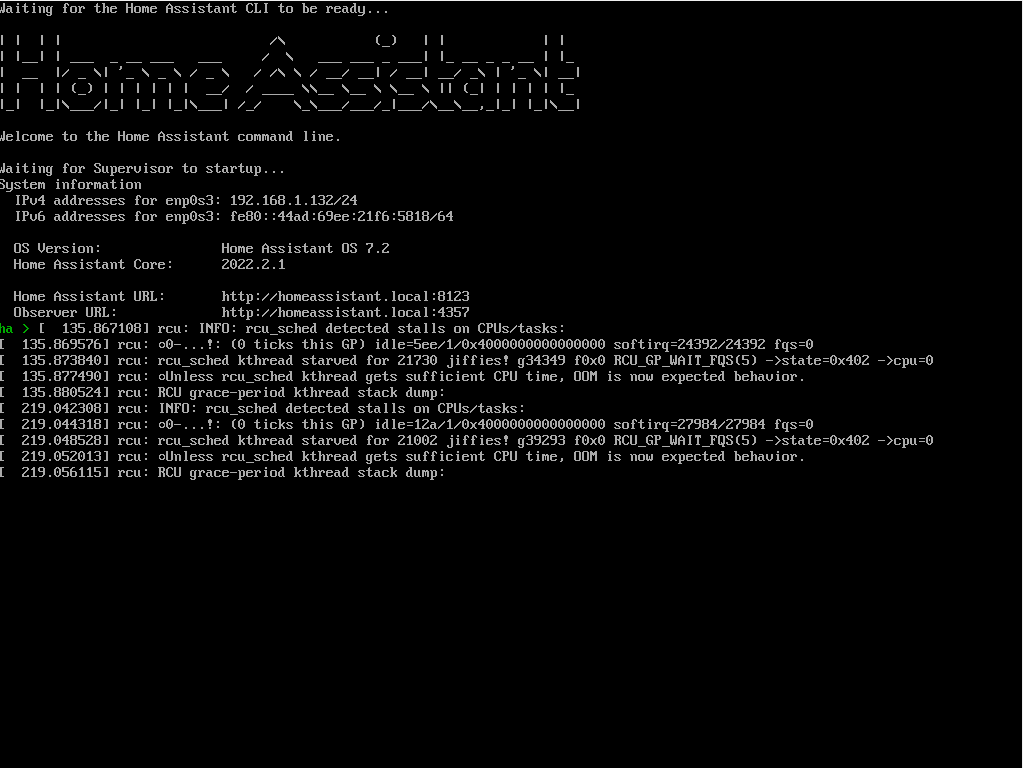

I can also confirm that virtualbox 6.1.32 caused HA to not boot. I was getting all sorts of errors but they all seemed to end in an rcu error and stalled CPU. Downgrading back to 6.1.30 fixed the issue

Just stumbled across this. HassVM would hang on boot, use excessive CPU, and would stop responding to pings with 6.1.32 and 6.1.34, downgrading to 6.1.30 worked.
The VM that I was trying to boot was at HassOS 7.4
Anyone have an issue at virtualbox.org to tie this to?
(Additional data points, I also had Fedora 29, Fedora 30, and RHEL 8 VMs lying around that I tested. Only Fedora 29 would boot without issue on VBox 6.1.34. RHEL 8 and Fedora 30 seemed to fail in the same way as the HassOS VM. Downgrading to 6.1.30 enabled them all to boot without issue. VBox 6.1.30 is from Nov. 2021. Things appear to have been broken since 6.1.32 released Jan 2022. I'm on a Windows 10 host, which has Hyper-V enabled.)

@rct I am not aware that somebody linked this to a VirtualBox issue, but I agree it should be. HAOS uses a rather vanilla upstream Linux kernel, so something which should run fine in VirtualBox. It seems to be machine/OS dependent, I can't reproduce the problem on Linux using latest VirtualBox on my AMD Ryzen machine.
If you can reproduce it, creating a VirtualBox issue and attach logs etc. would be highly appreciated.
same issue on VirtualBox 6.1.36. I tried both HA 8.1 and 8.4(latest). Both fail with failure to start the Docker Application container engine. I am running VirtualBox on ubuntu-2004-focal-v20220705.

There hasn't been any activity on this issue recently. To keep our backlog manageable we have to clean old issues, as many of them have already been resolved with the latest updates. Please make sure to update to the latest Home Assistant OS version and check if that solves the issue. Let us know if that works for you by adding a comment 👍 This issue has now been marked as stale and will be closed if no further activity occurs. Thank you for your contributions.
![github-actions[bot] avatar](https://avatars.githubusercontent.com/in/15368?v=4 "Published by a pub.dev verified publisher")
An FYI that I thought I posted. VirtualBox resolved the linked regression but I still had an HaOS VM that wouldn't no longer boot when HaOS tried to upgrade from 8.1 to 8.5.
I was finally able to resolve the issue by creating a new VM and reusing the same virtual disks (VDI files).
There were a few differences between the old VM, that would hang at docker application start as described above, and the new VM. The most obvious was the emulated disk controller and disks. Previously VirtualBox defaulted to an IDE setup, now it defaults to SATA/AHCI. There were a few other minor differences in the emulated hardware. I didn't go back and test which change fixed things.
There hasn't been any activity on this issue recently. To keep our backlog manageable we have to clean old issues, as many of them have already been resolved with the latest updates. Please make sure to update to the latest Home Assistant OS version and check if that solves the issue. Let us know if that works for you by adding a comment 👍 This issue has now been marked as stale and will be closed if no further activity occurs. Thank you for your contributions.
An FYI that I thought I posted. VirtualBox resolved the linked regression but I still had an HaOS VM that wouldn't no longer boot when HaOS tried to upgrade from 8.1 to 8.5.
I was finally able to resolve the issue by creating a new VM and reusing the same virtual disks (VDI files).
There were a few differences between the old VM, that would hang at docker application start as described above, and the new VM. The most obvious was the emulated disk controller and disks. Previously VirtualBox defaulted to an IDE setup, now it defaults to SATA/AHCI. There were a few other minor differences in the emulated hardware. I didn't go back and test which change fixed things.
So is this entirely fixed for you? Would it be possible to upgrade the VM while keeping all the data
There hasn't been any activity on this issue recently. To keep our backlog manageable we have to clean old issues, as many of them have already been resolved with the latest updates. Please make sure to update to the latest Home Assistant OS version and check if that solves the issue. Let us know if that works for you by adding a comment 👍 This issue has now been marked as stale and will be closed if no further activity occurs. Thank you for your contributions.
There hasn't been any activity on this issue recently. To keep our backlog manageable we have to clean old issues, as many of them have already been resolved with the latest updates. Please make sure to update to the latest Home Assistant OS version and check if that solves the issue. Let us know if that works for you by adding a comment 👍 This issue has now been marked as stale and will be closed if no further activity occurs. Thank you for your contributions.