
core
 core copied to clipboard
 home-assistant
Tesla PowerWall Integration Error
The problem
Hello, I have configured with success the PowerWall in HA with the Tesla integration but now won't work anymore.. If i try to access the PowerWall in chrome using the IP address of the gateway works well, but in HA i have this error:
Config entry 'Casa' for powerwall integration not ready yet: Powerwall is unreachable:
HTTPSConnectionPool(host='192.168.2.21', port=443): Max retries exceeded with url: /api/login/Basic (Caused by NewConnectionError('<urllib3.connection.HTTPSConnection object at 0x7ff7eb458130>:
Failed to establish a new connection: [Errno 113] Host is unreachable'));
Retrying in background
The IP is correct, the strange thing is that if i try to ping 192.168.2.21 i have this error (The same as the integration):
ping 192.168.2.21
PING 192.168.2.21 (192.168.2.21) 56(84) bytes of data.
From 192.168.2.14 icmp_seq=1 Destination Host Unreachable
From 192.168.2.14 icmp_seq=2 Destination Host Unreachable
From 192.168.2.14 icmp_seq=3 Destination Host Unreachable
But, as i have said before, if i try to acess via Chrome works well..
What version of Home Assistant Core has the issue?
2023.1.7
What was the last working version of Home Assistant Core?
No response
What type of installation are you running?
Home Assistant Supervised
Integration causing the issue
Tesla
Link to integration documentation on our website
https://www.home-assistant.io/integrations/powerwall/
Diagnostics information
home-assistant_powerwall_2023-01-23T10-47-32.242Z.log
Example YAML snippet
No response
Anything in the logs that might be useful for us?
No response
Additional information
No response

Hey there @bdraco, @jrester, mind taking a look at this issue as it has been labeled with an integration (powerwall) you are listed as a code owner for? Thanks!
Code owner commands
Code owners of powerwall can trigger bot actions by commenting:
@home-assistant closeCloses the issue.@home-assistant rename Awesome new titleChange the title of the issue.@home-assistant reopenReopen the issue.@home-assistant unassign powerwallRemoves the current integration label and assignees on the issue, add the integration domain after the command.
(message by CodeOwnersMention)
powerwall documentation powerwall source (message by IssueLinks)
![home-assistant[bot] avatar](https://avatars.githubusercontent.com/in/97978?v=4 "Published by a pub.dev verified publisher")
I had a similar issue yesterday after a few hours the powerwall came back online in home assistant.
I suspect some internal IP routing on the LAN.

I am also getting this issue occasionally (every 2 months). It is a lot less after your last update (late last year I think) when it was occurring every few weeks. I have the powerwall connected via ethernet since the wireless connection is unreliable. However, the "too many retries" error shows it was trying to re-connect to the wifi IP address. (I have reserved IP addresses for both the ethernet and wifi connections in my router). So it appears that in some circumstances, it is still reverting to connecting to the wifi connection or at least trying to. To solve the problem, I have to remove the Integration and add it back using the ethernet IP address. I did initially have it connected to the wifi IP address way back, so could it be that this IP address is still floating around somewhere and gets used if there is an interruption to the ethernet connection? Otherwise, I am not sure how it's re-finding the wifi address.

I'm also seeing similar issues. Had a Powerwall+ installed this week, connected it to my local network, and am constantly getting Host is down errors. Seems like it's probably a problem with the Powerwall itself and not HA.

I also just had a Powerwall+ installed and connected over wifi. It worked with this integration for a short while, perhaps 30 minutes, before getting the same error as described in this issue. Trying to connect with a browser said there is a timeout reaching the site. My router, a firewalla, said the device is offline.
I toggled the exterior power switch on the Powerwall+ and the web site is now reachable via a browser, though the suggestion of re-installing the Powerwall doesn't appear as a discovered integration in the HA integrations page., The firewalla says the device is online again, but there is almost no data going back and forth to Tesla, even though there were regular spikes in traffic before connecting this integration.
Perhaps the integration isn't properly using the web connections to the powerwall or isn't releasing them, using up all the connections in the powerwall's web server?

We are only using standard components to perform the HTTP requests and don't work with any low level connection primitives. This is all handled internally by the widely used python standard library. Also the error "Destination Host Unreachable" AFIK is an error from a routing devices, which indicates that the powerwall is not even online/connected. If the Webserver of the powerwall would be overloaded, I think you should see something like a "Connection Timeout". I would therefore not suspect any problems with connection clogging or something similar. My first suspection would be, that wherever your powerwall is installed, the WIFI connectivity is not ideal and that this causes the connection to fail sometimes. It would be great, if you can check this first and if it is not the problem we can continue the investigation into the powerwall integration.

Annoying follow-up of what worked to fix this for me. I had originally had my Powerwall+ connected to a dual 5Ghz/2.4Ghz SSID. Setting up a 2.4-only SSID and putting the Powerwall on that resolved all issues.
Hey,
Has there been any progress on this issue. I'm also having the same problem. I often occurs when Home Assistant is restarted and I'm unsure how previously I got things working again. I thought it might be by toggling the off/on switch on the Powerwall but that hasn't seemed to help. I've also previously avoided this problem by disabling the integration before any Home Assistant restart. But that's a work around and ofcourse sometimes I forget which is why I'm back in this situation.
Id be very grateful if a solution could be found for this problem. I'm also happy to work with you on logs etc. as required. Currently all the logs I have are:
- 2023-06-23 17:19:47.724 WARNING (MainThread) [homeassistant.config_entries] Config entry 'redact' for powerwall integration not ready yet: Powerwall is unreachable: HTTPSConnectionPool(host='192.168.1.45', port=443): Max retries exceeded with url: /api/login/Basic (Caused by NewConnectionError('<urllib3.connection.HTTPSConnection object at 0x7f8baaa410>: Failed to establish a new connection: [Errno 113] Host is unreachable')); Retrying in background
- 2023-06-23 17:31:12.780 WARNING (MainThread) [homeassistant.config_entries] Config entry 'redact' for powerwall integration not ready yet: Powerwall is unreachable: HTTPSConnectionPool(host='192.168.1.45', port=443): Max retries exceeded with url: /api/login/Basic (Caused by NewConnectionError('<urllib3.connection.HTTPSConnection object at 0x7f5b0d1490>: Failed to establish a new connection: [Errno 113] Host is unreachable')); Retrying in background
- 2023-06-23 17:39:03.884 WARNING (MainThread) [homeassistant.config_entries] Config entry 'redact' for powerwall integration not ready yet: Powerwall is unreachable: HTTPSConnectionPool(host='192.168.1.45', port=443): Max retries exceeded with url: /api/login/Basic (Caused by NewConnectionError('<urllib3.connection.HTTPSConnection object at 0x7f728a31d0>: Failed to establish a new connection: [Errno 113] Host is unreachable')); Retrying in background
- 2023-06-23 17:39:33.420 WARNING (MainThread) [homeassistant.config_entries] Config entry 'redact' for powerwall integration not ready yet: Powerwall is unreachable: HTTPSConnectionPool(host='192.168.1.45', port=443): Max retries exceeded with url: /api/login/Basic (Caused by NewConnectionError('<urllib3.connection.HTTPSConnection object at 0x7f554223d0>: Failed to establish a new connection: [Errno 113] Host is unreachable')); Retrying in background
I can see the IP address is correct and online via my PfSense router and I've also confirmed it by directly connecting to the Powerwall on 192.168.91.1 and checking against its mac address. Everything looks fine from that perspective.
Here's some images to help display the Powerwall is connected and online:

@bdraco do you know when you might have time to look at this issue? Much appreciated.
I have started having this issue as well. I used to have it intermittently (it would happen and then resolve after a few hours), but now it has been ongoing for 3 days. Had been working perfectly beyond that. Appears to be the exact same issue as others have described.
One datapoint that stuck out to me as odd: I am able to access the Powerwall through a browser and ping it on my own computers, but I am unable to ping it from my Home Assistant device (a HA Blue/Odroid N2+) using the terminal/SSH addon.
I tried removing the integration and re-adding it to see if that was the issue, but whenever I tried to re-add I would get a "failed to connect" error at the setup stage (when inputting IP address and password)

I also got this issue again yesterday. After restarting my Home Assistant multiple times over the last few weeks without issue. Yesterday I did an upgrade to some other integration which required a restart and that resulted in this same error once again.
In an attempt to get it working I usually try disabling the Tesla Powerwall integration for 24 hours before trying to enable it again. Doesn't always work, but it's the only method I have right now.
It's highly frustrating as it's destroying my energy tracking results.
I am also now having this issue -- Powerwall is cutting off intermittently, despite being able to access from the Tesla app and it being on my Wi-Fi with no problems.

Seems like its network issue on the powerwalls side, ive been struggling with this all week since updating to Supervisor 2023.8.03 restarts etc did nothing. to fix it i swapped the wifi network it was on via the app and rightaway HA connected to it and began getting stats. I'm guessing after a period of time the powerwalls websever stops accepting new connections for whatever reason and the change of SSID resets that.

I had the same issue trying to setup my powerwall integration today. Ping failed. Browser access via IP failed. Connected directly to GW2 via TEG wifi, clicked on Networks -> WiFi -> clicked on the EXISTING WiFi connection, then closed out of that dialog, then clicked on ReScan. And then ping, HA setup etc all worked. So not sure whether it was clicking on the existing Wifi connection or the re-scan but it started working without having to actually CHANGE the wifi network/SSID.

I had the same issue trying to setup my powerwall integration today. Ping failed. Browser access via IP failed. Connected directly to GW2 via TEG wifi, clicked on Networks -> WiFi -> clicked on the EXISTING WiFi connection, then closed out of that dialog, then clicked on ReScan. And then ping, HA setup etc all worked. So not sure whether it was clicking on the existing Wifi connection or the re-scan but it started working without having to actually CHANGE the wifi network/SSID.
This worked for me, all I did was clicked on the existing SSID. Thanks for the tip.

I had the same issue as reported above with similar logs. The PW2 is connected to the WiFi ok and is available in the Tesla App but not in HA, (or at least intermittently available). The problems seemed to start with an upgrade to H.A (individual app upgrade of Appdaemon in my case). I did a similar 'fix' to above by logging into TEG and deleting then re-establishing the WiFi connection. It has reconnected and I'll monitor to see if it remains stable.

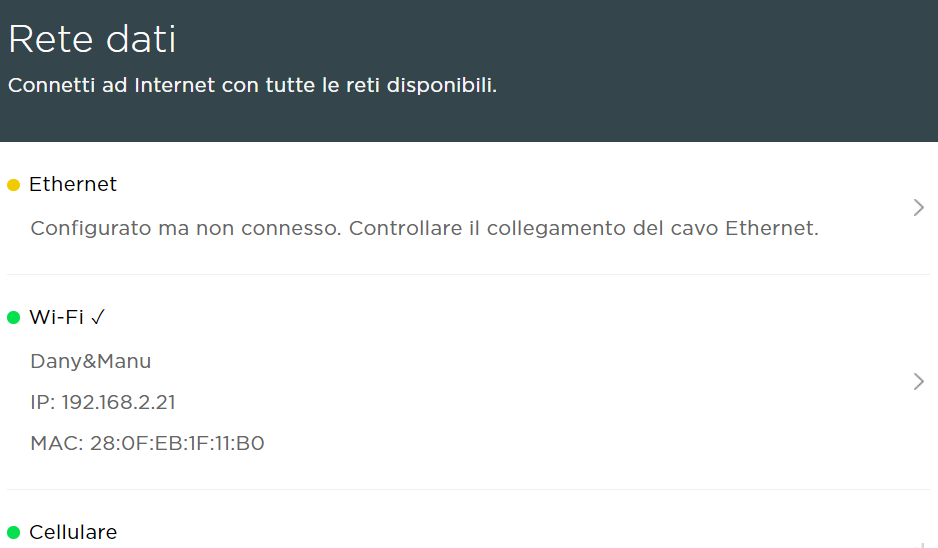
No, I'm still having connection problems. Started looking into this a bit further. Tried deleting the connection, both at the Tesla Powerwall and in the router - no change. I downloaded the Tesla pros app (official installer app) and looking at the networking section. This software also shows the "Cellular" connection and I can see that when the WiFi 'disconnects' the "tick" moves to the cellular connection, I guess as a fallback.
My WiFi connection is via a Unifi ssyetm with 3 AP's. The signal is poor for all 3 and so it roams around. I'm going to experiment with locking it to one AP and see if this helps.
Still periodically have this issue: changing WiFi connection with AP or Router do not change, randomly appear again and again... Could a wired connection using Ethernet solve it? The fact that is connected by Cellular can be a problem and maybe disconnecting it can solve the WiFi issue?

I moved to an ethernet only connection to the powerwall about a year ago and the frequency of this issue reduced dramatically (once every month or so). However, sometimes it would revert to the wifi connection and the error returned so I have blocked the wifi IP address from connecting to my local network (I have assigned static IP addresses to both the ethernet and wifi connections in my router). If you could work out how to remove previous wifi connection credentials from the powerwall setup then blocking it may not be required. When it fails, I usually just delete the integration in Home Assistant and re-add it again and everything works again. However, it just failed a few days ago while I was away and I tried this proceedure and the lovelace stuff has not come back.
Update: Apparently the latest version of the Powerwall integration has changed the entity names ending in " _now" to "_power" so I had to update all references to get it all working again.
Hi @peterhow11, thanks for the answer! I did the same two weeks ago, all seems ok so far and no more disconnection. Just a strange behave from login to PW2: it show Connected on Network but if I go inside I see on both Ethernet and Cellulare "Configured but not connected". I double check the Ethernet cable with a cable connection tester and it is ok and, more important, it work perfectly. Any idea about the strange message? I confirm that I delete the WiFi pairing so WiFi is now correctly "Not Connected".
So, apart that strange message, seems connection to Tesla is more reliable now!
There hasn't been any activity on this issue recently. Due to the high number of incoming GitHub notifications, we have to clean some of the old issues, as many of them have already been resolved with the latest updates. Please make sure to update to the latest Home Assistant version and check if that solves the issue. Let us know if that works for you by adding a comment 👍 This issue has now been marked as stale and will be closed if no further activity occurs. Thank you for your contributions.
![issue-triage-workflows[bot] avatar](https://avatars.githubusercontent.com/u/13844975?v=4 "Published by a pub.dev verified publisher")
For me solved "only" moving to physical connection via Ethernet, WiFi still unreliable and I will not use anymore in future. Thanks to @peterhow11 for his suggestion🥇
Hi there,
the best thing is to use the wired connection to communicate with the gateway. I do this way and I got no network problems.
Since the Tesla integration update, I have to notice there are login problems. I opened a new issue for this.
https://github.com/home-assistant/core/issues/110536
Anybody has this problem?
Alex

There hasn't been any activity on this issue recently. Due to the high number of incoming GitHub notifications, we have to clean some of the old issues, as many of them have already been resolved with the latest updates. Please make sure to update to the latest Home Assistant version and check if that solves the issue. Let us know if that works for you by adding a comment 👍 This issue has now been marked as stale and will be closed if no further activity occurs. Thank you for your contributions.