
core
 core copied to clipboard
 home-assistant
Withings Sleep Mat Sensor never available
The problem
After configuring my Withings Sleep mat within the Withings HealthMate app, creating a development account with Withings, adding a Personal App to Withings, getting my Client ID and Client Secret, and following the Withings integration setup instructions here --https://www.home-assistant.io/integrations/withings/ -- some data for the Withings integration import, but the binary sensor associated with my Sleep mat never becomes available. I have gotten into and out of bed to attempt to force the binary sensor to become available since I had seen that others had also had that sensor become available after getting into and out of bed.
I know that Withings is registering the "in bed" and "out of bed" times because I set up IFTTT to write new lines to a Google Sheet on updates, and those Sheets record all of my into and out of bed times.
To troubleshoot: I have deleted and added the integration many times. I have deleted the integration, removed the Sleep mat from my Withings, hard reset the Sleep mat, added the Sleep mat back to Withings, added the integration back to HA. All without any change in the binary sensors status.
What version of Home Assistant Core has the issue?
core-2022.3.7
What was the last working version of Home Assistant Core?
No response
What type of installation are you running?
Home Assistant OS
Integration causing the issue
Withings
Link to integration documentation on our website
No response
Diagnostics information
No response
Example YAML snippet
withings:
  client_id: !secret withings_id
  client_secret: !secret withings_secret
  use_webhook: true
Anything in the logs that might be useful for us?
Logger: homeassistant.components.withings
Source: components/withings/common.py:702
Integration: Withings (documentation, issues)
First occurred: 4:44:13 PM (1 occurrences)
Last logged: 4:44:13 PM

Unexpected error fetching subscription_update_coordinator data: Error code 293
Traceback (most recent call last):
  File "/usr/src/homeassistant/homeassistant/helpers/update_coordinator.py", line 187, in _async_refresh
    self.data = await self._async_update_data()
  File "/usr/src/homeassistant/homeassistant/helpers/update_coordinator.py", line 147, in _async_update_data
    return await self.update_method()
  File "/usr/src/homeassistant/homeassistant/components/withings/common.py", line 660, in async_subscribe_webhook
    return await self._do_retry(self._async_subscribe_webhook)
  File "/usr/src/homeassistant/homeassistant/components/withings/common.py", line 656, in _do_retry
    raise exception
  File "/usr/src/homeassistant/homeassistant/components/withings/common.py", line 649, in _do_retry
    return await func()
  File "/usr/src/homeassistant/homeassistant/components/withings/common.py", line 702, in _async_subscribe_webhook
    await self._hass.async_add_executor_job(
  File "/usr/local/lib/python3.9/concurrent/futures/thread.py", line 58, in run
    result = self.fn(*self.args, **self.kwargs)
  File "/usr/local/lib/python3.9/site-packages/withings_api/__init__.py", line 348, in notify_subscribe
    self.request(path=self.PATH_NOTIFY, params=params)
  File "/usr/local/lib/python3.9/site-packages/withings_api/__init__.py", line 115, in request
    return response_body_or_raise(
  File "/usr/local/lib/python3.9/site-packages/withings_api/common.py", line 830, in response_body_or_raise
    raise InvalidParamsException(status=status)
withings_api.common.InvalidParamsException: Error code 293
Additional information
No response

Hey there @vangorra, mind taking a look at this issue as it has been labeled with an integration (withings) you are listed as a code owner for? Thanks!
(message by CodeOwnersMention)
withings documentation withings source (message by IssueLinks)
![probot-home-assistant[bot] avatar](https://avatars.githubusercontent.com/in/36093?v=4 "Published by a pub.dev verified publisher")
Same here. Also did reconfigure, delete and added the webhooks in nabu casa config. No chance to get data when I sit on the sensor.

I, too, am also having this problem - coupled with the fact that it's constantly asking for reconfiguration.
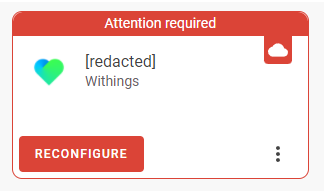
Running Home Assistant 2022.3.8

There is a beta out for testing which came as part of the last release, it is working for some but not all. I still get the re-auth prompt but it is still updating via the webhook so I ignore it. I get the following error which is what they are trying to resolve. https://github.com/home-assistant/core/issues/42717#event-6357691273
Logger: homeassistant.components.withings Source: components/withings/common.py:716 Integration: Withings (documentation, issues) First occurred: April 6, 2022, 8:14:41 PM (6 occurrences) Last logged: 6:15:43 AM
Unexpected error fetching subscription_update_coordinator data: Error code 401 Traceback (most recent call last): File "/usr/src/homeassistant/homeassistant/helpers/update_coordinator.py", line 190, in _async_refresh self.data = await self._async_update_data() File "/usr/src/homeassistant/homeassistant/helpers/update_coordinator.py", line 150, in _async_update_data return await self.update_method() File "/usr/src/homeassistant/homeassistant/components/withings/common.py", line 664, in async_subscribe_webhook return await self._do_retry(self._async_subscribe_webhook) File "/usr/src/homeassistant/homeassistant/components/withings/common.py", line 660, in _do_retry raise exception File "/usr/src/homeassistant/homeassistant/components/withings/common.py", line 649, in _do_retry return await func() File "/usr/src/homeassistant/homeassistant/components/withings/common.py", line 675, in _async_subscribe_webhook await self.async_unsubscribe_webhook() File "/usr/src/homeassistant/homeassistant/components/withings/common.py", line 712, in async_unsubscribe_webhook return await self._do_retry(self._async_unsubscribe_webhook) File "/usr/src/homeassistant/homeassistant/components/withings/common.py", line 660, in _do_retry raise exception File "/usr/src/homeassistant/homeassistant/components/withings/common.py", line 649, in _do_retry return await func() File "/usr/src/homeassistant/homeassistant/components/withings/common.py", line 716, in _async_unsubscribe_webhook response = await self._hass.async_add_executor_job(self._api.notify_list) File "/usr/local/lib/python3.9/concurrent/futures/thread.py", line 58, in run result = self.fn(*self.args, **self.kwargs) File "/usr/local/lib/python3.9/site-packages/withings_api/init.py", line 315, in notify_list return NotifyListResponse(**self.request(path=self.PATH_NOTIFY, params=params)) File "/usr/local/lib/python3.9/site-packages/withings_api/init.py", line 115, in request return response_body_or_raise( File "/usr/local/lib/python3.9/site-packages/withings_api/common.py", line 828, in response_body_or_raise raise AuthFailedException(status=status) withings_api.common.AuthFailedException: Error code 401

just wanted to update this is still happening for us as of 2022.4.5.
Looks like it is available for some time and then goes unavailable
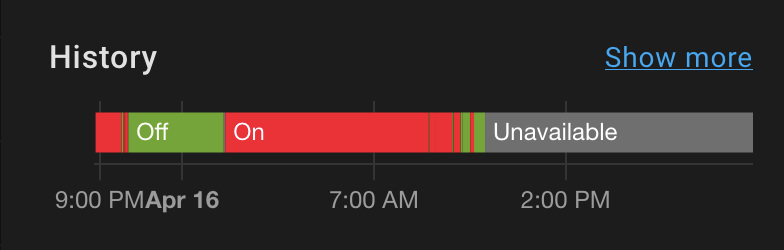
Not sure when the race condition fix will merge into main from dev, but wanted to let folks know the sleep sensor issue might still be happening.
Thanks for all your work on this awesome integration!

Yep, just setup this integration and having the same issue. All the sensor.withings_sleep_* sensors are disabled and the in bed sensor, which is the one I'm mostly interested in, is "unavailable".
Has anyone gotten these to work?

Yes, once you get into bed the sensor will activate and work. Once setup via the webhook it gets the feed from Withings. Just ignore the re-auth for now and it will work :)
Does it? I don't think so. I've configured may home assistant using nabu casa and opened the default ports on my router. Everything works fine except the "in bed" status. Also reconfigured it, deleted it, double checked the hook, jumped in my bed an waited some minutes. Nothing happened. Still unavailable.
So no.... Currently on my configuration it does not work.
Yea, for me all my withings_sleep_* sensors were disabled after the install. Re-enabling seems to work for everything except the binary_sensor.withings_in_bed_tony sensor which is shown as unavailable.

Yea, for me all my withings_sleep_* sensors were disabled after the install. Re-enabling seems to work for everything except the
binary_sensor.withings_in_bed_tonysensor which is shown as unavailable.
Yes mine does that too, but once I get into bed it then "enables" with the status detected. I have been using it like this for close to 2yrs. Then it holds its status, even though it will ask to re-auth but if you look a the integration further down the list it shows still active.
Yep, just setup this integration and having the same issue. All the sensor.withings_sleep_* sensors are disabled and the in bed sensor, which is the one I'm mostly interested in, is "unavailable".
Has anyone gotten these to work?
I have the exact same problem and am also most interested in the in bed status. It never becomes available. I've also tried enabling the other sleep sensors a few times but even though they don't show as unavailable, I never get any data.

any resolution to this issue yet. ive read somewhere it might be version issue whether got a European or US. im EU and not working.

There doesn't appear to be. I'm in the US, so that probably rules out that idea.
can't believe everything u read on internet i guess. why is it proving so difficult to get that one one sensor to work in HA as i can use it to trigger in IFTTT.
Forgive me if I am stating something obvious, but I suspect that Withings has made a modification to their API that reports the "in-bed"/"out-of-bed" statuses differently causing the "unavailable" status. @vangorra I have attempted connecting to the API using Postman, but I am very new to accessing APIs and have been unsuccessful.
I'll have a same issue. I noticed when i do reachability test for callback URL in withings dev portal it gives error.
Partner error: Callback URL test failed:[Partner error: Fail to connect to callback url:[https://XXX.ui.nabu.casa/auth/external/callback]]
Webhook is enabled from HA cloud settings and i can authorize HA to use withings data. Mayby withings expects something from HA to response for callback which it does not.
I have core 2022.5.4


I spoke to a support guy from Withings about this Callback URL Test. Apparently the callback URL you provide must be able to respond to POST and HEAD requests in under 2000ms (2 seconds).
I notice my /auth/external/callback URL gives a "method not supported" error when attempting to make a HTTP request with both POST and HEAD method types.

Just got my sensors today, configured exactly as specified in the docs, no matter how long I lay in bed, it will not report anything other than Unavailable. Fully updated HASS OS on a pi400. webhook true and enabled.

Yeah it’s not working for anyone. I’ve reverted to ifttt webhooks
On 17 Jul 2022, at 03:38, Pronown @.***> wrote:
Just got my sensors today, configured exactly as specified in the docs, no matter how long I lay in bed, it will not report anything other than Unavailable. Fully updated HASS OS on a pi400. webhook true and enabled.
— Reply to this email directly, view it on GitHub, or unsubscribe. You are receiving this because you are subscribed to this thread.

Mine is working fine, yes it shows unavailable sometimes but once you get into bed it activates. It has always done this, I have been using it now for over 3yrs.

Aw wow. I stand corrected!
On 17 Jul 2022, at 08:46, Patrick-UK @.***> wrote:
Mine is working fine, yes it shows unavailable sometimes but once you get into bed it activates. It has always done this, I have been using it now for over 3yrs.
— Reply to this email directly, view it on GitHub, or unsubscribe. You are receiving this because you are subscribed to this thread.
Aw wow. I stand corrected! … On 17 Jul 2022, at 08:46, Patrick-UK @.***> wrote: Mine is working fine, yes it shows unavailable sometimes but once you get into bed it activates. It has always done this, I have been using it now for over 3yrs. — Reply to this email directly, view it on GitHub, or unsubscribe. You are receiving this because you are subscribed to this thread.
Try getting into bed (normally only takes less than 10-15 sec to register), then check your logs in HA to see if it has registered your presence. I rely on it greatly for my night time automation, as it starts the put the house into night mode. So when it breaks it results in my largest routine breaking. I do have an override for that rare event with a button beside my bed to trigger. At first I thought there was something wrong with it always showing unavailable but then noticed once I got into bed it then springs into life. I have 2 mats setup and both do the same thing. Hope this makes sense :)
What exactly did you do to get it working? When I configure it I create an integration profile for the two i have linked in my withings account. I've configured the nabu casa web access and use home assistant without https. Did you configure some port forwarding on your router or something? I've added client id, secret and use_webhook to my configuration yaml.
What exactly did you do to get it working? When I configure it I create an integration profile for the two i have linked in my withings account. I've configured the nabu casa web access and use home assistant without https. Did you configure some port forwarding on your router or something? I've added client id, secret and use_webhook to my configuration yaml.
Mine was setup originally the old way in the config file, then when it moved to UI it imported it. I don't have use_webhook in my config. No port forwarding. Just using the the standard Nabu Cassa setup.
In the Withings developer portal does it pass the test when you test your callback url?
Use webhook - if set to true will get data every 120 mins but if not enables it will poll every 10mins. I suggest you set to false or remove from your config file and try that.
It doesn't let you add it now unless the check passes. Use Webhook is required if you don't want to wait 10 mins to know you're out of bed. I went to the IFTTT route as well for now. Just would be nice if it worked properly.
What about the callback url. In the "manual" page it says to enter "https://my.home-assistant.io/redirect/oauth", but I think most of it should be changed to the nabu casa url except the /redirect/oauth part. Am I right? But on both urls it says "Our servers couldn't reach this URL:"
So what do I do wrong?
Update: I did not read that I had to use the same url I used for configuration. So my new url is: https://xxxxx.ui.nabu.casa/auth/external/callback --> Answer: "Missing state parameter" When I click "Test" on the developer board, it still says its not reachable.
I am using https://xxxxx.ui.nabu.casa/auth/external/callback, in the dev portal with Withings it says failed when I just tested it. I have webhook disabled and I get updates pushed through in 15 secs of getting in or out of the bed. It must be something new at Withings end that is now failing that test, might explain why mine is working and a new setup isn't.
Maybe it has something to do with the region you are using it from? I am from Germany. As my callback URL says "missing state parameter" when I open it on my own, I expect that there is an auth service at the end. I have no idea why withings is not responding. Also I think the "https://my.home-assistant.io/redirect/oauth" is totally wrong. How should this local working adress be valid for an online hosted webservice.