
core
 core copied to clipboard
 home-assistant
Tuya - Status not updating
The problem
Clean install of home assistant container 2022.2.6 on docker. Added tuya addon and thats it.
Most of the time if i open a light the status never updates and Home assistant thinks it still closed. With the log at Diagnostics information
But sometime after a restart there is no errors and the status updates without problem. The fact im running a clean install and the fact the problem seems to follow the log means its most likely the problem.
What version of Home Assistant Core has the issue?
2022.2.6
What was the last working version of Home Assistant Core?
No response
What type of installation are you running?
Home Assistant Container
Integration causing the issue
Tuya
Link to integration documentation on our website
No response
Diagnostics information
Logger: root Source: /usr/src/homeassistant/homeassistant/bootstrap.py:319 First occurred: 3:23:49 PM (1 occurrences) Last logged: 3:23:49 PM
Uncaught thread exception Traceback (most recent call last): File "/usr/local/lib/python3.9/threading.py", line 973, in _bootstrap_inner self.run() File "/usr/local/lib/python3.9/site-packages/tuya_iot/openmq.py", line 158, in run self.__run_mqtt() File "/usr/local/lib/python3.9/site-packages/tuya_iot/openmq.py", line 172, in __run_mqtt mqttc = self._start(mq_config) File "/usr/local/lib/python3.9/site-packages/tuya_iot/openmq.py", line 192, in _start mqttc.connect(url.hostname, url.port) File "/usr/local/lib/python3.9/site-packages/paho/mqtt/client.py", line 914, in connect return self.reconnect() File "/usr/local/lib/python3.9/site-packages/paho/mqtt/client.py", line 1044, in reconnect sock = self._create_socket_connection() File "/usr/local/lib/python3.9/site-packages/paho/mqtt/client.py", line 3685, in _create_socket_connection return socket.create_connection(addr, timeout=self._connect_timeout, source_address=source) File "/usr/local/lib/python3.9/socket.py", line 823, in create_connection for res in getaddrinfo(host, port, 0, SOCK_STREAM): File "/usr/local/lib/python3.9/socket.py", line 954, in getaddrinfo for res in _socket.getaddrinfo(host, port, family, type, proto, flags): socket.gaierror: [Errno -3] Try again
Example YAML snippet
No response
Anything in the logs that might be useful for us?
No response
Additional information
No response

![probot-home-assistant[bot] avatar](https://avatars.githubusercontent.com/in/36093?v=4 "Published by a pub.dev verified publisher")
Hey there @tuya, @zlinoliver, @metisu, @frenck, mind taking a look at this issue as it has been labeled with an integration (tuya) you are listed as a code owner for? Thanks!
(message by CodeOwnersMention)
@qazinus i am having similar issues like you. There are also other people that are experiencing the same issue and the only very temporary solution is to restart your HA which is like a hack at best. I hope they will release a fix in 2022.03

I have same issue starting from december 2021. It was on each version...I created an issue for this topic but was automatically closed after few weeks.

I have the same issu, Tuya PIR sensor model without zigbbe is woriking OK, but zigbee motion PIR some time dont refresh the status, when i load configuration for tuya in Integration then is OK.

I am running HA 2021.12.10. I have a similar problem, reloading the integration will fix the problem, but after a while I'll have a similar problem again.

I have the same problem with tuya switches they will update the state in the android app perfectly but in HA sometimes they will, sometimes not.

Still not working on 2022.3.5 or even the latest 2022.4.0.dev20220317 pushed one hour ago.
Seems to be a common recurring issue with Tuya, so unlikely to be solvable by the HA team and more-so reliant on the Tuya servers to cooperate. It works occasionally, then doesn't again for a long time, seems to be no rhyme or reason to it but would love to know if there anything that could be done to stabilize it!

Still that suffering. It worked stably for a couple of weeks, and now I had to turn on the automation of restarting the integration again.

I just added Tuya integration. All devices are discovered by HomeAssistant. However, the on/off status is not working. When I turn the light on, it always change back to not on. I think the problem has to do with Update Device Status API where by default, it includes the led_type_1 value = "LED". However, the acceptable values are either "Incandescent" or "Halogen". This will cause an error "Params Range Invalid". When I manually set the led_type_1 value to either "Incandescent" or "Halogen", then then the action would work and the status update correctly.
Though I'm not how to fix this in HomeAssistant. Please help.
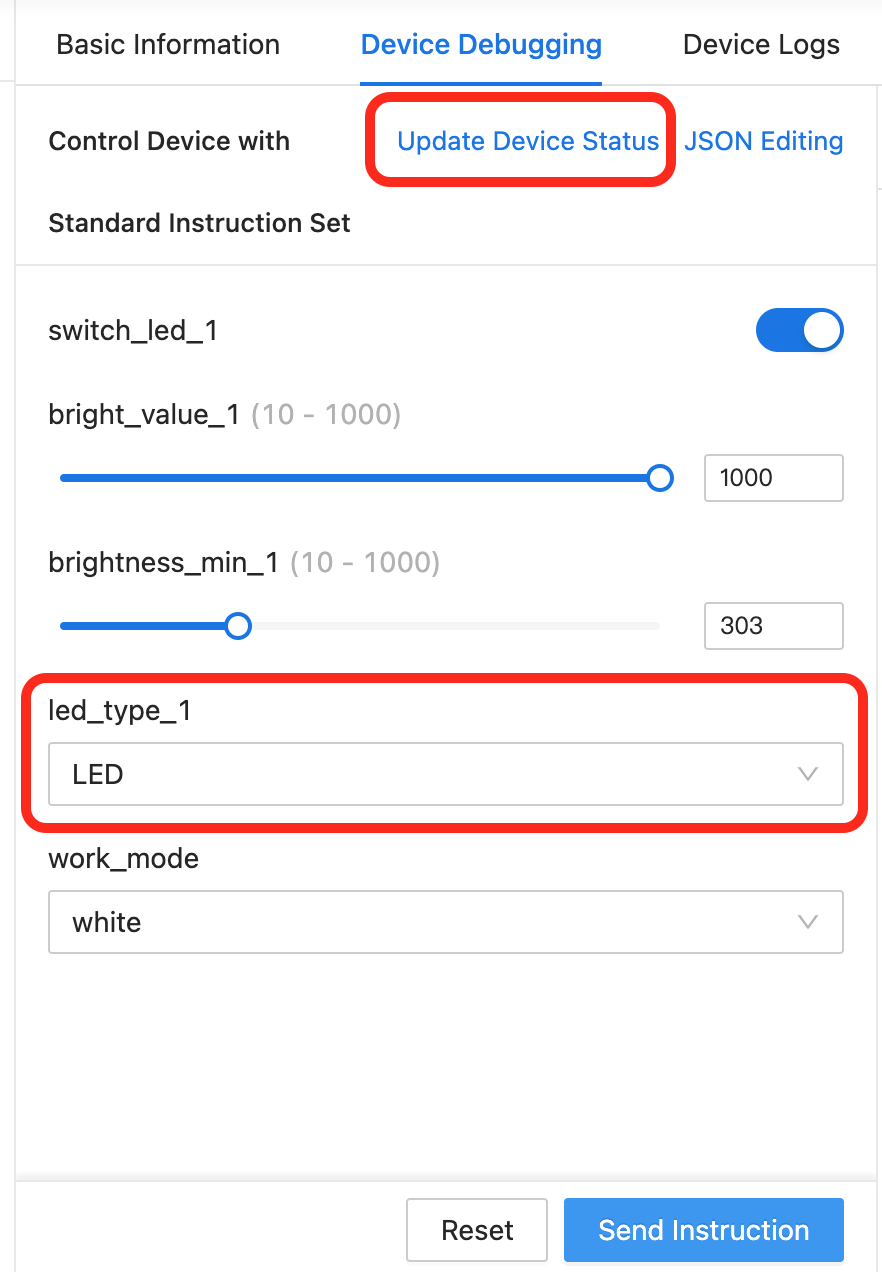

Does anyone have any idea how to fix this?
I dug through the code for the integration as well as the Tuya API docs, and everything seems to be calling just fine, seems to be the Tuya Cloud not sending out the status 'Push' updates to home assistant.
I'm going to look and see if I can implement a sort of polling code like the SharkIQ integration does for updates, maybe not as a replacement, but as a fail-over/fallback solution. The Tuya API has a method for this type of status request which should be easy enough to implement.
If anyone can accomplish this before I try my hand at it and see if it's a good possible addition or at least a temporary or documented mitigation, that would be great.
I have noticed sometimes the On and Off commands not just the status get lost between tuya and the device. Seems to be fairly consistant as of late.

Actually seems like homeassistant send comand to tuya only when status it's changed internally. When homeassistant see the light started, it can't start it. For me statuses are not updated, so sometimes lights remains in status open even if they ore closed...etc
I try to look for workaround but without succes. Probaby will be better to buy Sonoff devices. Those are working well.
Same problem. The integration is unstable. My boiler switch and consequent heating of the water is linked to this, it causes a lot of problems in my house. Anything I can do ?

Same problem. The integration is unstable. My boiler switch and consequent heating of the water is linked to this, it causes a lot of problems in my house. Anything I can do ?
Switch to Local_Tuys, I've moved all my switched and compatible devices over to it for reliability
I was thinking of this. Question, which devices are supported ? I have one boiler switch, a few motion- and door sensors.
I was thinking of this. Question, which devices are supported ? I have one boiler switch, a few motion- and door sensors.
https://github.com/rospogrigio/localtuya This is the repo for it, and lists everything compatible. Some things not listed work but it's definitely a YMMV on unsupported things. The thing is, if it doesn't work, you don't have to rebind or do any reconfiguring so you can try it no problems
@TheOneOgre I've been trying LocalTuya to work without success. It feels like the protocol isn't supported. So back to square 1.
I have a similar problem, reloading the integration will fix the problem, but after a while I'll have a similar problem again. Home Assistant 2022.4.7
:(


Not much help, but mine has been working for a few weeks now. I did have the auto reload of the integration going to bypass the problem but I turned that off weeks ago and it has been working fine, both for changes(switching) made from within ha, and externally elsewhere (eg:alexa) . I have no idea why some people are ok and some aren't.

Mine has been working for a while. Though tonight I added a few new devices and they were hit or miss in Hassio, I ended up logging into tuya IOT platform and just checked to see if the devices are there (they were) and ever since I did this they are working great. I know sounds like vodoo but I have no issues at the moment.

Located this thread after going through a lot of the older, closed ones. I just installed HA for the first time to the latest version yesterday. Finding the same issues as listed here, none of my Tuya switches/lights are accurately listing their states. They will send an ON or OFF signal, but the icon gets switched back to the prior state, even though the switch has been activated.
On an older thread, they talked about de-authorizing and reauthorizing the IOT + Device notification APIs. I tried that and it didn't work.
Hitting the "reload integration" for Tuya does nothing as well.
Seems like a lot of us are lost for any workable ideas.

I'm experiencing the same issue on an up to date HASS docker install. The last sign of activity is this error:
Logger: tuya_iot
Source: /usr/local/lib/python3.9/site-packages/tuya_iot/openmq.py:166
First occurred: 12:36:43 (2 occurrences)
Last logged: 14:35:44

error while get mqtt config
And then it stops responding. After a reload it starts working again, until the next time the error occurs.

Here's a workaround for folks affected by the issue, it does the job for me at least. Just replace the devices with your tuya device entities:
alias: Restart Tuya
description: ''
trigger:
  - platform: event
    event_type: system_log_event
condition:
  - condition: template
    value_template: '{{ ''mqtt'' in trigger.event.data.message[0] }}'
action:
  - service: homeassistant.reload_config_entry
    data: {}
    target:
      device_id:
        - <>
        - <>
mode: single
You also need to at this bit to your configuration.yaml and restart:
logger:
  default: info
  logs:
    tuya_iot: error
Also, it looks like there's a pattern in the integration failure, it fails every two hours for me:
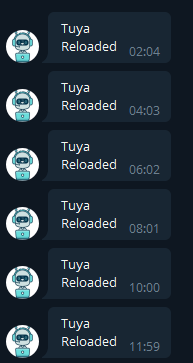
Here's a workaround for folks affected by the issue, it does the job for me at least. Just replace the devices with your tuya device entities:
alias: Restart Tuya
description: ''
trigger:
  - platform: event
    event_type: system_log_event
condition:
  - condition: template
    value_template: '{{ ''mqtt'' in trigger.event.data.message[0] }}'
action:
  - service: homeassistant.reload_config_entry
    data: {}
    target:
      device_id:
        - <>
        - <>
mode: single
You also need to at this bit to your configuration.yaml and restart:
logger:
  default: info
  logs:
    tuya_iot: error
Hi Strasharo In witch file did I put this lines ? Thanks JB

first one as Automation so automation.yaml second one to configuration.yaml
