
core
 core copied to clipboard
 home-assistant
Tado: Cannot control Tado Smart AC Control
The problem
I have a Tado Smart AC Control. I have disabled fallback mode.
Only two buttons on the Tado control in HA work - automatic schedule and power off.
All of the other controls do nothing (and changing the temperature does nothing). I have tested via the app and via my.tado.com. Controlling using these methods works as expected.
While the AC has been switched on using another method using the tado.set_climate_timer also does nothing when trying to change the temperature.
What version of Home Assistant Core has the issue?
2021.12.10
What was the last working version of Home Assistant Core?
Not known
What type of installation are you running?
Home Assistant OS
Integration causing the issue
Tado
Link to integration documentation on our website
https://www.home-assistant.io/integrations/tado/
Example YAML snippet
No response
Anything in the logs that might be useful for us?
No error is shown either in lovelace or logs.
Additional information
No response

Hey there @michaelarnauts, mind taking a look at this issue as it has been labeled with an integration (tado) you are listed as a code owner for? Thanks!
(message by CodeOwnersMention)
tado documentation tado source (message by IssueLinks)
![probot-home-assistant[bot] avatar](https://avatars.githubusercontent.com/in/36093?v=4 "Published by a pub.dev verified publisher")
I can't confirm because I don't know how to see what the precise JSON the Tado integration is sending is, but I believe I have narrowed down the possible cause.
I used the unofficial API guide published here: https://shkspr.mobi/blog/2019/02/tado-api-guide-updated-for-2019/
Using curl I was able to pull the states etc. but I was never able to turn on the airconditioning.
I then used the web interface and inspected the JSON it was sending and I received this:
{"termination":{"typeSkillBasedApp":"MANUAL"},"setting":{"fanLevel":"LEVEL1","verticalSwing":"OFF","horizontalSwing":"OFF","light":"OFF","mode":"FAN","type":"AIR_CONDITIONING","power":"ON"}}
Manually using curl to put this worked - however, leaving off any of these settings gave me a deny response (note, my airconditioning doesn't have a light and this command is meaningless but you send it anyway).
I note that in the control panel there is no setting for fan speed etc. I'd be content if for AC systems it set fanLevel to "AUTO" and left swings and lights off.
For completeness, here is a properly formed request to activate the AC on cooling mode:
{"termination":{"typeSkillBasedApp":"TIMER","durationInSeconds":7200},"setting":{"temperature":{"celsius":24,"fahrenheit":75.2},"fanLevel":"AUTO","verticalSwing":"OFF","horizontalSwing":"OFF","light":"OFF","mode":"COOL","type":"AIR_CONDITIONING","power":"ON"}}
The delete commands appear to work as per normal (which is why setting the a/c back to automatic and turning off via the control panel work).
Edit: On further inspection, it seems that you need to request GET capabilities for the zone e.g. https://my.tado.com/api/v2/homes/[insert home ID here]/zones/2/capabilities
For me this yields, this result (which allows you to properly send the correct PUT request:
{"type":"AIR_CONDITIONING","COOL":{"temperatures":{"celsius":{"min":17,"max":30,"step":1.0},"fahrenheit":{"min":63,"max":86,"step":1.0}},"fanLevel":["LEVEL1","LEVEL2","LEVEL3","AUTO"],"verticalSwing":["OFF","ON"],"horizontalSwing":["OFF","ON"],"light":["OFF","ON"]},"HEAT":{"temperatures":{"celsius":{"min":17,"max":30,"step":1.0},"fahrenheit":{"min":63,"max":86,"step":1.0}},"fanLevel":["LEVEL1","LEVEL2","LEVEL3","AUTO"],"verticalSwing":["OFF","ON"],"horizontalSwing":["OFF","ON"],"light":["OFF","ON"]},"DRY":{"temperatures":{"celsius":{"min":17,"max":30,"step":1.0},"fahrenheit":{"min":63,"max":86,"step":1.0}},"verticalSwing":["OFF","ON"],"horizontalSwing":["OFF","ON"],"light":["OFF","ON"]},"FAN":{"fanLevel":["LEVEL1","LEVEL2","LEVEL3","AUTO"],"verticalSwing":["OFF","ON"],"horizontalSwing":["OFF","ON"],"light":["OFF","ON"]},"AUTO":{"temperatures":{"celsius":{"min":17,"max":30,"step":1.0},"fahrenheit":{"min":63,"max":86,"step":1.0}},"verticalSwing":["OFF","ON"],"horizontalSwing":["OFF","ON"],"light":["OFF","ON"]},"initialStates":{"mode":"COOL","modes":{"COOL":{"temperature":{"celsius":24,"fahrenheit":75},"fanLevel":"LEVEL2","verticalSwing":"OFF","horizontalSwing":"OFF"},"HEAT":{"temperature":{"celsius":24,"fahrenheit":75},"fanLevel":"LEVEL2","verticalSwing":"OFF","horizontalSwing":"OFF"},"DRY":{"temperature":{"celsius":24,"fahrenheit":75},"verticalSwing":"OFF","horizontalSwing":"OFF"},"FAN":{"fanLevel":"LEVEL2","verticalSwing":"OFF","horizontalSwing":"OFF"},"AUTO":{"temperature":{"celsius":24,"fahrenheit":75},"verticalSwing":"OFF","horizontalSwing":"OFF"}},"light":"ON"}}
I have the same issue. However it seems to work via the node red tado plugin. Maybe something in the API changed?

Same issue here. Only two buttons on the Tado control in HA work, i.e. automatic schedule and power off.
EDIT: it seems to be the same issue also described in #51062.

I did some research too and I think the problem is on PyTado library. Is sending a payload with fanSpeed and swing instead of fanLevel and verticalSwing.
At least this is the issue for me with Tado Smart Control V3. There might be more things to consider, e.g: Dry mode requires a temperature and it seems the home assistant panel is not setting it with that mode.
https://github.com/wmalgadey/PyTado/blob/master/PyTado/interface.py#L358-L363

Hello @north3221, I see you've been doing some great stuff on the Tado integration lately, thanks! Any chance you could look into the issue discussed in this thread too? Apparently, it's a long-standing one (see also https://github.com/home-assistant/core/issues/51062).
I developed the Tado plugin for Homeseer and i am moving over my HA solution to homeassistant. I can provide assistance in this matter as my homeseer plugin works with v3, Let me know if there is any insight and assistance I can provide.

ok, I am pretty sure I know what the issue is with the AC, not all my modes on the capability such as heat and cool support swing, you are sending the swing command, you need to amend to review the capabilities and only if the mode supports swing should you even have the swing command in the json body. I examine the capabilities for all devices and only post if the properties exist in the capability. is this something you can fix? my python coding skills will need brushed up before I can jump in an do a pull request.
I have this problem as well, but in my case I have 4 AC controllers. 3 work fine. I recently bought a new one and that one has the problem descrbed above, only Auto or off, no actual control. Tado app works fine so it seems like it is a problem between HA and the Tado API. I just uninstalled and reinstalled the integration to see if that helped but it made no difference

100% it is in my case because my AC supports swing in Auto and Fan modes, but not in Heating/Cooling/Dry modes. I have reviewed the code and can see that you look for swing in capabilities and when found in the first list entry this is globally for all modes for the AC, as supportSwing is set. so the functions for Auto Fan and off commands work. but heating and cooling commands or temp changes in these modes are a no go as the command is sent that includes the swing and the tado API rejects it. i don't however see any failures in the logging.
The integration I made for HomeSeer I assessed each mode and checked if swing and fan modes are supported and has DrySwingSupported, HeatSwingSupported etc.. and checks the capability against the mode requested to check if I include the swing and fan in the Http Post JSON body. I can see how to fix, but I am far too new to home assistant to figure out how I can use and debug some code changes I make to test so I can submit a pull request. if anyone can give me a pointer on the easiest way to update and test/debug code for this from a forked repo i can most likely get this fixed soon enough.
@fuzzysb The proper way to fork and test is to set up a dev environment using visual studio code and dev container, see here.
I couldn't get that working for the dev I have done on Tado integration, so I usually just clone and stick my changes in custom_component folder so I can check they work (any integrations in there overwrite the official ones) NB you have to add a version to the manifest.

Great thanks @north3221 for the headstart on this. I will take a look in a couple of weeks after I have finished moving home and getting settled, but it's a great starter for 10
I am not sure its going to get fixed tbh, as I no longer need AC control in my new house I was going to take along my complete tado system, but the people purchasing the house wanted to retain the tado system. I have now upgraded to a Honeywell Evo Home system as i hear better things over tado for control especially around battery usage.
I am happy to volunteer as a tester if that could help. It would be a pity not to fix it for an integration that is used by 2.7% of active installations.
Happy to help test too with my Tado Smart AC Control V3+. With the Tado app, my AC supports Heating and Cooling just fine, so I could test both of those if it gets fixed in the HA integration.
Also see: https://github.com/home-assistant/home-assistant.io/issues/21831

I don't have AC so its really difficult for me to do anything here to help as I cant triage/test any changes... It would be useful if someone with the problem set up locally and raised a pr, as @fuzzysb was going to but given he no longer has ac either... anyone else?
From what @fuzzysb says above it looks like a change to HA integration needed, to check capability per mode rather than per device. However, reading the thread over here it seems @palazzem suggests here its an issue with PyTado in that if settemp isnt set then it doesnt send swing and fanspeed.
So based on this:
@fuzzysb is suggesting swing is being sent even on modes not supporting it but @palazzem is suggesting that swing is not being sent when it should be...
So even if I wanted to help, with no ac, no way of testing and not really clear which way round (or which lib) the problem is... I am a bit stuck
Anyone provide a bit of clarity on which way round the issue is and when it occurs/doesnt?
I am experiencing the same issue. Home Assistant 2022.4.3 core-2022.4.3 Tado Integration Mitshubishi Airco Tado V3+
Devices automatically discovered, fallback disabled, as instructed on similar issues. Tried one-block Smart Schedule in Tado, and Multiple block schedules as well.
Result: I can only Power On the aircon using the schedule button, and power it off. All else fails. Nothing specific in the logs. Tried re-adding Tado integration, reconnecting tado with aircon, and again re-adding Tado integration. All with no result.
@north3221 what information can I provide you with? Specific config files or anything?

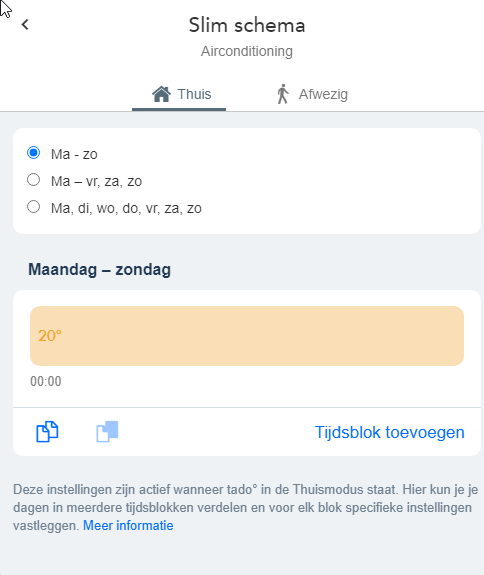
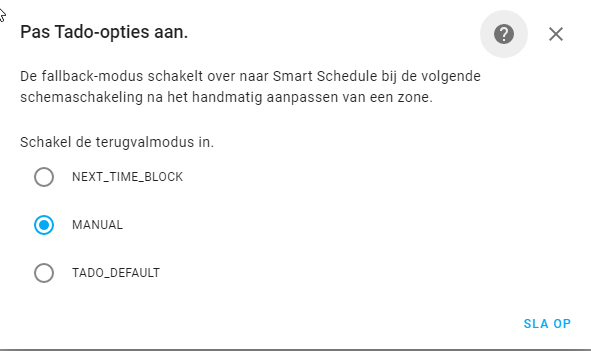

@north3221 I'd be more than happy to help you debug, as I've got 4 Tado Smart AC Control V3+ paired with two different types of Aermec A/C.
As reported by many, only two buttons on the Tado control in HA work - automatic schedule and power off.
I setup a local environment in Visual Studio Code with HA and the Tado integration. I'm way too new to touch the code but, if I knew how to do it, I could check what happens when any of the non-working buttons is pressed. However, I have no idea how to see/sniff what request is being sent out and what response Tado is returning.
If you could point me in the right direction and tell me how I can effectively support you in identifying the issue with my local environment, I'm available to perform multiple test cases and report the outcomes to you.
Many thanks!
I think I have an idea where the issue is coming from, but no idea how to resolve it. I have two different AC systems. The one in the house has 4 units and is working fine in Home assistant.

The one in the home office a single split unit and not working from Tado, although I think it did work when i used homekit integration.

The non working one has more options in TaDo it has swing on both directions but the working one only has up and down swing. Interestingly both have swing in both directions that can be controlled, but Tado doesn't seem to know it on the one that works.
In HA neither has option to set the swing, but I assume (and it was referenced above) that some swing messages are being sent but not enough for the ones with two options to understand what to do.

although I think it did work when i used homekit integration.
Can confirm I am currently using the homekit controller integrations as a temporary workaround in the meantime.
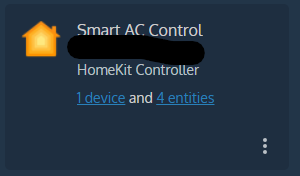
Please note: this gives minimal functionality (heat/ cool/ thermostat) but because of the limitations of homekit the other modes are not available (if your a/c supports it) like: manual fan speed control/ dry (humidity)/ fan only mode.
Wish my python skills were up to scratch otherwise I'd fix it myself.
Hello everyone, The issue is still present in version 2022.5.1. @north3221 (or whoever can take on the challenge) I reiterate my availability to debug and test a possible patch. Is there an easy way to see/sniff what request is being sent out by HA and what response Tado is returning? @illuzn I'm also relying on Homekit Controller as a workaround but, as you say, that means losing most of the functionalities.
Hi @MacrosorcH . Actually I did the investigation back in the days and by making the change I proposed here I made it work. I didn't make the change upstream, but if I get some validation within this group, I may get more confidence that I'm actually solving all the problems AC related (and not just a subset).
What I can do tomorrow, is posting here some instructions to validate the change, and see if the problem I was experiencing is the same you have (it may be not). Then if we get consensus that it works, I can work with the maintainer to make the change and update the version of PyTado for the next HA release.
If I can help with anything, testing or something else, please let me know, I would be happy to!
Hi @MacrosorcH and @Tom109123 . So I didn't find a really easy way to let you test the fix as everything installed in a production HA instance needs to be officially published, and I'm not the maintainer of python-tado so I can't make a dev release. I'm posting some manual steps here, but if you're not comfortable with the concepts I'm writing below, just tell me and I'll find a different approach.
I made a fork and published the change in this PR that does two things:
- Fixes the problem by setting
fanSpeedandswingif they are provided. This changed fixed entirely my issue, even though I don't know if you are experiencing the same problem as me. - Adds a debug log (actually it's an ERROR log that bubbles up to HA logs) we can use to triage your issue in case it persists.
In the meantime, I've reached out the latest PyTado maintainer to be sure this and other changes go upstream, otherwise we're a bit stuck.
[Edit: install instructions removed to avoid confusion, just follow this comment instead instead.
@MacrosorcH @Tom109123 I think I found a way to use a custom integration to override the python-tado dependency. It looks like custom components always take precedence over built-in integrations, so I may be capable to override the Tado integration entirely just to download a different version of python-tado.
Before following the steps above, let me try to use this cleaner approach (or just follow it if you think it's easy enough). I'll reach out to you in a few!
@MacrosorcH @Tom109123 I managed to find a clean way to try this change in your installation. Ignore any steps written above and just follow this one. TL;DR:
- I published a
python-tado-dev==0.13.0.dev1package that includes my change. It also has a different namespace (PyTadoDev) to avoid any version conflict with the official package. - I created a custom component that uses the new
PyTadoDevnamespace, and installspython-tado-devinstead of the official one.
Patch PyTado through a Custom Component
- Go to my release page and download one of the two archives you find in the page. I had to provide two custom integrations as in version
2022.5there is a breaking change I had to support, so pick the right version based on what version of HA you are using:
tado-integration-pre-2022.5.tar.gzif you are using any version before2022.5tado-integration-post-2022.5.tar.gzif you are using any version after2022.5
- Extract the archive in your
config/custom_componentsfolder, as you would do with any regular custom integration (you can find a lot of documentation if you are not familiar with this process). - Restart HA.
You don't need to do anything else, as my integration is a drop-in replacement of the built-in one. To uninstall my change simply remove config/custom_components/tado folder.
Debug the change
If everything goes well, you should not notice anything in particular. What you should do is use Tado integration without any extra config. When you start using it (dry mode, set cool temperature etc...) you should see these log lines in your HA logs:
2022-05-07 14:20:29 ERROR (SyncWorker_1) [PyTado.interface] {'type': 'MANUAL', 'setting': {'type': 'AIR_CONDITIONING', 'power': 'ON', 'mode': 'DRY', 'fanSpeed': 'AUTO', 'swing': 'OFF'}, 'termination': {'type': 'MANUAL', 'typeSkillBasedApp': 'MANUAL', 'projectedExpiry': None}}
Paste here every PyTado.interface log line so that I can take a look and triage the issue if it doesn't work. Note that you will see these log lines even if it works in which case you don't need to post anything. If it works I'm going to send this change upstream and ask the maintainer for a release.
Let me know how it goes!
Thanks a lot @palazzem!
Unfortunately, the patch does not seem to work for me. Here is the result of my first round of tests.
I installed tado-integration-post-2022.5.tar.gz because I am running 2022.5.2.
I tried hitting the following buttons:
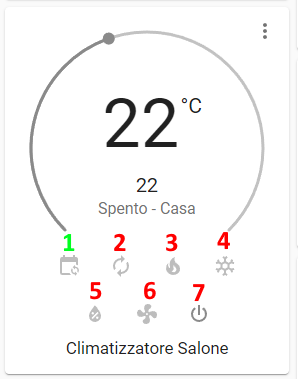
Except for button 1, that did not trigger any log entry, here are the messages I got for the other actions:
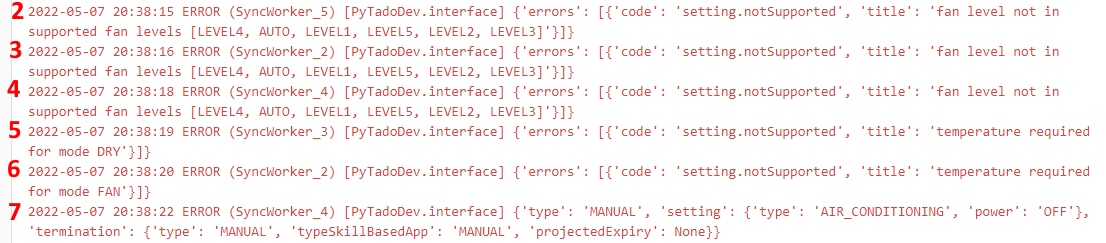
Note that the overall behavior has not changed, i.e. the only actions that work are 1 and 7 (although 1 does not trigger any log entry, while 7 does).
I'm pasting the log entries in text format too for ease of reference:
2022-05-07 20:38:15 ERROR (SyncWorker_5) [PyTadoDev.interface] {'errors': [{'code': 'setting.notSupported', 'title': 'fan level not in supported fan levels [LEVEL4, AUTO, LEVEL1, LEVEL5, LEVEL2, LEVEL3]'}]}
2022-05-07 20:38:16 ERROR (SyncWorker_2) [PyTadoDev.interface] {'errors': [{'code': 'setting.notSupported', 'title': 'fan level not in supported fan levels [LEVEL4, AUTO, LEVEL1, LEVEL5, LEVEL2, LEVEL3]'}]}
2022-05-07 20:38:18 ERROR (SyncWorker_4) [PyTadoDev.interface] {'errors': [{'code': 'setting.notSupported', 'title': 'fan level not in supported fan levels [LEVEL4, AUTO, LEVEL1, LEVEL5, LEVEL2, LEVEL3]'}]}
2022-05-07 20:38:19 ERROR (SyncWorker_3) [PyTadoDev.interface] {'errors': [{'code': 'setting.notSupported', 'title': 'temperature required for mode DRY'}]}
2022-05-07 20:38:20 ERROR (SyncWorker_2) [PyTadoDev.interface] {'errors': [{'code': 'setting.notSupported', 'title': 'temperature required for mode FAN'}]}
2022-05-07 20:38:22 ERROR (SyncWorker_4) [PyTadoDev.interface] {'type': 'MANUAL', 'setting': {'type': 'AIR_CONDITIONING', 'power': 'OFF'}, 'termination': {'type': 'MANUAL', 'typeSkillBasedApp': 'MANUAL', 'projectedExpiry': None}}
Any other scenario that you would like me to test? Please let me know how I can support you further.
Thanks again!