
a-shell
 a-shell copied to clipboard
 holzschu
Add ffmpeg
Would like to use this in conjunction with Siri Shortcuts to convert my gopro videos to smaller size on iPad given that iPad itself is pretty powerful.


Hi,
ffmpeg is now available as a binary to download. From here: https://github.com/holzschu/a-Shell-commands , download ffmpeg.wasm, place it in ~/Documents/bin and type ffmpeg on the command line.
It takes a lot of memory, so it might crash on smaller iPhones. Also it can take a long time to process a large video.


Yes, ffmpeg is a bit memory intensive (the binary itself is 87 MB), so just loading it in memory requires a powerful iPad, with few other memory-intensive apps running. After that, it can take a long time to complete the task, too.
When I ‘ls’ into ~/Documents/bin I get a no such document/directory error and when I try to mv the ffmpeg.wasm file into that directory I also get an error. Any ideas what I’m doing wrong? Thanks.
You might need to create the directory first if it doesn't exist, with mkdir.
Thanks! Got it working (didn’t need the “cd ~”). Unfortunately though, like one of the above posts, ffmpeg crashes when running it on my iPad and iPhone 7. Haven’t tried it with youtube-dl yet, which is mainly what I want it for.
Edit: Nice! ffmpeg works when youtube-dl calls it in the case that formats need to be merged.
I don't know what went wrong, but ffmpeg.wasm is 88 MB. If the file that was dowloaded is only 624 bytes, then something went wrong during the download. cat ~/Documents/bin/ffmpeg.wasm will probably tell you what.
Given that ffmpeg seems to be a popular use case for A-Shell, and is performance critical, is it possible to compile it natively as part of A-Shell itself, rather than a wasm binary?

Is it possible for ffmpeg.wasm to include encoders for h264 and h265? So far it's helpful for changing the file format, but it would be nice to re-encode videos to make them smaller.

Hi, the latest release of a-Shell has native ffmpeg, with hardware-accelerated h264 encoding. You will have to remove the webAssembly version in order to access the native version.
I installed latest version a-Shell on my iPad . How to remove FFmpeg web assembly version . I am a novice . Thanks in advance.

thanks . but it returned no file or directory .. need more clarification . i was in correct directory. home folder .
need clarification . does latest version by default come with two version of ffmpeg . ( native and wasm ) . i thought i should delete wasm version to access native . or have to delete wasm version only if i explicitly installed it in first place .
Latest version comes with only native ffmpeg. If you previously installed WebAssembly version of ffmpeg, it is in your homedirectory and has priority over the native App version. If you never installed it, you have nothing to do.
To check: type ffmpeg --help. If it takes several seconds to reply, it is the WebAssembly version. If it is very fast, it is the native version.
If you have the WebAssembly version, it has to be in the $PATH, so: ~/Library/bin or ~/Documents/bin.
ok thanks . so i tried executing this command .
$ ffmpeg -i q.mp4 -vcodec libx264 -acodec aac output.mp4
it says unknown encoder 'libx264' . but same thing worked in windows . ipad screen shot attached .
[](url
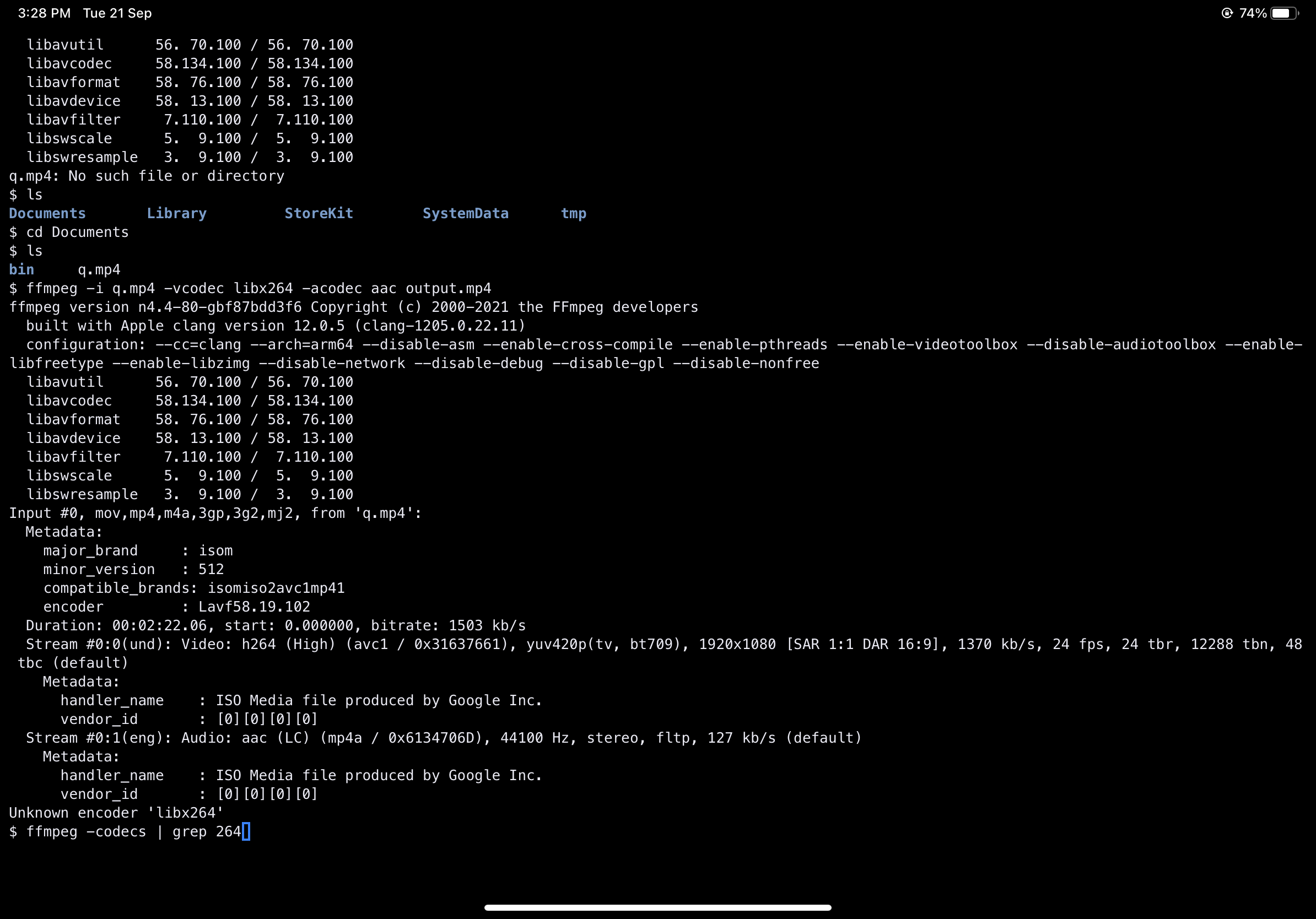 )
)
So, if it says --enable-videotoolbox, then it is the native version. I'm glad we settled this one.
Next, libx264 is a GPL library, so it is incompatible with AppStore distribution according to the FSF. You have to use the h264 codec, which also encodes to H264 format, but using native iOS libraries (also, ffmpeg is pretty good now at guessing the codec from file extensions, so you could just type ffmpeg -i q.mp4 output.mp4).
Latest version comes with only native ffmpeg. If you previously installed WebAssembly version of ffmpeg, it is in your homedirectory and has priority over the native App version. If you never installed it, you have nothing to do.
Where is the native ffmpeg location? I’m trying to use it with yt-dlp --ffmpeg-location option.

I don't understand why you would need to specifify the location of ffmpeg, since it is in the PATH, but it's in $APPDIR/bin/ffmpeg.
I was getting error with yt-dlp --embed-thumbnail, works perfectly now. Thanks!