
CopyQ
 CopyQ copied to clipboard
 hluk
hluk
"Open windows on current screen" does not appear to work on Linux + i3 wm
To Reproduce Steps to reproduce the behavior:
- Open CopyQ on left screen (via
copyq toggle) - Close CopyQ window
- Move focus to the right screen
- Open CopyQ again
Expected behavior
CopyQ should have opened on the right monitor that is currently focused.
Actual behavior
CopyQ opens on the same position that I closed it at, which means it opens on the left monitor.
Interestingly enough, it actually opens on the right monitor for a split second and then moves back to its previous position.
Version, OS and Environment
(Get details from copyq version command if possible.)
CopyQ Clipboard Manager 6.0.1
Qt: 5.15.2
KNotifications: 5.89.0
Compiler: GCC
Arch: x86_64-little_endian-lp64
OS: Manjaro Linux
- Desktop environment, window manager: i3 4.20.1

Can you start CopyQ with env COPYQ_LOG_LEVEL=DEBUG copyq and share the logs (you can retrieve them with copyq logs or F12 shortcut from the main window)?

Here https://privatebin.support-tools.com/?980465dc70be421d#vPYAv2FmGxltFuGJZoioJw9LBcUFC/sGAp+Gua8NSNM=
I've set CTRL+E for under mouse cursor.

@afro-coder Looks like you trigger "Show main window under mouse cursor" command which does not depend on the option "Open windows on current screen" but always opens main window under mouse pointer. Try assigning shortcut to "Show/hide main window" command instead.
I've set that option to CTRL+~ same issue :( see I tried with both now
DEBUG: Server "/home/leon/.config/copyq/.copyq_s" started. DEBUG: Geometry: Window "MainWindow": New geometry "Options/MainWindow_geometry": 645x421,637,329 -> 645x421,637,329 DEBUG: Focus window is "leon@afro-pc:/tmp" DEBUG: Loading configuration Warning: [default] QtWarning: QSystemTrayIcon::setVisible: No Icon set DEBUG: Configuration loaded DEBUG: Starting monitor DEBUG: Executing: copyq --clipboard-access monitorClipboard DEBUG: Starting callback: onStart DEBUG: Executing: copyq onStart DEBUG: Tab "&clipboard": Loading items DEBUG: Tab "&clipboard": 29 items loaded DEBUG: Executing: copyq eval -- runMenuCommandFilters() DEBUG: Focus window is "leon@afro-pc:/tmp" DEBUG: Executing: Command "Show/hide main window" DEBUG: Focus window is "leon@afro-pc:/tmp" DEBUG: Raising window "CopyQ" DEBUG: Geometry: Window "MainWindow": New geometry "Options/MainWindow_geometry": 645x421,637,329 -> 645x421,637,329 DEBUG: Saving items on application state change (2) DEBUG: Focus window is "leon@afro-pc:/tmp" DEBUG: Auto-hiding unfocused main window DEBUG: Focus window is "leon@afro-pc:/tmp" DEBUG: Executing: Command "Show/hide main window" DEBUG: Focus window is "Let's Encrypt SSL issues - Security - Cloudflare Community - Brave" DEBUG: Raising window "CopyQ" DEBUG: Geometry: Window "MainWindow": New geometry "Options/MainWindow_geometry_screen_1": 400x500,2680,290 -> 400x500,2680,290 DEBUG: Saving items on application state change (2) DEBUG: Focus window is "leon@afro-pc:/tmp" DEBUG: Auto-hiding unfocused main window DEBUG: Focus window is "leon@afro-pc:/tmp" DEBUG: Executing: Command "Show main window under mouse cursor" DEBUG: Geometry: Window "MainWindow": Geometry blocked until hidden: 1 DEBUG: Geometry: Window "MainWindow": Move window: 3231, 466 DEBUG: Focus window is "Let's Encrypt SSL issues - Security - Cloudflare Community - Brave" DEBUG: Raising window "CopyQ" DEBUG: Saving items on application state change (2) DEBUG: Focus window is "leon@afro-pc:/tmp" DEBUG: Auto-hiding unfocused main window DEBUG: Geometry: Window "MainWindow": Geometry blocked until hidden: 0 DEBUG: Focus window is "leon@afro-pc:/tmp" DEBUG: Executing: Command "Show main window under mouse cursor" DEBUG: Geometry: Window "MainWindow": Geometry blocked until hidden: 1 DEBUG: Geometry: Window "MainWindow": Move window: 257, 579 DEBUG: Focus window is "leon@afro-pc:/tmp" DEBUG: Raising window "CopyQ" DEBUG: Saving items on application state change (2) DEBUG: Focus window is "leon@afro-pc:/tmp" DEBUG: Auto-hiding unfocused main window DEBUG: Geometry: Window "MainWindow": Geometry blocked until hidden: 0 DEBUG: Focus window is "leon@afro-pc:/tmp" ^CDEBUG: Terminating application on signal. DEBUG: Closing server. DEBUG: Starting callback: onExit DEBUG: Executing: copyq onExit DEBUG: Waiting for callback to finish DEBUG: Monitor finished DEBUG: Starting monitor DEBUG: Executing: copyq --clipboard-access monitorClipboard DEBUG: Callback finished DEBUG: Monitor finished
When I open CopyQ, these two lines are printed in debug mode:
DEBUG: Raising window "CopyQ"
DEBUG: Geometry: Window "MainWindow": Restore geometry "Options/MainWindow_geometry_screen_1_2560x1440": 1291x879,3196,280 -> 1291x879,3264,307
Here are my steps:
- Start
copyqdaemon and keep it running in a terminal somewhere - Open CopyQ (via
copyq togglecommand) - Move it to the left monitor manually
- Close CopyQ window
- Move focus (either via mouse or via keyboard) to the right monitor
- Open CopyQ again (via
copyq togglecommand) - Copy Q will open wherever I left it on the left monitor, it will not move to the right monitor that is now focused.
Here are my steps:
1. Start  `copyq` daemon and keep it running in a terminal somewhere

2. Open CopyQ (via `copyq toggle` command)

3. Move it to the left monitor manually

4. Close CopyQ window

5. Move focus (either via mouse or via keyboard) to the right monitor

6. Open CopyQ again (via `copyq toggle` command)

7. Copy Q will open wherever I left it on the left monitor, it will not move to the right monitor that is now focused.
I think this is expected. Why move the window to left monitor (step number 3)? In such case, CopyQ would later expect that the window should open on the left monitor when the show action is triggered from the right one.
This also happens with step 3 left out (if CopyQ starts at the left monitor). I wanted to include that because you wanted more detailed description.
Also, I might want to move CopyQ temporarily sometimes (maybe to see what is behind it). That should not save its position permanently.
This used to work and it really helps when you have 2 monitors.
New to the whole screen rec let me know if the quality isn't good. https://user-images.githubusercontent.com/8469842/151310301-14d24397-112d-40b5-a85b-17747c3377d6.mp4
Debug log
DEBUG: Server "/home/leon/.config/copyq/.copyq_s" started.
DEBUG: Geometry: Window "MainWindow": New geometry "Options/MainWindow_geometry": 645x421,637,329 -> 645x421,637,329
DEBUG: Focus window is "leon@afro-pc:/home/leon"
DEBUG: Loading configuration
Warning: [default] QtWarning: QSystemTrayIcon::setVisible: No Icon set
DEBUG: Configuration loaded
DEBUG: Starting monitor
DEBUG: Executing: copyq --clipboard-access monitorClipboard
DEBUG: Starting callback: onStart
DEBUG: Executing: copyq onStart
DEBUG: Tab "&clipboard": Loading items
DEBUG: Tab "&clipboard": 0 items loaded
DEBUG: Executing: copyq eval -- runMenuCommandFilters()
DEBUG: Focus window is "leon@afro-pc:/home/leon"
DEBUG: Executing: Command "Show main window under mouse cursor"
DEBUG: Geometry: Window "MainWindow": Geometry blocked until hidden: 1
DEBUG: Geometry: Window "MainWindow": Move window: 690, 507
DEBUG: Focus window is "SimpleScreenRecorder"
DEBUG: Raising window "CopyQ"
DEBUG: Saving items on application state change (2)
DEBUG: Focus window is "SimpleScreenRecorder"
DEBUG: Auto-hiding unfocused main window
DEBUG: Geometry: Window "MainWindow": Geometry blocked until hidden: 0
DEBUG: Focus window is "SimpleScreenRecorder"
DEBUG: Executing: Command "Show main window under mouse cursor"
DEBUG: Geometry: Window "MainWindow": Geometry blocked until hidden: 1
DEBUG: Geometry: Window "MainWindow": Move window: 3148, 476
DEBUG: Focus window is "Using WP Mail SMTP to send Contact Form 7 emails - CF7 Skins Blog - Brave"
DEBUG: Raising window "CopyQ"
DEBUG: Saving items on application state change (2)
DEBUG: Focus window is "SimpleScreenRecorder"
DEBUG: Auto-hiding unfocused main window
DEBUG: Geometry: Window "MainWindow": Geometry blocked until hidden: 0
DEBUG: Focus window is "SimpleScreenRecorder"
DEBUG: Executing: Command "Show/hide main window"
DEBUG: Focus window is "Using WP Mail SMTP to send Contact Form 7 emails - CF7 Skins Blog - Brave"
DEBUG: Raising window "CopyQ"
DEBUG: Geometry: Window "MainWindow": New geometry "Options/MainWindow_geometry_screen_1": 400x500,2680,290 -> 400x500,2680,290
DEBUG: Saving items on application state change (2)
DEBUG: Focus window is "SimpleScreenRecorder"
DEBUG: Auto-hiding unfocused main window
DEBUG: Focus window is "SimpleScreenRecorder"
Thanks for sharing the recording.
The logs say New geometry... which indicates no previous window geometry has ever been stored. In such case it will reuse last known geometry.
Can you move the window manually (drag with mouse) to the correct workspace? Logs should say Save geometry... after it is moved and the window should open on given position next time.
I can do that by moving the clipboard, but it doesn't seem to remember the new position that is the mouse cursor
DEBUG: Executing: Command "Show main window under mouse cursor", this just moves it back to the last known location
Debug Logs
DEBUG: Server "/home/leon/.config/copyq/.copyq_s" started.
DEBUG: Geometry: Window "MainWindow": Restore geometry "Options/MainWindow_geometry": 645x421,637,329 -> 400x500,2722,388
DEBUG: Focus window is "leon@afro-pc:/home/leon"
DEBUG: Loading configuration
Warning: [default] QtWarning: QSystemTrayIcon::setVisible: No Icon set
DEBUG: Configuration loaded
DEBUG: Starting monitor
DEBUG: Executing: copyq --clipboard-access monitorClipboard
DEBUG: Starting callback: onStart
DEBUG: Executing: copyq onStart
DEBUG: Tab "&clipboard": Loading items
DEBUG: Tab "&clipboard": 76 items loaded
DEBUG: Executing: copyq eval -- runMenuCommandFilters()
DEBUG: Focus window is "leon@afro-pc:/home/leon"
DEBUG: Executing: Command "Show main window under mouse cursor"
DEBUG: Geometry: Window "MainWindow": Geometry blocked until hidden: 1
DEBUG: Geometry: Window "MainWindow": Move window: 675, 150
DEBUG: Focus window is "leon@afro-pc:/home/leon"
DEBUG: Raising window "CopyQ"
DEBUG: Saving items on application state change (2)
DEBUG: Focus window is "CopyQ"
DEBUG: Focus window is "CopyQ"
DEBUG: Saving items on application state change (2)
DEBUG: Focus window is "leon@afro-pc:/home/leon"
DEBUG: Auto-hiding unfocused main window
DEBUG: Geometry: Window "MainWindow": Geometry blocked until hidden: 0
DEBUG: Focus window is "leon@afro-pc:/home/leon"
DEBUG: Executing: Command "Show main window under mouse cursor"
DEBUG: Geometry: Window "MainWindow": Geometry blocked until hidden: 1
DEBUG: Geometry: Window "MainWindow": Move window: 1137, 410
DEBUG: Focus window is "leon@afro-pc:/home/leon"
DEBUG: Raising window "CopyQ"
DEBUG: Saving items on application state change (2)
DEBUG: Focus window is "leon@afro-pc:/home/leon"
DEBUG: Auto-hiding unfocused main window
DEBUG: Geometry: Window "MainWindow": Geometry blocked until hidden: 0
DEBUG: Focus window is "leon@afro-pc:/home/leon"
DEBUG: Executing: Command "Show main window under mouse cursor"
DEBUG: Geometry: Window "MainWindow": Geometry blocked until hidden: 1
DEBUG: Geometry: Window "MainWindow": Move window: 1324, 579
DEBUG: Focus window is "leon@afro-pc:/home/leon"
DEBUG: Raising window "CopyQ"
DEBUG: Executing: Command "Show/hide main window"
DEBUG: Geometry: Window "MainWindow": Geometry blocked until hidden: 0
DEBUG: Saving items on application state change (2)
DEBUG: Focus window is "Specifying sensitive data using Secrets Manager - Amazon Elastic Container Service - Brave"
DEBUG: Executing: Command "Show/hide main window"
DEBUG: Focus window is "Specifying sensitive data using Secrets Manager - Amazon Elastic Container Service - Brave"
DEBUG: Raising window "CopyQ"
DEBUG: Geometry: Window "MainWindow": Restore geometry "Options/MainWindow_geometry_screen_1_1920x1080": 400x500,2680,290 -> 400x500,2722,388
DEBUG: Saving items on application state change (2)
DEBUG: Focus window is "Specifying sensitive data using Secrets Manager - Amazon Elastic Container Service - Brave"
DEBUG: Auto-hiding unfocused main window
DEBUG: Focus window is "leon@afro-pc:/home/leon"
DEBUG: Executing: Command "Show/hide main window"
DEBUG: Focus window is "leon@afro-pc:/home/leon"
DEBUG: Raising window "CopyQ"
DEBUG: Geometry: Window "MainWindow": Restore geometry "Options/MainWindow_geometry": 400x500,760,290 -> 400x500,2722,388
DEBUG: Saving items on application state change (2)
DEBUG: Focus window is "Specifying sensitive data using Secrets Manager - Amazon Elastic Container Service - Brave"
DEBUG: Auto-hiding unfocused main window
DEBUG: Focus window is "leon@afro-pc:/home/leon"
DEBUG: Executing: Command "Show/hide main window"
DEBUG: Focus window is "leon@afro-pc:/home/leon"
DEBUG: Raising window "CopyQ"
DEBUG: Geometry: Window "MainWindow": Restore geometry "Options/MainWindow_geometry": 400x500,760,290 -> 400x500,2722,388
DEBUG: Saving items on application state change (2)
DEBUG: Focus window is "Specifying sensitive data using Secrets Manager - Amazon Elastic Container Service - Brave"
DEBUG: Auto-hiding unfocused main window
DEBUG: Focus window is "Specifying sensitive data using Secrets Manager - Amazon Elastic Container Service - Brave"
^CDEBUG: Terminating application on signal.
DEBUG: Closing server.
DEBUG: Starting callback: onExit
DEBUG: Executing: copyq onExit
DEBUG: Waiting for callback to finish
DEBUG: Callback finished
DEBUG: Monitor finishedDEBUG: Server "/home/leon/.config/copyq/.copyq_s" started.
DEBUG: Geometry: Window "MainWindow": Restore geometry "Options/MainWindow_geometry": 645x421,637,329 -> 400x500,2722,388
DEBUG: Focus window is "leon@afro-pc:/home/leon"
DEBUG: Loading configuration
Warning: [default] QtWarning: QSystemTrayIcon::setVisible: No Icon set
DEBUG: Configuration loaded
DEBUG: Starting monitor
DEBUG: Executing: copyq --clipboard-access monitorClipboard
DEBUG: Starting callback: onStart
DEBUG: Executing: copyq onStart
DEBUG: Tab "&clipboard": Loading items
DEBUG: Tab "&clipboard": 76 items loaded
DEBUG: Executing: copyq eval -- runMenuCommandFilters()
DEBUG: Focus window is "leon@afro-pc:/home/leon"
DEBUG: Executing: Command "Show main window under mouse cursor"
DEBUG: Geometry: Window "MainWindow": Geometry blocked until hidden: 1
DEBUG: Geometry: Window "MainWindow": Move window: 675, 150
DEBUG: Focus window is "leon@afro-pc:/home/leon"
DEBUG: Raising window "CopyQ"
DEBUG: Saving items on application state change (2)
DEBUG: Focus window is "CopyQ"
DEBUG: Focus window is "CopyQ"
DEBUG: Saving items on application state change (2)
DEBUG: Focus window is "leon@afro-pc:/home/leon"
DEBUG: Auto-hiding unfocused main window
DEBUG: Geometry: Window "MainWindow": Geometry blocked until hidden: 0
DEBUG: Focus window is "leon@afro-pc:/home/leon"
DEBUG: Executing: Command "Show main window under mouse cursor"
DEBUG: Geometry: Window "MainWindow": Geometry blocked until hidden: 1
DEBUG: Geometry: Window "MainWindow": Move window: 1137, 410
DEBUG: Focus window is "leon@afro-pc:/home/leon"
DEBUG: Raising window "CopyQ"
DEBUG: Saving items on application state change (2)
DEBUG: Focus window is "leon@afro-pc:/home/leon"
DEBUG: Auto-hiding unfocused main window
DEBUG: Geometry: Window "MainWindow": Geometry blocked until hidden: 0
DEBUG: Focus window is "leon@afro-pc:/home/leon"
DEBUG: Executing: Command "Show main window under mouse cursor"
DEBUG: Geometry: Window "MainWindow": Geometry blocked until hidden: 1
DEBUG: Geometry: Window "MainWindow": Move window: 1324, 579
DEBUG: Focus window is "leon@afro-pc:/home/leon"
DEBUG: Raising window "CopyQ"
DEBUG: Executing: Command "Show/hide main window"
DEBUG: Geometry: Window "MainWindow": Geometry blocked until hidden: 0
DEBUG: Saving items on application state change (2)
DEBUG: Focus window is "Specifying sensitive data using Secrets Manager - Amazon Elastic Container Service - Brave"
DEBUG: Executing: Command "Show/hide main window"
DEBUG: Focus window is "Specifying sensitive data using Secrets Manager - Amazon Elastic Container Service - Brave"
DEBUG: Raising window "CopyQ"
DEBUG: Geometry: Window "MainWindow": Restore geometry "Options/MainWindow_geometry_screen_1_1920x1080": 400x500,2680,290 -> 400x500,2722,388
DEBUG: Saving items on application state change (2)
DEBUG: Focus window is "Specifying sensitive data using Secrets Manager - Amazon Elastic Container Service - Brave"
DEBUG: Auto-hiding unfocused main window
DEBUG: Focus window is "leon@afro-pc:/home/leon"
DEBUG: Executing: Command "Show/hide main window"
DEBUG: Focus window is "leon@afro-pc:/home/leon"
DEBUG: Raising window "CopyQ"
DEBUG: Geometry: Window "MainWindow": Restore geometry "Options/MainWindow_geometry": 400x500,760,290 -> 400x500,2722,388
DEBUG: Saving items on application state change (2)
DEBUG: Focus window is "Specifying sensitive data using Secrets Manager - Amazon Elastic Container Service - Brave"
DEBUG: Auto-hiding unfocused main window
DEBUG: Focus window is "leon@afro-pc:/home/leon"
DEBUG: Executing: Command "Show/hide main window"
DEBUG: Focus window is "leon@afro-pc:/home/leon"
DEBUG: Raising window "CopyQ"
DEBUG: Geometry: Window "MainWindow": Restore geometry "Options/MainWindow_geometry": 400x500,760,290 -> 400x500,2722,388
DEBUG: Saving items on application state change (2)
DEBUG: Focus window is "Specifying sensitive data using Secrets Manager - Amazon Elastic Container Service - Brave"
DEBUG: Auto-hiding unfocused main window
DEBUG: Focus window is "Specifying sensitive data using Secrets Manager - Amazon Elastic Container Service - Brave"
^CDEBUG: Terminating application on signal.
DEBUG: Closing server.
DEBUG: Starting callback: onExit
DEBUG: Executing: copyq onExit
DEBUG: Waiting for callback to finish
DEBUG: Callback finished
DEBUG: Monitor finished
https://user-images.githubusercontent.com/8469842/151522696-24216422-40e0-4bf6-8e52-78a659354a91.mp4
Oh, the geometry won't be stored when the window is moved if it has been opened with "Show main window under mouse cursor" command.
The behavior is quite complex but I was expecting users to use either one of the Show commands exclusively. :)
The workaround would be:
- Trigger "Show/hide main window" command.
- Move window to desired position on the current screen.
At this point the geometry would be saved and when you trigger the command again on the same screen it would reappear with this last set position (which would be different from "Show main window under mouse cursor" position from now onward).
Here is my recording. Left two terminals are on the left monitor, rightmost terminal is on the right monitor.
https://user-images.githubusercontent.com/507922/151689945-b1573185-b77c-4494-9125-d494384c9692.mp4
You can see logs on the leftmost terminal. I close copyQ with escape key (and I don't move the window around at all).
Oh, the geometry won't be stored when the window is moved if it has been opened with "Show main window under mouse cursor" command.
The behavior is quite complex but I was expecting users to use either one of the Show commands exclusively. :)
The workaround would be:
- Trigger "Show/hide main window" command.
- Move window to desired position on the current screen.
At this point the geometry would be saved and when you trigger the command again on the same screen it would reappear with this last set position (which would be different from "Show main window under mouse cursor" position from now onward).
oh alright, no worries but then can you please let me know what the shortcut " Open window under mouse cursor" is actually doing? I'm using two different commands moving the clipboard across screens seems a bit weird is there any way we can help with this, like the use case is when I'm working on screen 1 I open the clipboard there but when I need it on screen 2 it pulls my mouse cursor back to screen 1
oh alright, no worries but then can you please let me know what the shortcut " Open window under mouse cursor" is actually doing?
"Show main window under mouse cursor" opens main window under mouse pointer but blocks storing window geometry until the window is closed.
I checked both recordings with the logs again, and it seems that i3 is ignoring further window positions set by the app and just opens the window on its initial position (or last position set manually).
Can you test copyq showAt 0 0 vs copyq showAt 500 500? Do they show main window on different positions (indicated by command line arguments)?
Can you also disable "Open windows on current screen" option (in General config tab) to see if it changes anything?
BTW, if anyone is interested, the code that does most of the geometry restoring magic is here: https://github.com/hluk/CopyQ/blob/ff4f670588df9ae15bd6d86c3f49cdd28aea5cd8/src/common/config.cpp#L228-L268
So in the end I tested couple of things under i3 and the best behavior was to increase delay before restoring geometry, here: https://github.com/hluk/CopyQ/blob/ff4f670588df9ae15bd6d86c3f49cdd28aea5cd8/src/gui/windowgeometryguard.cpp#L90
Unfortunately, depending on the delay, the window visibly jumps from the position restored by i3.
I wonder if there is a simple way to destroy the old window and create it again (if Qt framework supports this).
BTW, workaround to disable the geometry restoring and leave it to window manager is to use the following command and restart the app:
copyq config restore_geometry false
Sadly this didn't work for me no clue I'm also on i3wm @hluk did this work on i3 for you? if so maybe something is wrong with my system :(
Can you test copyq showAt 0 0 vs copyq showAt 500 500? Do they show main window on different positions (indicated by command line arguments)?
Opens at the same position
Sadly this didn't work for me no clue I'm also on i3wm @hluk did this work on i3 for you? if so maybe something is wrong with my system :(
The command only disables the geometry restoring on application side - i3 would still set the position. Using "Show main window under mouse cursor" probably won't work if the showAt commands do not work.
Not sure if this was mentioned earlier. This is how it works for me now.
Disable the Shortcuts from copyq prefs.
In i3wm config
bindsym ctrl+e exec copyq toggle
I'm trying to improve the window-geometry-restore behavior in fc307126c9cfd165222f0d598abae53332162e81.
Oh, I'm so sorry, thanks for taking the time to improve this!
On Sat, Feb 26, 2022 at 10:04 PM Lukas Holecek @.***> wrote:
I'm trying to improve the window-geometry-restore behavior in fc30712 https://github.com/hluk/CopyQ/commit/fc307126c9cfd165222f0d598abae53332162e81 .
— Reply to this email directly, view it on GitHub https://github.com/hluk/CopyQ/issues/1886#issuecomment-1052284376, or unsubscribe https://github.com/notifications/unsubscribe-auth/ACAT2URBMERP4JR22UX6NI3U5D6KPANCNFSM5MUN4TUA . Triage notifications on the go with GitHub Mobile for iOS https://apps.apple.com/app/apple-store/id1477376905?ct=notification-email&mt=8&pt=524675 or Android https://play.google.com/store/apps/details?id=com.github.android&referrer=utm_campaign%3Dnotification-email%26utm_medium%3Demail%26utm_source%3Dgithub.
You are receiving this because you were mentioned.Message ID: @.***>
@afro-coder It doesn't work with
bindsym ctrl+e exec copyq toggle
I appreciate work being done on this..

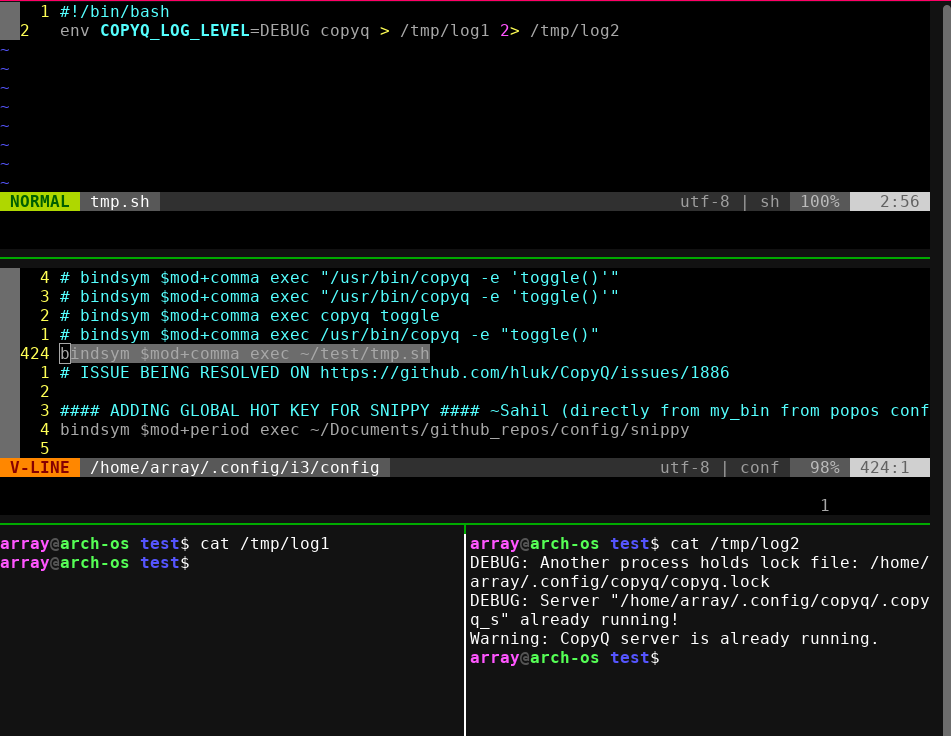
Hey @sahilrajput03, can you please post the debug mode output? Also, what doesn't work?
Can you start CopyQ with
env COPYQ_LOG_LEVEL=DEBUG copyqand share the logs (you can retrieve them withcopyq logsor F12 shortcut from the main window)?
Also, try disabling the shortcut from within the application
@afro-coder It works now!! THANKS I think restarting my computer fixed something behind the screen. Thanks a lot @afro-coder I appreciate your interest.!