
ICNet-tensorflow
 ICNet-tensorflow copied to clipboard
 hellochick
Training on Cityscapes and Predict result worse
This is what I got, really bad result, the car can not segment out. I have trained with pretuned model about 4750 epochs.
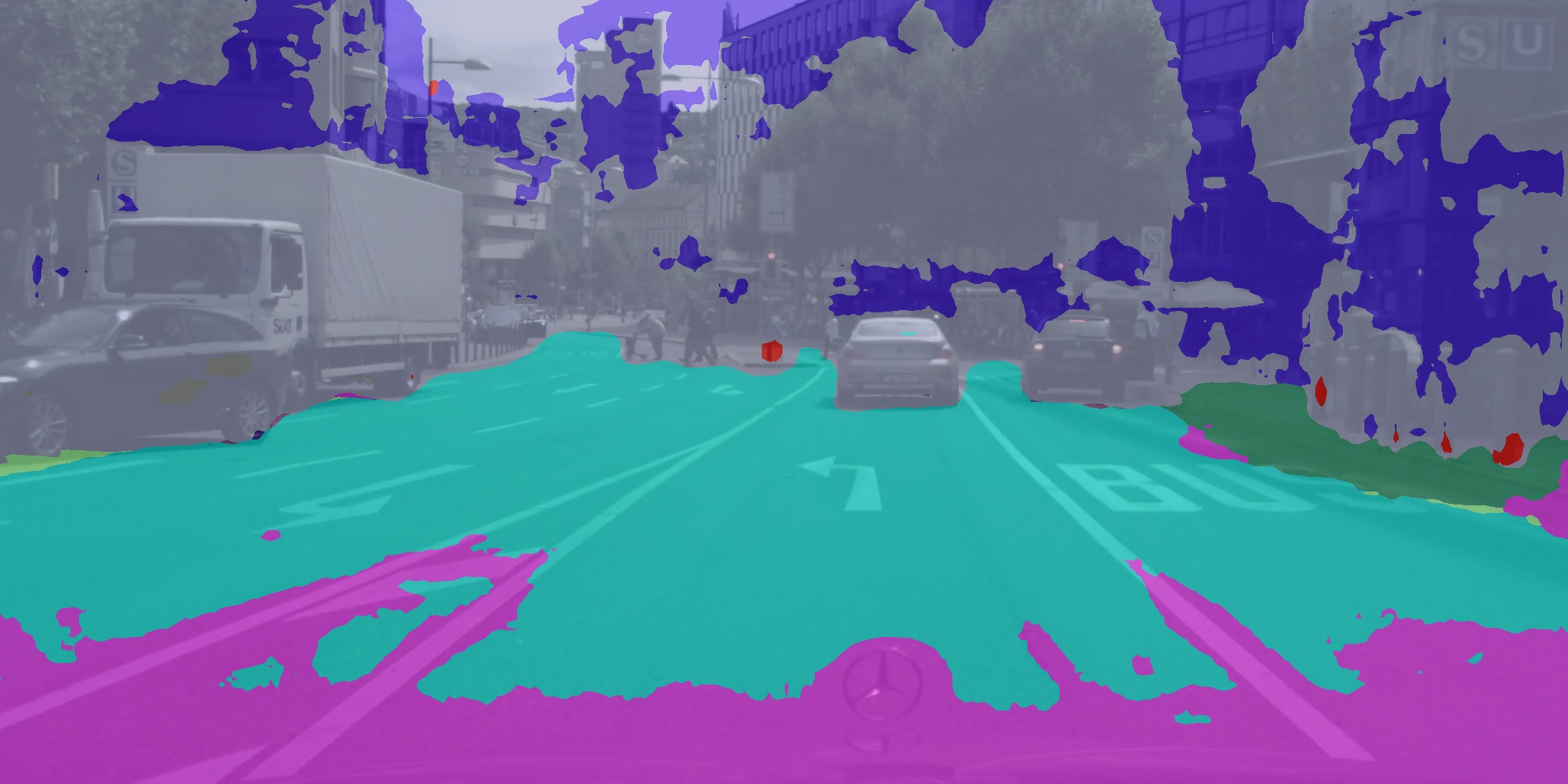
Here is my predict codes, what have I miss?
from __future__ import print_function

import argparse
import os
import glob
import sys
import timeit
from tqdm import trange
import tensorflow as tf
import numpy as np
from scipy import misc

from model import ICNet, ICNet_BN
from tools import decode_labels
import time
import cv2


IMG_MEAN = np.array((103.939, 116.779, 123.68), dtype=np.float32)
# define setting & model configuration
ADE20k_class = 150  # predict: [0~149] corresponding to label [1~150], ignore class 0 (background)
cityscapes_class = 19

model_paths = {'train': './model/icnet_cityscapes_train_30k.npy',
               'trainval': './model/icnet_cityscapes_trainval_90k.npy',
               'train_bn': './model/icnet_cityscapes_train_30k_bnnomerge.npy',
               'trainval_bn': './model/icnet_cityscapes_trainval_90k_bnnomerge.npy',
               'others': './model/'}

# mapping different model
model_config = {'train': ICNet, 'trainval': ICNet, 'train_bn': ICNet_BN, 'trainval_bn': ICNet_BN, 'others': ICNet_BN}

snapshot_dir = './snapshots'
SAVE_DIR = './output/'


class Segment(object):

    def __init__(self, model_name, model_path, num_classes, input_shape):
        self.model_name = model_name
        self.model_path = model_path
        self.num_classes = num_classes

        self.filter_scale = 1
        self.shape = input_shape

        self.model = None

    def _load_model(self, shape):
        self.x = tf.placeholder(dtype=tf.float32, shape=shape)
        img_tf = self.preprocess(self.x)
        self.img_tf, self.n_shape = self.check_input(img_tf)

        self.model = model_config[self.model_name]
        print(self.model)
        net = self.model({'data': img_tf}, num_classes=self.num_classes,
                         filter_scale=self.filter_scale)
        # net = self.model({'data': img_tf}, num_classes=self.num_classes)

        raw_output = net.layers['conv6_cls']

        # Predictions.
        raw_output_up = tf.image.resize_bilinear(raw_output, size=self.n_shape, align_corners=True)
        raw_output_up = tf.image.crop_to_bounding_box(raw_output_up, 0, 0, shape[0], shape[1])
        raw_output_up = tf.argmax(raw_output_up, axis=3)
        self.pred = decode_labels(raw_output_up, shape, self.num_classes)

        # Init tf Session
        config = tf.ConfigProto()
        config.gpu_options.allow_growth = True
        self.sess = tf.Session(config=config)
        init = tf.global_variables_initializer()
        self.sess.run(init)

        # model_path = model_paths[self.model_name]
        model_path = snapshot_dir
        if self.model_name == 'others':
            ckpt = tf.train.get_checkpoint_state(model_path)
            if ckpt and ckpt.model_checkpoint_path:
                loader = tf.train.Saver(var_list=tf.global_variables())
                load_step = int(os.path.basename(ckpt.model_checkpoint_path).split('-')[1])
                self.load(loader, self.sess, ckpt.model_checkpoint_path)
            else:
                print('No checkpoint file found.')
        else:
            # model path must be a model
            net.load(self.model_path, self.sess)
            print('Restore from {}'.format(model_path))

    def seg_img(self, img):
        tic = time.time()
        preds = self.sess.run(self.pred, feed_dict={self.x: img})
        print(preds)
        print('fps: ', round(1 / (time.time() - tic), 4))
        overlayed_img = cv2.addWeighted(np.array(img, dtype='float32'), 0.4, preds[0], 0.6, 0)
        return overlayed_img, preds

    def seg_video(self, video_f, is_save=True, is_record=False):
        if os.path.exists(video_f):
            save_dir = os.path.join(os.path.dirname(video_f), os.path.basename(video_f).split('.')[0])
            save_record_f = os.path.join(os.path.dirname(video_f), os.path.basename(video_f).split('.')[0] + '.mp4')
            i = 0
            cap = cv2.VideoCapture(video_f)

            while cap.isOpened():
                ret, frame = cap.read()
                tic = time.time()
                if ret:
                    if i == 0:
                        # get the shape from first frame
                        print('Detect input shape once: ', frame.shape)
                        self._load_model(shape=frame.shape)
                    i += 1
                    res, _ = self.seg_img(frame)

                    if is_save:
                        if not os.path.exists(save_dir):
                            os.makedirs(save_dir)
                        cv2.imwrite(os.path.join(save_dir, 'frame_%04d.jpg' % i), res)
                    if is_record:
                        # TODO: do some record things
                        pass
                    print('fps: ', round(1 / (time.time() - tic), 4))
                    cv2.imshow('seg', res)
                    cv2.waitKey(1)
        else:
            print('# video file not exist: '.format(video_f))

    @staticmethod
    def load(saver, sess, ckpt_path):
        saver.restore(sess, ckpt_path)
        print("Restored model parameters from {}".format(ckpt_path))

    @staticmethod
    def load_img(img_path):
        if os.path.isfile(img_path):
            print('successful load img: {0}'.format(img_path))
        else:
            print('not found file: {0}'.format(img_path))
            sys.exit(0)

        filename = img_path.split('/')[-1]
        img = misc.imread(img_path, mode='RGB')
        print('input image shape: ', img.shape)
        return img, filename

    @staticmethod
    def preprocess(img):
        # Convert RGB to BGR
        img_r, img_g, img_b = tf.split(axis=2, num_or_size_splits=3, value=img)
        img = tf.cast(tf.concat(axis=2, values=[img_b, img_g, img_r]), dtype=tf.float32)
        # Extract mean.
        img -= IMG_MEAN
        img = tf.expand_dims(img, dim=0)
        return img

    @staticmethod
    def check_input(img):
        ori_h, ori_w = img.get_shape().as_list()[1:3]
        if ori_h % 32 != 0 or ori_w % 32 != 0:
            new_h = (int(ori_h / 32) + 1) * 32
            new_w = (int(ori_w / 32) + 1) * 32
            shape = [new_h, new_w]
            img = tf.image.pad_to_bounding_box(img, 0, 0, new_h, new_w)
            print('Image shape cannot divided by 32, padding to ({0}, {1})'.format(new_h, new_w))
        else:
            shape = [ori_h, ori_w]

        return img, shape


if __name__ == '__main__':
    seg = Segment('others', 'model/cityscapes/icnet.npy', cityscapes_class, [1024, 2048])
    seg.seg_video('/media/jintian/sg/permanent/Cityscape/test.mp4')

Maybe you should update the batch norm variable first. Btw, if you use this code in your github repo, you need to refer to this repository.

@hellochick Of course, that is only the inference code which works fine, but the training actually not works. If so, I'd better delete it.
I have tried to train on different dataset, and the code can work. There are several things you should notice:
- Update the mean & var first using the flag
--update_mean_var - Train the beta & gamma variable for batch norm layer.
- Freeze those variables and keep finetuning on your dataset.
I also have not been able to get this code to train on my own data. Could you give us the details of how you got it to work?

I have tried to train on different dataset, and the code can work. There are several things you should notice:
- Update the mean & var first using the flag
--update_mean_var- Train the beta & gamma variable for batch norm layer.
- Freeze those variables and keep finetuning on your dataset.
@hellochick Thanks for the guidelines for training own dataset. May I know how do you separate these three steps? Are they three different training?

I have tried to train on different dataset, and the code can work. There are several things you should notice:
- Update the mean & var first using the flag
--update_mean_var- Train the beta & gamma variable for batch norm layer.
- Freeze those variables and keep finetuning on your dataset.
The third, where is reflected in the code
