
nomad
 nomad copied to clipboard
 hashicorp
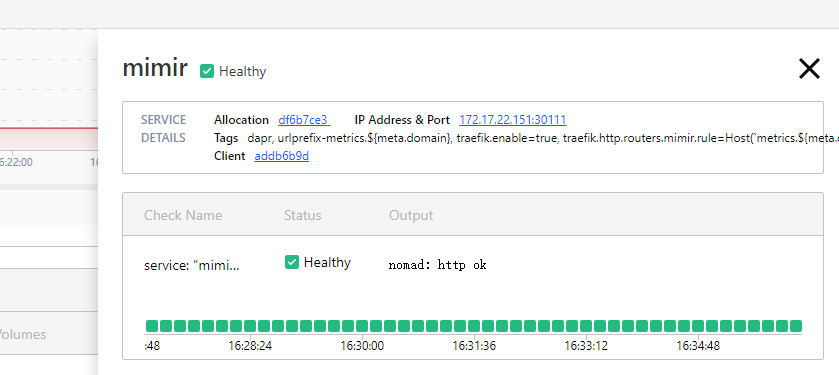
No service registrations found but show in ui
Nomad version
1.4.1
Issue
service ( nomad service info --namespace=ptl mimir )
No service registrations found
allocs( nomad alloc status -namespace=ptl df6b7ce3 )
ID                  = df6b7ce3-83a8-3e63-ff9f-ce27f84a3e89
Eval ID             = fe8ff5ca
Name                = mimir.prom[0]
Node ID             = addb6b9d
Node Name           = server2
Job ID              = mimir
Job Version         = 28
Client Status       = running
Client Description  = Tasks are running
Desired Status      = run
Desired Description = <none>
Created             = 30m23s ago
Modified            = 29m6s ago
Deployment ID       = 5e6034dd
Deployment Health   = healthy

Allocation Addresses:
Label  Dynamic  Address
*http  yes      172.17.22.151:30111 -> 9009

Nomad Service Checks:
Service  Task     Name                    Mode         Status
mimir    (group)  service: "mimir" check  healthiness  success

Task "prom" is "running"
Task Resources:
CPU        Memory          Disk     Addresses
5/500 MHz  64 MiB/500 MiB  300 MiB

CSI Volumes:
ID   Read Only
art  false

Task Events:
Started At     = 2022-10-21T08:12:31Z
Finished At    = N/A
Total Restarts = 1
Last Restart   = 2022-10-21T16:12:30+08:00

Recent Events:
Time                       Type                   Description
2022-10-21T16:12:31+08:00  Started                Task started by client
2022-10-21T16:12:30+08:00  Restarting             Task restarting in 6.156059778s
2022-10-21T16:12:30+08:00  Terminated             Exit Code: 0
2022-10-21T16:12:30+08:00  Restart Signaled       healthcheck: check "service: \"mimir\" check" unhealthy
2022-10-21T16:12:07+08:00  Started                Task started by client
2022-10-21T16:12:06+08:00  Downloading Artifacts  Client is downloading artifacts
2022-10-21T16:12:06+08:00  Task Setup             Building Task Directory
2022-10-21T16:11:53+08:00  Received               Task received by client
UI

Hi @chenjpu thanks for reporting. Seems like this may have something to do with the task having failed on initial startup and only succeeding after a restart; I'll try and see if I can re-create the problem.
As for the UI, it's looking up the check status of the service (stored on the client), which are different from the service registration itself (stored on the server).

Hi @chenjpu I did spend some time looking into this but so far have not been able to reproduce the problem. Is this bug something you are experiencing regularly? Do you happen to have a way to reproduce it?
I tried to remove the initial_status = "warning" of the check configuration, and then it is back to normal. I wonder if it is related to this setting?
After this configuration is removed, when the service monitoring check failure service resumes, the registry still does not display the service.:):)
And provider=consul services are normal, currently can only be first back to the consul registry to solve the problem
Hi @chenjpu sorry for the slow followup - I was finally able to reproduce this issue using the job below. Still need to find the root cause but it is looking like this happens to services that fail their initial healthcheck until after a task restart.
job "bug" {
  datacenters = ["dc1"]

  group "group" {
    network {
      mode = "host"
      port "http" {
        static = 8888
      }
    }

    service {
      provider = "nomad"
      name = "web"
      port = "http"
      check {
        type = "http"
        path = "/hi.txt"
        interval = "3s"
        timeout = "1s"
        check_restart {
          limit = 3
          grace = "5s"
        }
      }
    }

    task "py" {
      driver = "raw_exec"

      config {
        command = "python3"
        args = ["-m", "http.server", "8888", "--directory", "/tmp"]
      }

      resources {
        cpu    = 100
        memory = 64
      }
    }
  }
}
(Then just touch /tmp/hi.txt after the task is restarted during the deployment)
Looks like this is a logical race condition caused by the group service hook PreTaskRestart method, where we de-register and re-register checks in quick succession. The problem is that check de-registration occurs asynchronously - which races with the re-registration attempt shortly after. Under normal circumstances letting the de-registration happen in the background is fine, because it doesn't impact anything. But in this case we need to know the de-registration is complete before doing the re-registration. Can probably just bubble up a Future to optionally block on.