

 handsontable
[Research/Spike]: Ability to parse formulas for highlighting
So I'm doing formula syntax highlighting in my spreadsheet like this example:
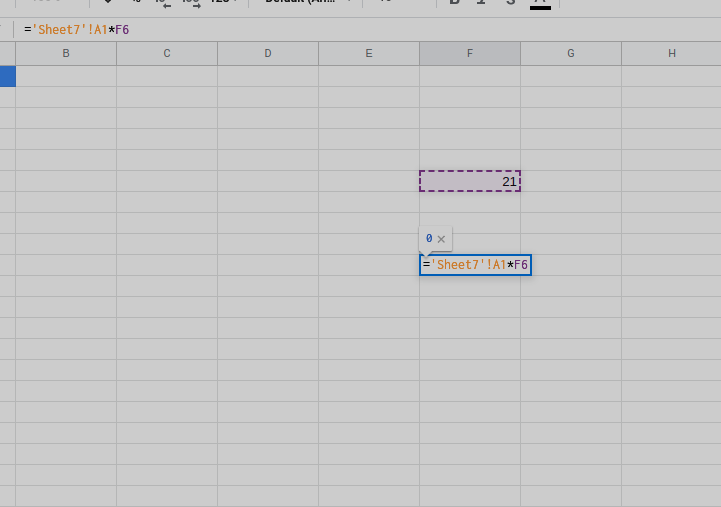
Currently hyperformula does formula parsing internally however there's no way to access it and the indexes in the string for it.
I tried to internally access lexer to do it but that doesn't work as it hasn't been parsed in the AST yet.
I also looked at getCellPrecedents, however this requires the cells to have been set already and in the dependency tree I think.
So something like:
@helper~
parseFormulas(text: string): string[].
Would be great.

If anyone knows of a work around to do this in the meantime that would be great as well.
~Actually after debugging through HF I have seen that LexerConfig.js holds the regexp patterns. So I can use these to find the cell references through text and then convert them to SimpleCellAddresses which I think I should be able to do with simpleCellAddressFromString().~
~However it would be good to export the regex patterns from hyperformula to enable this from the root import.~
EDIT: actually no this doesn't work either...
As this regex from HF:
(([A-Za-z0-9_À-ʯ]+|'(((?!').|'')*)')!)?\$?[A-Za-z]+\$?[0-9]+
Matches the formulas in invalid strings still, for example: =2A1
This is what I have got working for now:
    const lexer = this.spreadsheet.hyperformula._parser.lexer;

    const { tokens } = lexer.tokenizeFormula(text);

    const cellReferenceParts: ICellReferencePart[] = [];
    const tokenParts = [];

    for (const [index, token] of tokens.entries()) {
      if (index === 0 && token.tokenType.name !== EqualsOp.name) {
        break;
      }

      if (token.tokenType.name === CellReference.name) {
        const color = getSyntaxColor();

        cellReferenceParts.push({
          startOffset: token.startOffset,
          endOffset: token.endOffset,
          referenceText: token.image,
          color,
        });
      }
    }

You can see it incorrectly highlights A2 in 2A2 even though it's invalid.
I'm thinking the best way to fix this is to iterate all characters before & after a cell reference up to the Multiply/Add/Divide etc Operations and see if each character is valid or not.
Then I will try put this in hyperformula as a parseValidCellReferences() function as a PR if people here think it should go in hyperformula?
If not then we the createTokens will still need exporting from the root of HF
It looks great @MartinDawson ! do you use Handsontable as the table solution?

@AMBudnik Thanks.
No we just use Hyperformula.js. We are creating our own which will match Google Sheets as close as possible because we needed a canvas based solution in the long term for our main application and not DOM (due to performance if there's tons of cells/styles visible).
It's still very early though with some bugs.
Here's an example demo: https://storybook.powersheet.io/?path=/story/spreadsheet--formulas
This issue is just about parsing valid cell references from a string with HF. I just added screenshots to make it easier to see the use case for it.
Ah.. yes, understandable.
I love this idea and I'm delighted to see such advanced use of HyperFormula.
Yeah we use pretty much every feature of HF, especially custom functions :). It would be impossible to do this without it (I tried & failed at creating my own parser before I found HF) so it's really great.
HF parser will fail with partially written formula:

You will not get any tokens for this scenario.
I was considering such a method when designing public API. But HF will not be very helpful here and I don't think this is the right way to go. HF will parse only full, valid formula string. Anything else is rejected. Those regexes are not ready for partially written formula, which is what we get during the editing process.
But you should have everything that is needed to implement such functionality.
Named expressions autocomplete can be achieved with listNamedExpressions or getAllNamedExpressionsSerialized(). So whenever you get anything that is not function, reference or string, you may filter the list to find best matches. Like GS does:
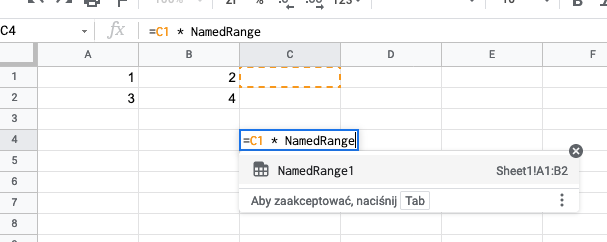
For function list intelisense, like GS functionality:

You can use getRegisteredFunctionNames() method. Then filter the list
Function arguments intelisense may require some additional meta data storage #2.

But those files should be stored next to the HF anyway and does not require any changes in HF. Of course, they are needed only if we need additional descriptions and guides (as well translations for them). Some basic argument intelisense should be possible with getAllFunctionPlugins() by reading meta from plugin static property implementedFunctions. Argument list and types are there for taking.
https://github.com/handsontable/hyperformula/blob/b989cfde24024309eae32a3edb069de84539ddeb/src/interpreter/plugin/SumifPlugin.ts#L63-L71
And if you want to get helpful tooltip with calculated value:

You probably already know, but for anyone else that's reading this "guide". When we have parsed range or cell reference with regex we can get cells coordinates to highglight with simpleCellAddressFromString() or simpleCellRangeFromString()

There are multiple partially written references A:, Sheet1!, A1:B, NameExpr when HF will fail. But formula editor experience should provide valid options to continue user input. Those need to be handled very carefully by custom regexes.

@wojciechczerniak Got it,.
Yeah I was presuming that HF already had all this parsing internally and we could just re-use it or the regexes but I was wrong as it errors out if invalid strings are in the formula string (by design).
So custom regexes are the way to go here.
Thanks!
Hmm the regex for all possible matches of cell references seems extremely complex as per this issue and very buggy: https://stackoverflow.com/questions/1897906/is-this-the-regex-for-matching-any-cell-reference-in-an-excel-formula https://stackoverflow.com/questions/21199404/regular-expression-to-extract-valid-cell-references-from-a-spreadsheet-formula
All of the 'solution' regexes I have seen online have things missing like sheet references or ranges etc
The fact that the regexes are split up and parsed individually through lexer makes it much easier...
I am thinking that using lexer/HF is still the way to go.
Maybe even having an AnyInputCharacter token for lexer with /./ so it doesn't fail with errors and then parsing it through the AST functions is more robust...
I guess they are designed for different use case. I had a very custom solution in mind.
Of course this can be done step by step. You can even use Chevrotain as HF does. This dependency would not add any weight to your app as it's already loaded by HyperFormula.
Syntax is well documented by OpenDocument Standard, part 4: OpenFormula, in Section 5: Expression Syntax
You can even use Chevrotain as HF does.
I would use an incremental parser that's also error insensitive like lezer. Syntax highlighting for parsing incomplete formulas is very similar to highlighting for incomplete code.
CodeMirror 5 previously had something for spreadsheets https://codemirror.net/mode/spreadsheet/ but that's outdated.

Formula syntax highlighting is a common use case for apps using HyperFormula. We'll analyze different solutions to make implementing this feature easier. As a result, we'll either:
- add API that can parse formulas, or
- create an official example that demonstrates the recommended approach to implementing custom formula parsing
